

usyd-community/vitpose-plus-large at 5 frames per second.
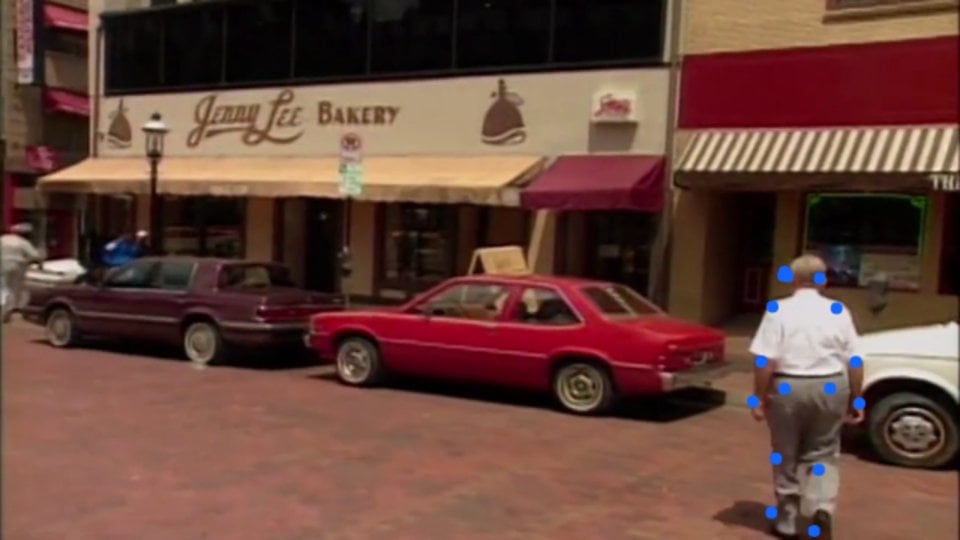
The page below with a recorded street scene as the camera. Each dot is a keypoint from the latest result.
1. Why a relay
The browserWebSocket API cannot set request headers, so a page cannot send Authorization on the upgrade. Putting the key in the page would also give it to every visitor. The relay solves both: the browser connects to your server, and your server opens the Gateway socket with the key.
The relay forwards every message unchanged, in both directions. The page speaks the
WS /v1/ws protocol, so session.create, frames, and events are the same as in Video over WebSocket.
2. Run the relay
The relay serves the page at/ and relays the socket at /live. It opens one Gateway session for each browser connection, and closes it when the browser leaves.
3. Build the page
Save the page aspublic/index.html. It asks for the camera, opens the relay socket, and sends one JPEG of the video every 200 ms once session.created arrives.
public/index.html
http://localhost:8080 and allow the camera. The status line shows the latest frame number and its event, and the overlay redraws on every result. Keypoints are fractions of the frame from 0 to 1, so the page multiplies them by the canvas size. Keypoints with a score below 0.5 are not drawn.
getUserMedia runs only on a secure origin: https in production, or localhost while you develop. In production, serve the page over https and connect with wss://.
4. Keep the stream live
The page sends on a timer and does not wait for replies. A frame that arrives whilemax_inflight reads are outstanding is dropped with reason: "busy", so a slow read costs you one stale frame, never a growing delay. Each event names its frame, so you can always tell how old the drawing is.
In a test with a recorded camera feed, the page sent 5 frames per second and drew a
result for each one.
5. Before you ship
- Authenticate your users at the relay. The relay spends your API key. Check the user’s session on the
/liveupgrade, and refuse it when the check fails. - Cap sessions per user. Each browser connection is one Gateway session. Your plan allows 1 at once on Free and up to 5 on paid plans. See Rate Limits.
- Reconnect on
1013. A full plan or a starting model closes with1013. Waitretry_afterwhen theerrorevent has one, then open a new socket. See Close codes. - Reopen at 10 minutes. A session lasts up to 10 minutes. Open a new one when it closes with the reason
expired.
Related
Video over WebSocket
The same socket from a script, with a recorded video.
Masks per Frame
Segment every frame with
facebook/sam3.1.Hand Tracking
2D and 3D hand joints per frame with
geopavlakos/hamer.Realtime
Session lifecycle, close codes, and billing.