

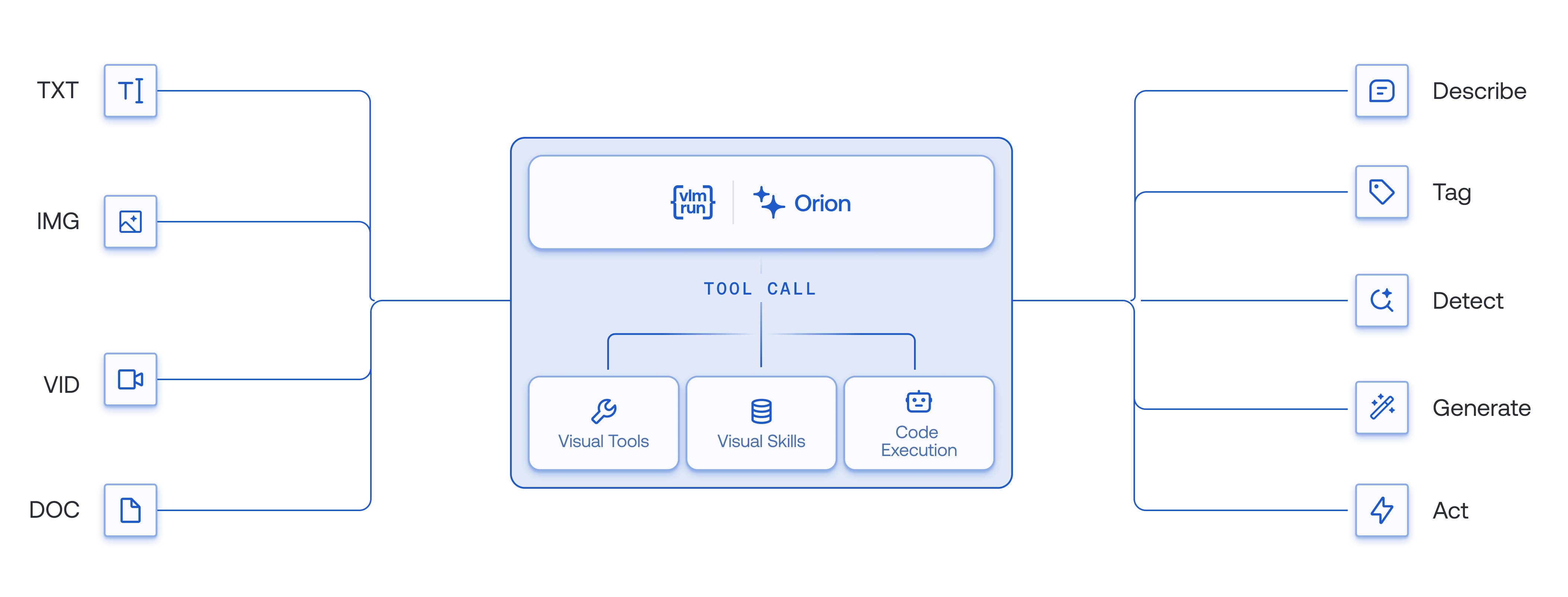
Orion architecture for visual understanding, reasoning, and action.
What is Orion?
Orion is VLM Run’s visual agent. It sees, reasons, and acts. You describe the outcome in plain language and attach images, documents, video, or audio. Orion plans the steps, runs the right vision tools, and returns the result as structured JSON or as a new image, video, or document.- Sees: reads pixels with dedicated vision models, including detection, segmentation, and specialized document OCR VLMs. It does not guess from a caption.
- Reasons: decides which tools to run and in what order.
- Acts: runs the tools and hands back something you can use: validated JSON, a cropped or redacted image, a generated video.
vlmrun-orion-1: our first visual agent, released in November 2025. It calls one tool at a time.vlmrun-orion-2: our second generation. It writes and runs code, so one program runs a whole pipeline. It is faster, cheaper, and more capable, with high reliability and repeatability.
What Orion does
Orion runs real vision tools. The toolsets cover:- Documents: layout detection, visual grounding, and multi-page analysis.
- Images: caption and tag, detection, segmentation, pointing, and UI parsing.
- Video: caption and tag and video tools.
- Create and edit: generate and edit images, crop, rotate, upscale, and colorize, and generate video.
- Structured output: JSON that validates against your schema, and artifacts for generated files.
Agents Supported
vlmrun-orion-2: writes and runs code in a sandbox.vlmrun-orion-1: calls tools with structured tool calls.
Each agent has three variants. Address one as
vlmrun-orion-2:<variant>.
fast: speed and cost. Lighter models for short, simple workflows.auto: the default. Picks the model, tool, and thinking budget from the task.pro: maximum quality. A high thinking budget for long pipelines and tool trajectories.
vlmrun-orion-2:qwen3.6-35b-a3b, vlmrun-orion-2:gemma4-26b-a4b, vlmrun-orion-2:kimi-2.6, vlmrun-orion-2:gpt-5.5, and vlmrun-orion-2:claude-opus-4.8. Prices are on Pricing.
How it works
- You ask. Send a request in natural language with your media. See inputs.
- Orion plans. The agent picks the tools and the order.
- Orion runs the tools. OCR, detection, segmentation, and the rest run as tools and return exact results.
- You get the result. Text, validated JSON, or generated files.
Python
Next
Start withvlmrun-orion-2:auto. Keep Orion-1 for a single tool call or an existing integration.
- Code Execution: when to use Orion-2, and how it runs.
- Chat: try an agent in the browser.
- SDK: call an agent from code.