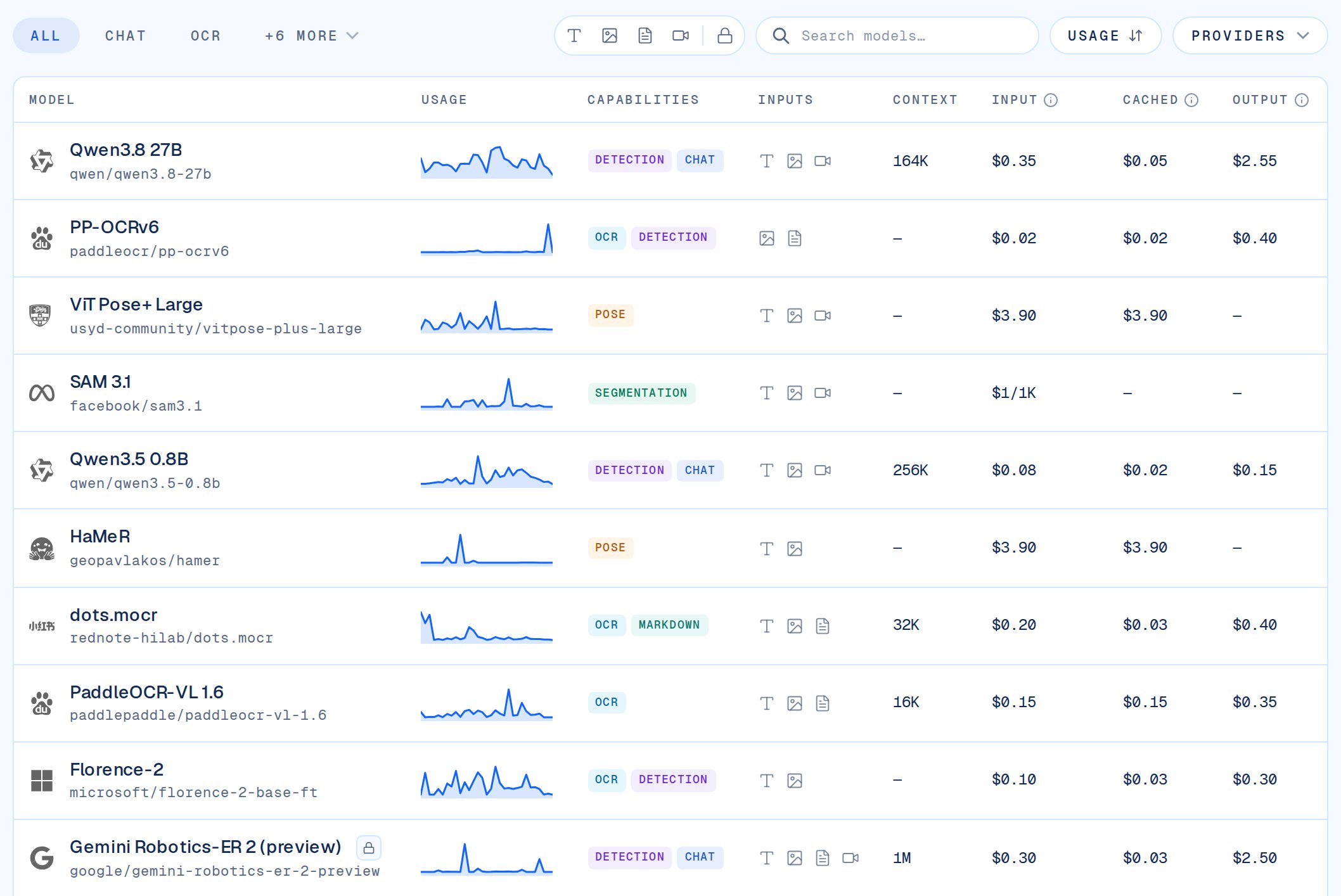
The VLM Run Gateway serves open-weight vision and document models through a single OpenAI-compatible API. Each model declares the input types it accepts (text, image_url, document_url) and the operations it supports via the method field.

Visual Question Answering (VQA)

VQA models accept text plus up to 64 images in the same message.
ModelStatusMethodAccepted InputsMax images
qwen/qwen3.5-0.8bAvailabletext, image_url64
See method parameters for more details.
from openai import OpenAI

client = OpenAI(
    base_url="https://gateway.vlm.run/v1/openai",
    api_key="<VLMRUN_API_KEY>",
)

response = client.chat.completions.create(
    model="qwen/qwen3.5-0.8b",
    messages=[
        {
            "role": "user",
            "content": [
                {"type": "text", "text": "What is happening in this image?"},
                {
                    "type": "image_url",
                    "image_url": {
                        "url": "https://storage.googleapis.com/vlm-data-public-prod/hub/examples/image.caption/sample.jpg"
                    },
                },
            ],
        }
    ],
)

print(response.choices[0].message.content)

Document and Image OCR

These models accept a PDF via document_url or an image via image_url. The VLM Run Gateway rasterizes each page and runs per-page inference, returning concatenated markdown (non-streaming) or ordered page blocks (streaming). Use method: "ocr" for full OCR, or method: "detect" when you only need text detection and bounding polygons. zai-org/glm-ocr and rednote-hilab/dots.mocr produce reading-order markdown via method: "markdown". For images, the Gateway runs inference on the entire image. For consistency purposes, we do not stream on a token-by-token basis.
ModelStatusMethodAccepted InputsStreaming
paddleocr/pp-ocrv6Availableocrimage_url, document_urlPage-wise
zai-org/glm-ocrAvailablemarkdownimage_url, document_urlPage-wise
rednote-hilab/dots.mocrAvailablemarkdownimage_url, document_urlPage-wise
See method parameters for more details.
from openai import OpenAI

client = OpenAI(
    base_url="https://gateway.vlm.run/v1/openai",
    api_key="<VLMRUN_API_KEY>",
)

response = client.chat.completions.create(
    model="paddleocr/pp-ocrv6",
    messages=[
        {
            "role": "user",
            "content": [
                {
                    "type": "document_url",
                    "document_url": {
                        "url": "https://storage.googleapis.com/vlm-data-public-prod/hub/examples/document.markdown/goog-10-k-2024.pdf"
                    },
                },
            ],
        }
    ],
    extra_body={"method": "ocr", "document_dpi": 150},
)

print(response.choices[0].message.content)

Embeddings and Transcription

These models appear on GET /v1/openai/models with a task field other than chat. They use separate OpenAI-compatible endpoints, not chat completions. See Embeddings and Audio Transcriptions for full request schemas.
ModelStatusTaskEndpoint
qwen/qwen3-vl-embedding-2bAvailableembedPOST /v1/openai/embeddings
nvidia/parakeet-tdt-0.6b-v3AvailabletranscribePOST /v1/openai/audio/transcriptions
Python
from openai import OpenAI

client = OpenAI(
    base_url="https://gateway.vlm.run/v1/openai",
    api_key="<VLMRUN_API_KEY>",
)

response = client.embeddings.create(
    model="qwen/qwen3-vl-embedding-2b",
    input="Extract a vector representation for this text.",
)

print(len(response.data[0].embedding))

Model Aliases

Many models accept multiple request IDs:
  1. Preferred: lowercase <org>/<slug> (listed on /models)
  2. Short: slug only (e.g. pp-ocrv6)
  3. Hugging Face: upstream repo id (e.g. PaddlePaddle/PP-OCRv6_medium_det)

Next steps

Flexible Document OCR

End-to-end recipe from model selection to response parsing.

Methods

Per-model method and method_params reference.

Chat Completions API

Full request parameters, streaming, and error handling.

Error Codes

HTTP status mapping, correlation ids, and support details.