> ## Documentation Index
> Fetch the complete documentation index at: https://docs.vlm.run/llms.txt
> Use this file to discover all available pages before exploring further.

# Platform

> The VLM Run platform: chat with visual agents, build skills, and observe every request in one place

<div className="platform-figure">
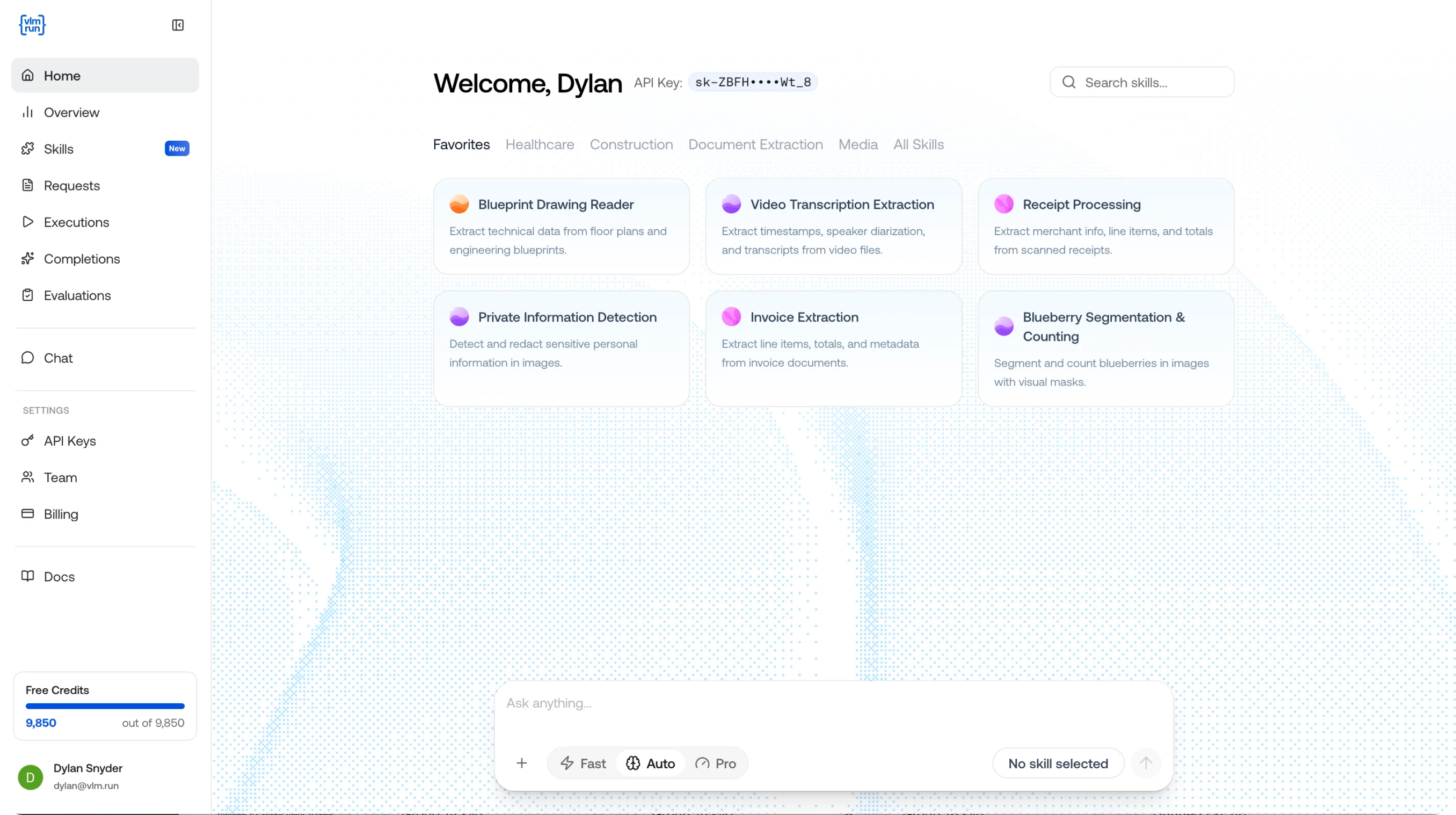
  <img src="https://mintcdn.com/autonomiai/31N4NFzIelpYJkPB/images/platform-main-page.png?fit=max&auto=format&n=31N4NFzIelpYJkPB&q=85&s=ad225b922eb4fcaea721b95e942e9ecd" alt="VLM Run platform dashboard" width="2712" height="1518" data-path="images/platform-main-page.png" />
</div>

The VLM Run platform is where you interact with, build on, and monitor your visual AI. Whether you're chatting with Orion to understand a PDF, building a reusable skill for invoice extraction, or tracking the latency and cost of every API call, it all happens here.

The platform is organized around four pillars:

* **[Observe](https://app.vlm.run/dashboard/overview)**: Full observability across your visual AI usage. Monitor requests, track executions, review completions, and keep costs in check.
* **[Skills](https://app.vlm.run/dashboard/skills)**: Modular, reusable capabilities that tell the model what to extract and how to structure it. Create once, reference from any endpoint.
* **[Chat](https://chat.vlm.run/)**: The interactive playground for your visual agent. Attach images, PDFs, or videos and get structured responses in real time.
* **[Evaluations](/platform/observe/evaluations)**: Measure accuracy for skills, agents, and domains using feedback as ground truth, with dashboard runs and per-field metrics.

## Explore the Platform

<div className="platform-card-grid">
  <CardGroup cols={2}>
    <Card title="Home" img="https://mintcdn.com/autonomiai/31N4NFzIelpYJkPB/images/platform-observe-overview.png?fit=max&auto=format&n=31N4NFzIelpYJkPB&q=85&s=301f311a66f371a2b8b90520e63a55ed" href="https://app.vlm.run/dashboard/overview" width="2712" height="1512" data-path="images/platform-observe-overview.png">
      Monitor requests, executions, and completions across the platform in one single pane of glass.
    </Card>

    <Card title="Skills" img="https://mintcdn.com/autonomiai/31N4NFzIelpYJkPB/images/platform-skill-detail.png?fit=max&auto=format&n=31N4NFzIelpYJkPB&q=85&s=913570b047b374833a4dbced98f198c9" href="https://app.vlm.run/dashboard/skills" width="2886" height="1600" data-path="images/platform-skill-detail.png">
      Create, edit, and manage reusable extraction skills for your team.
    </Card>

    <Card title="Requests" img="https://mintcdn.com/autonomiai/31N4NFzIelpYJkPB/images/platform-requests-inside.png?fit=max&auto=format&n=31N4NFzIelpYJkPB&q=85&s=6029141f0a6e59a93ab8f3573b77c013" href="https://app.vlm.run/dashboard/requests" width="2712" height="1520" data-path="images/platform-requests-inside.png">
      View and filter all API requests with status, duration, and cost.
    </Card>

    <Card title="Executions" img="https://mintcdn.com/autonomiai/31N4NFzIelpYJkPB/images/platform-executions-detail.png?fit=max&auto=format&n=31N4NFzIelpYJkPB&q=85&s=0f1df95b34c94ee04cd05b05f5f2c791" href="https://app.vlm.run/dashboard/agents/executions" width="2712" height="1518" data-path="images/platform-executions-detail.png">
      Track agent and skill executions end to end.
    </Card>

    <Card title="Chat" img="https://mintcdn.com/autonomiai/31N4NFzIelpYJkPB/images/platform-chat.png?fit=max&auto=format&n=31N4NFzIelpYJkPB&q=85&s=38ff0755879e21ae85f33c0f5d2addfc" href="https://chat.vlm.run/" width="2712" height="1530" data-path="images/platform-chat.png">
      Send messages to Orion, attach files, and get structured visual responses.
    </Card>

    <Card title="Completions" img="https://mintcdn.com/autonomiai/31N4NFzIelpYJkPB/images/platform-completions-group10.png?fit=max&auto=format&n=31N4NFzIelpYJkPB&q=85&s=588f4cee7006cb1f3ae297f61736470f" href="https://app.vlm.run/dashboard/chat-completions" width="2712" height="1506" data-path="images/platform-completions-group10.png">
      Browse model completions with token usage and output details.
    </Card>
  </CardGroup>
</div>

## Quick Links

<CardGroup cols={2}>
  <Card title="Try Orion" icon="rocket" href="https://chat.vlm.run/">
    Jump straight into the playground and chat with Orion for free.
  </Card>

  <Card title="Open Dashboard" icon="gauge-high" href="https://app.vlm.run/">
    Sign in to the VLM Run platform to manage your account.
  </Card>

  <Card title="API Docs" icon="server" href="/api-reference/index">
    Integrate programmatically with the VLM Run REST API.
  </Card>

  <Card title="Skills Reference" icon="screwdriver-wrench" href="/skills/introduction">
    Deep-dive into the skill specification and lifecycle.
  </Card>
</CardGroup>
