> ## Documentation Index
> Fetch the complete documentation index at: https://docs.vlm.run/llms.txt
> Use this file to discover all available pages before exploring further.
# Evaluations
> Measure and track the accuracy of your skills, agents, and request domains using feedback as ground truth.
VLM Run Evaluations compare **stored model outputs** from your organization’s traffic against **human corrections** recorded as feedback. They surface per-field accuracy, completion rates, and (for skill-based runs) structured hints you can feed into optimization and reruns.
## What is being compared?
For each item in scope (prediction request or agent execution, depending on the source), the platform:
1. Loads the **original structured response** the model produced (from durable storage).
2. Loads the **ground truth** from **feedback**: either JSON you supplied in the `response` field, or JSON **inferred** from text notes when [Infer corrections](#run-an-evaluation-in-the-dashboard) is enabled.
3. Runs one or more **evaluators** on those pairs and aggregates metrics.
Items in the selected window that never received feedback still count toward **totals** and **API completion rate**, but only corrected samples drive scorer metrics like field accuracy.
### How responses are flattened
Before scoring, both the model output and the ground truth are flattened into dotted leaf paths (e.g. `vendor_name`, `address.city`, `total_amount`). Three rules govern flattening:
* **Lists are atomic.** The whole list is kept as a single leaf value rather than recursed into. `line_items` is one leaf, not `line_items[0].description`. Each evaluator decides how to compare lists: `field_accuracy` does exact equality, `fuzzy_field_match` JSON-serializes both sides for similarity, and `llm_judge` evaluates the entire list semantically.
* **`_metadata` keys are skipped.** Any key containing `_metadata` (for example `_metadata`, `name_metadata`) is treated as internal bookkeeping and never scored.
* **Null ground truth is excluded by default.** When the corrected value for a leaf is `null`, that leaf is left out of the metric instead of being counted as a mismatch. Disable this with `skip_null_expected: false` if you want explicit nulls to participate in scoring.
## How evaluations work
1. **Collect feedback**: use the [Feedback & fine-tuning](/guides/feedback) flow so corrections are tied to request or execution IDs.
2. **Run an evaluation**: in the dashboard, pick a **skill**, **agent**, or **request domain**, set a date range, choose [evaluators](#evaluator-types), and start the job. The run is **asynchronous**: you get a run record immediately and results fill in when scoring finishes.
3. **Review and act**: inspect summaries, per-field breakdowns, and samples. For **skill** evaluations only, you can **Optimize** (new skill version) or **Rerun** (auto-optimize, re-process items, re-score).
## Run an evaluation in the dashboard
In the dashboard sidebar, choose **Evaluations** (same area as Overview, Requests, Executions, and Completions).
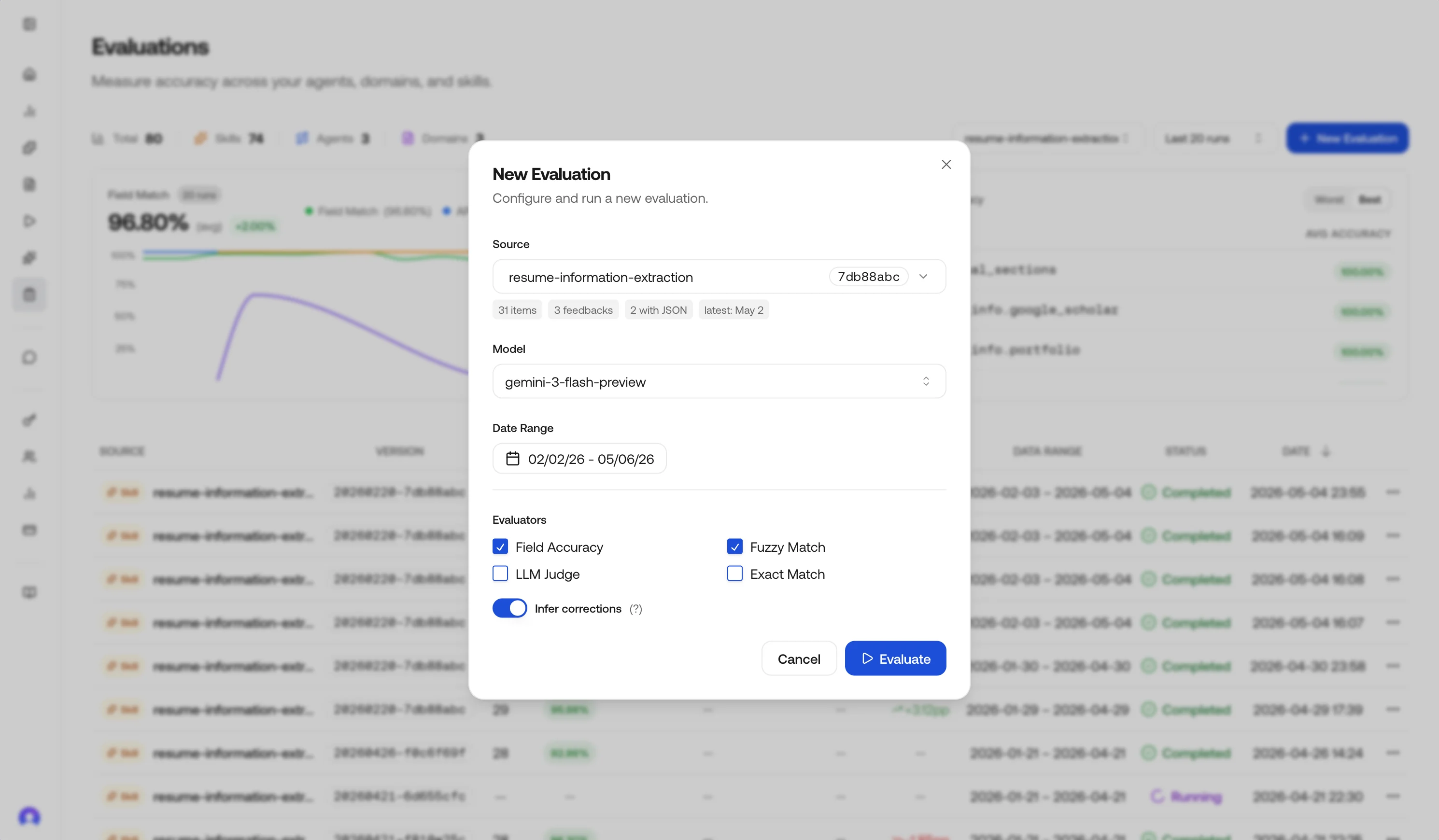
Click **New Evaluation** to open the configuration panel, then pick what you are scoring:
* **Skill**: one skill ID; includes matching **prediction requests** and **agent executions** that used that skill in the date range.
* **Agent**: one agent (ID and version); uses **agent executions** in range.
* **Request domain**: a hub domain string on requests (for example `document.invoice`); uses **prediction requests** for that domain.
Choose the time window. The UI shows a **preview**: total items, how many have feedback, how many include JSON corrections, and the latest activity timestamp, so you can confirm the slice before you spend credits.
Aim for at least **10–20 items with feedback** before treating metrics as stable.
Choose a specific inference model to scope the evaluation to (for example `gemini-3.1-flash-lite-preview`, `gemini-3.1-pro-preview`, `vlm-1`). When set, only requests and executions produced by that model are loaded into the run.
Leave it on **Default (auto-detect)** to score every item in the window regardless of which model produced it. The selected model is also the one used by **Rerun** when it has to skip inference (see [Rerun](#rerun-skill-evaluations-only)).
Select one or more strategies. Defaults lean on **Field accuracy**; see [Evaluator types](#evaluator-types) for tradeoffs.
Optionally restrict evaluation to specific fields by passing a list of top-level keys or dotted leaf-path prefixes (for example `vendor_name`, `address`, `line_items`). When omitted, all fields in the JSON output are evaluated.
This is useful when you only care about a few critical fields, or want to exclude noisy fields from accuracy metrics. See [Field selection](#field-selection) for matching rules and API examples.
**Infer corrections** is **on by default** in the dashboard. When it is on, the platform can turn **notes-only** feedback into structured JSON using an LLM, guided by your skill schema when available.
Inferred JSON is best-effort. For production-grade ground truth, prefer explicit JSON in feedback; see [Feedback & fine-tuning](/guides/feedback).
Submit the run. The run record is created immediately with status `running` and progresses through `running → completed` (or `failed` if scoring errors). The dashboard polls every few seconds and unlocks the result view once the status is `completed`.
## Review results
Open a **completed** run from the history table.
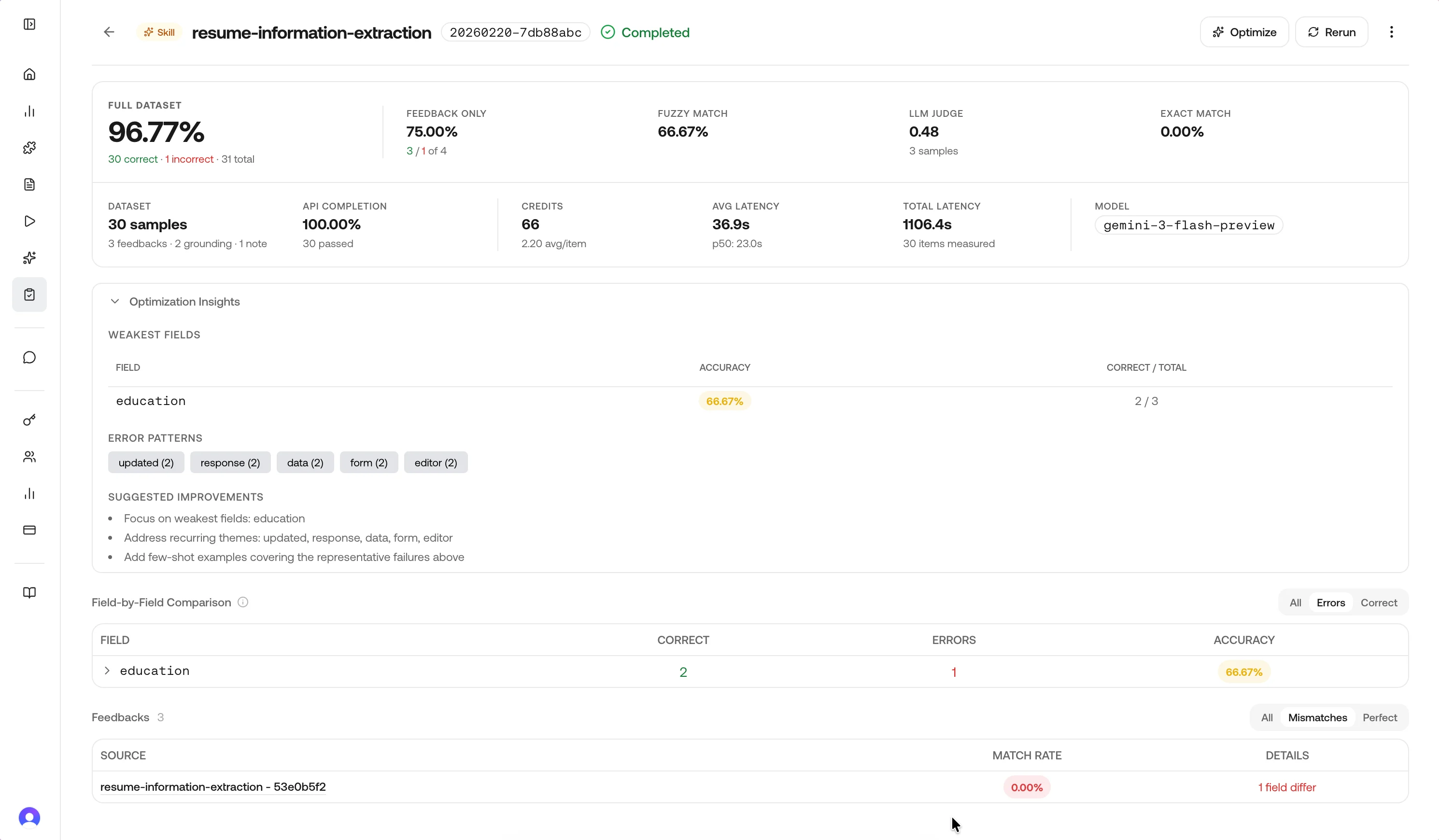
* **Overall accuracy**: rolled up from field-level matches vs mismatches (see field accuracy below), including samples without corrections where the model applies an "accepted" assumption for reporting.
* **Accuracy delta**: change vs the previous completed run for the same source label/type when one exists.
* **API completion rate**: share of in-scope items whose upstream API calls **completed** (vs failed or incomplete).
* **Total samples**: items evaluated in this run.
### Performance metrics
Completed runs also surface the cost and latency of the underlying API traffic so you can weigh accuracy against operational footprint.
| Metric | Meaning |
| ----------------------------- | -------------------------------------------------------------------------------------------------------------------------------------------------- |
| **Model** | The inference model the items were produced by, when scoped via the Model selector or auto-detected from the most common `model_id` in the window. |
| **Avg / Total / p50 latency** | Latency of the upstream prediction or execution aggregated across items that completed within the window. |
| **Avg / Total credits** | Credits charged for the underlying calls. Useful when comparing two skill versions or two models on the same task. |
The same numbers feed the **Credits** and **Model** columns in the history table. Use the **VS Prev** column on the same table to see field-match deltas at a glance.
### Field breakdown
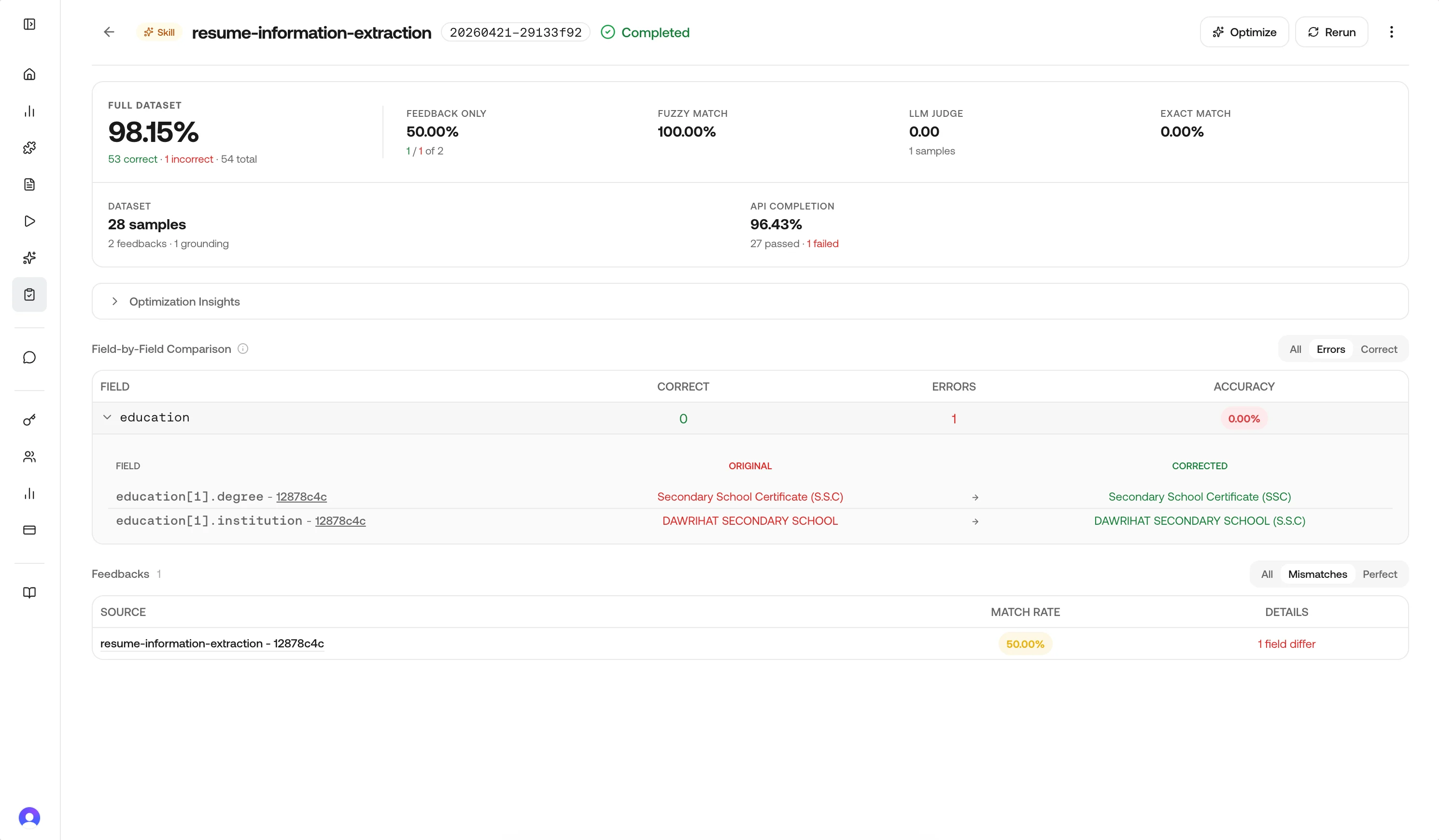
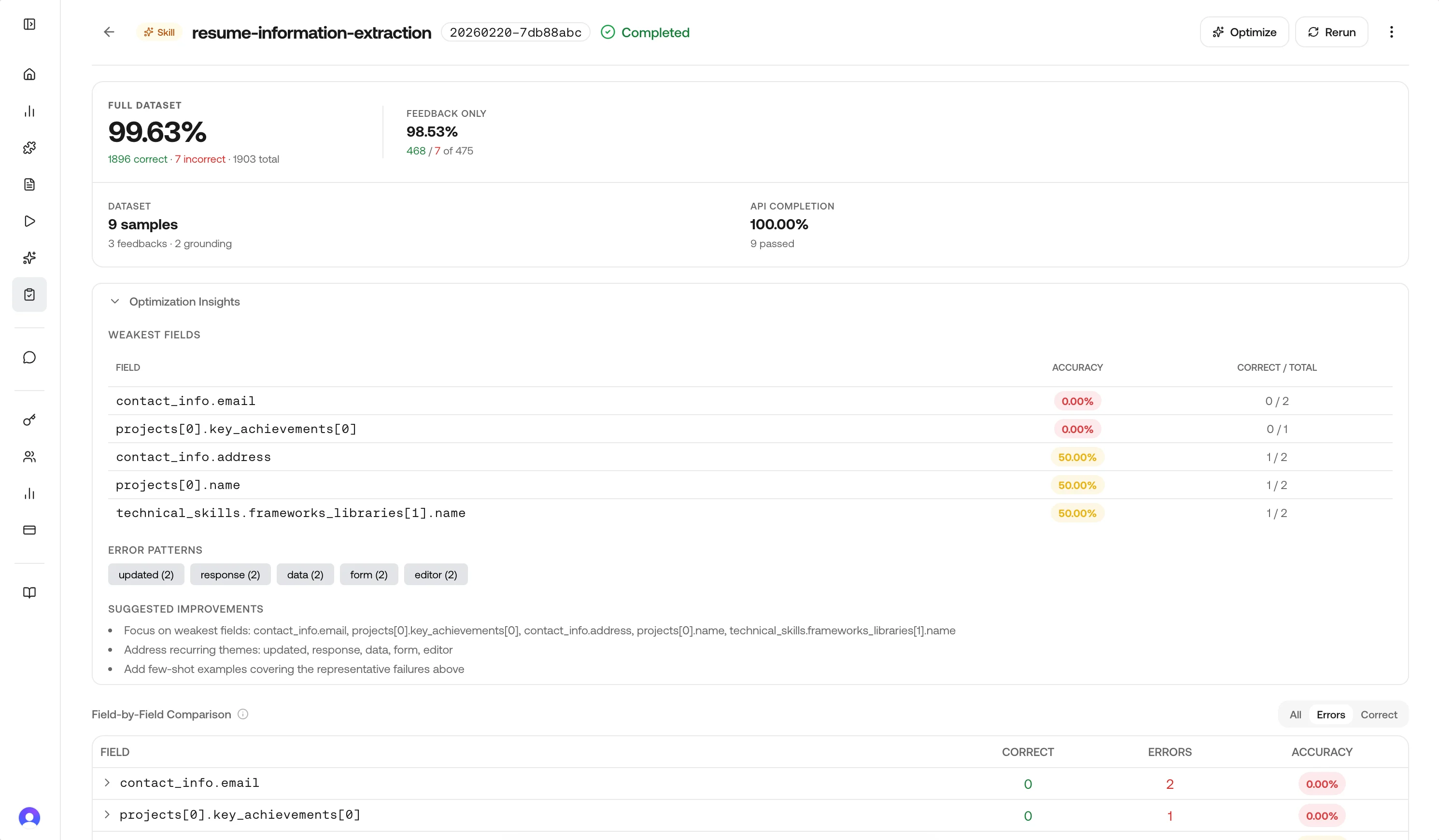
The **Field-by-Field Comparison** block lists each extracted field so you can see where the model disagrees with ground truth.
Use the row filters at the top right—**All**, **Errors**, or **Correct**—to narrow the table; **Errors** is useful when you only want fields that still need work.
| Column | Meaning |
| ------------ | ------------------------------------------------------------------------------------ |
| **Field** | Schema field name (for example `education[1].degree`). |
| **Correct** | Count of samples where this field matched the correction (shown in green in the UI). |
| **Errors** | Count of mismatches for that field (shown in red). |
| **Accuracy** | Share of samples where this field was correct. |
Rows are ordered so the weakest fields surface first. **Expand a field** to open an inline drill-down: a nested table with **Original** (model output) and **Corrected** (feedback) side by side so you can compare concrete values.
### Optimization hints (skill runs only)
When the source is a **skill**, completed results can include **optimization hints**: weakest fields, recurring themes from notes, a small set of representative failures, and short suggested next steps. These align with what the **Optimize** action uses when generating a new skill version.
## Metrics and history
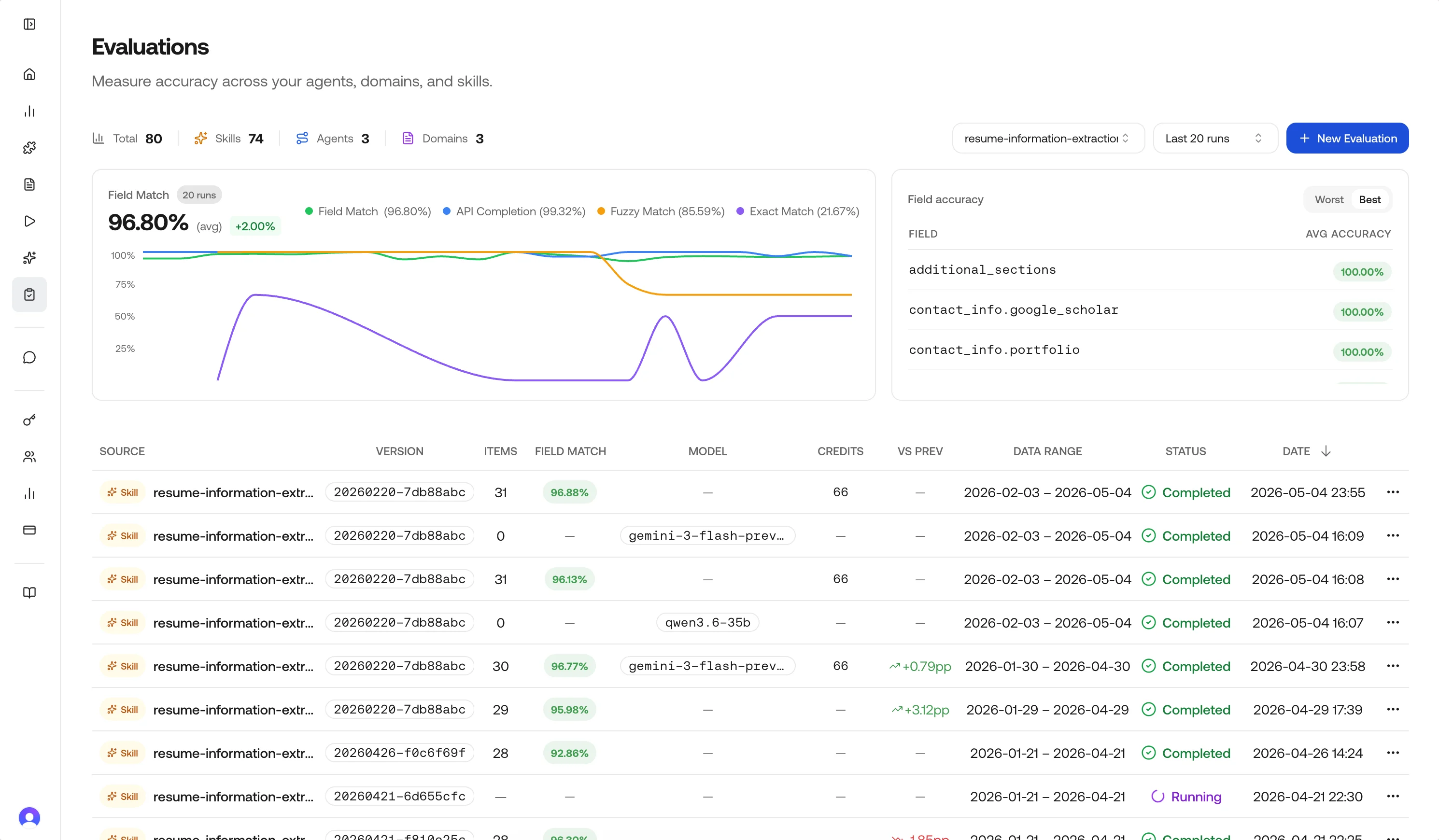
The main Evaluations page aggregates recent runs:
* **Summary cards**: Total runs and counts by source type (Skills, Agents, Domains).
* **Accuracy trend**: Field-match accuracy across recent completed runs, filterable by source. Optional overlays show API completion rate, fuzzy-match rate, and exact-match rate when those evaluators were enabled.
* **Cross-run field view**: Weakest fields across history, with a Worst / Best toggle.
* **History table**: Status, source, model, credits, field-match accuracy, **VS Prev** delta, data range, and timestamps. Row actions depend on status and source type.
## Evaluation sources (API naming)
The product and API distinguish sources like this:
| Dashboard concept | `source_type` in APIs | What is scored |
| ----------------- | --------------------- | --------------------------------------------------------- |
| Skill | `skill` | Requests and executions using that skill ID in the window |
| Agent | `agent` | Executions for that agent ID/version |
| Request domain | `request_domain` | Requests tagged with that domain string |
The preview endpoint uses the same identifiers so you can validate counts before running.
## Evaluator types
You can combine evaluators in one run. In API payloads, they are defined as follows:
| UI label | API ID | Role | Field selection |
| -------------- | ------------------- | ------------------------------------------------------------------------------------------------------------- | --------------- |
| Field accuracy | `field_accuracy` | Default. Per-field leaf comparison with light type coercion (e.g. numeric `"1"` vs `1.0`). | Yes |
| Fuzzy match | `fuzzy_field_match` | String similarity on text leaves; **0.7** similarity threshold by default. Non-strings fall back to equality. | Yes |
| LLM judge | `llm_judge` | Semantic score from a judge model over the full structured output. | No |
| Exact match | `equals_expected` | Strict per-field equality for **short** expected values only (see below). | Yes |
### Field accuracy (`field_accuracy`)
Flattens nested JSON into leaf paths, compares model output to ground truth, and reports match rate per field and overall. This is the primary signal for the dashboard’s field table and optimization hints.
### Fuzzy field match (`fuzzy_field_match`)
For string leaves, uses the **better** of character-level and token-level similarity so short labels and long sentences are both scored fairly. A pair **passes** if similarity ≥ **0.7**; otherwise it fails that leaf’s fuzzy check.
### LLM judge (`llm_judge`)
Evaluates whether the structured output is **semantically** acceptable versus the correction, with a 0–1 score per sample. Use it when paraphrases or layout differences should not count as errors. Enabling it adds model latency and cost relative to deterministic evaluators.
### Exact match (`equals_expected`)
Compares leaves with **strict** equality (including whitespace and casing). To avoid long free-text fields dominating the metric, only leaves whose **expected** string length is **≤ 128 characters** participate; longer leaves are **skipped** for this evaluator’s aggregate. If nothing qualifies on a sample, that sample may be omitted from the exact-match rate.
**LLM judge** and **Exact match** are independent toggles—turning on the judge does not replace exact match; choose both only when you want both signals.
### Choosing a combination
| Scenario | Good starting set |
| --------------------- | -------------------------------------- |
| Structured extraction | `field_accuracy` + `fuzzy_field_match` |
| Lots of free text | Add `llm_judge` |
| Tight IDs / codes | Add `equals_expected` |
| Unsure | `field_accuracy` only |
## Field selection
By default, evaluations score **all fields** in the JSON output. You can optionally restrict scoring to a subset of fields by passing a `fields` list of top-level keys or dotted leaf-path prefixes.
**How matching works:**
| `fields` value | Matches |
| -------------- | ------------------------------------------------------ |
| `"name"` | `name`, `name.first`, `name.last` |
| `"address"` | `address`, `address.street`, `address.city`, and so on |
| `"line_items"` | `line_items` (the whole list as one atomic leaf) |
Lists are not recursed into. A leaf prefix like `line_items` matches the list itself, not `line_items[0].description`. To compare list contents semantically, enable **LLM judge** alongside `field_accuracy`.
Field selection applies to **Field accuracy**, **Fuzzy match**, and **Exact match**. The **LLM judge** always evaluates the entire response regardless of field selection.
**API usage.** Pass `fields` (and any other run options) in the run or rerun request body:
```json Run Evaluation theme={"theme":{"light":"github-light","dark":"dark-plus"}}
{
"source_type": "skill",
"source_id": "",
"source_label": "Invoice extraction v3",
"model": "gemini-3.1-flash-lite-preview",
"data_from": "2026-04-01T00:00:00Z",
"data_to": "2026-04-30T23:59:59Z",
"evaluators": ["field_accuracy", "fuzzy_field_match"],
"fields": ["vendor_name", "total_amount", "line_items"],
"infer_corrections": true,
"skip_null_expected": true
}
```
```json Rerun theme={"theme":{"light":"github-light","dark":"dark-plus"}}
{
"evaluation_id": "",
"skill_id": "",
"model": "gemini-3.1-flash-lite-preview",
"evaluators": ["field_accuracy"],
"fields": ["vendor_name", "total_amount"]
}
```
When `fields` is omitted or `null`, all fields are evaluated (backward-compatible). The same is true of `evaluators`, `infer_corrections`, and `skip_null_expected` when reused inside [Rerun](#rerun-skill-evaluations-only): omitted values are inherited from the original run's stored config.
## Interpreting accuracy
| Band | Reading | Next step |
| ----------- | ------- | -------------------------------------------------------- |
| **95–100%** | Strong | Watch for regressions after deploys |
| **85–95%** | Solid | Tighten weakest fields surfaced in breakdown |
| **70–85%** | Mixed | Inspect samples and hints; adjust prompt/schema |
| **\< 70%** | Risky | Consider Optimize (skills) or deeper instruction changes |
## Actions on a run
### Optimize (skill evaluations only)
Available when `source_type` is **skill** and the run **completed**. The service samples up to **30** response/correction pairs by default (configurable up to **200** in the API), calls the skill optimizer with a Gemini model, and creates a **new skill version** with the same name. The optimizer produces:
* A **prompt addendum** appended to the original prompt that captures generic error patterns (no actual data values).
* **Per-field schema hints** that augment the JSON Schema's field descriptions for the columns that had the most errors.
You land on the skill detail page when it succeeds.
### Rerun (skill evaluations only)
Also **skill-only** in the UI. **Rerun** calls the platform rerun pipeline:
1. **Optimizes the source skill first** unless you pass a different skill via API.
2. **Re-executes** the underlying requests and executions against the new skill, swapping the model when one was selected.
3. **Copies feedback forward** onto the new request and execution IDs (LLM-inferring corrections from notes when enabled).
4. **Re-scores** the new traffic and writes the result to a fresh run row.
If you already have results for the target `(skill, model)` pair in the same window, Rerun **skips re-execution** and scores the existing items directly. This makes A/B comparisons across skill versions or models much cheaper when the new skill has already been used in production.
**Settings inheritance.** When you omit `evaluators`, `fields`, `infer_corrections`, or `skip_null_expected` on the rerun request, the values are inherited from the original run's stored `config`. Pass any of them explicitly to override. This lets you re-score the same window under different conditions (for example switching `evaluators` to `["llm_judge"]`) without rebuilding the full request.
Agent and domain evaluations still give you full metrics and samples, but **Optimize** and **Rerun** are not shown because those flows require a skill to re-execute against.
### Delete
Removes the run record (typically allowed for **completed** or **failed** runs). It does not delete underlying requests, executions, or feedback.
## Continuous improvement
With evaluations, you can continuously improve your processes:
## Programmatic feedback
Evaluations **read** feedback you already stored; they do not replace the feedback API. For submission formats, entity IDs (`request`, `agent_execution`, `chat`), and examples, use [Feedback & fine-tuning](/guides/feedback) and [Submit feedback](/api-reference/v1/post-submit-feedback).
The dashboard’s **run**, **optimize**, and **rerun** actions call internal evaluation services (not the public `api.vlm.run` OpenAPI bundle). Treat the dashboard as the supported surface for those operations unless your integration team has exposed the same routes to you.
## Best practices
* **Prefer JSON corrections** in feedback; use **Infer corrections** when you only have notes.
* **Use field selection** to focus metrics on the fields that matter most, especially during iterative improvement.
* **Match evaluator choice to schema**: fuzzy for noisy text fields, judge for semantic leniency, exact for short codes.
* **Read optimization hints** on skill runs before clicking Optimize to confirm the weakest fields make sense.
* **Use Rerun** as an end-to-end A/B after Optimize, since it reprocesses real inputs rather than only rescoring old JSON.
* **Keep date windows meaningful**: very wide windows mix old prompts with new ones and blur trends.
## Related pages
Ground truth tied to requests and executions.
HTTP reference for structured feedback.