> ## Documentation Index
> Fetch the complete documentation index at: https://docs.vlm.run/llms.txt
> Use this file to discover all available pages before exploring further.
# Voxel51 FiftyOne
## Overview
In partnership with [Voxel51](https://voxel51.com/), the [VLM Run plugin for FiftyOne](https://github.com/vlm-run/vlmrun-voxel51-plugin) brings advanced Visual AI capabilities directly into the FiftyOne ecosystem. This integration enables computer vision teams to leverage VLM Run's vision-language models for extracting structured data from images, documents, and videos through FiftyOne's powerful visualization and dataset management interface.
FiftyOne is the leading open-source toolkit for building high-quality datasets and computer vision models. By combining VLM Run's specialized domains with FiftyOne's intuitive UI, teams can rapidly prototype, analyze, and iterate on visual AI workflows.
 ## Key Features
* **Seamless Integration**: Native FiftyOne operators for all VLM Run capabilities
* **Visual Grounding**: Precise bounding box localization for detected objects and extracted data
* **Multiple Domains**: Access 50+ specialized processing domains (object detection, document analysis, video transcription)
* **Interactive Visualization**: View and validate extraction results directly in FiftyOne's UI
* **Batch Processing**: Process entire datasets with immediate or delegated execution modes
* **Custom Schemas**: Use pre-built domains or define custom extraction schemas
## Use Cases
1. **Computer Vision Dataset Annotation**: Automatically annotate images with object detections, classifications, and segmentations
2. **Document Processing Pipelines**: Extract structured data from invoices, forms, and documents with visual grounding
3. **Video Analysis Workflows**: Transcribe and analyze video content with temporal grounding
4. **Quality Assurance**: Validate model outputs by comparing VLM Run extractions with ground truth
5. **Data Exploration**: Rapidly explore and filter datasets based on visual content
## Installation
Install the VLM Run plugin directly from GitHub:
```bash theme={"theme":{"light":"github-light","dark":"dark-plus"}}
fiftyone plugins download \
https://github.com/vlm-run/vlmrun-voxel51-plugin
```
Install the required dependencies:
```bash theme={"theme":{"light":"github-light","dark":"dark-plus"}}
fiftyone plugins requirements @vlm-run/vlmrun-voxel51-plugin --install
```
Refer to the [FiftyOne Plugins documentation](https://docs.voxel51.com/plugins/index.html) for more information about managing plugins.
## Configuration
Set your VLM Run API key as an environment variable:
```bash theme={"theme":{"light":"github-light","dark":"dark-plus"}}
export VLMRUN_API_KEY="your-api-key-here"
```
You can obtain an API key from [vlm.run](https://vlm.run). Alternatively, you can provide the API key directly when running operators in the FiftyOne App.
## Getting Started
1. Launch the FiftyOne App with your dataset:
```python theme={"theme":{"light":"github-light","dark":"dark-plus"}}
import fiftyone as fo
import fiftyone.zoo as foz
# Load a sample dataset
dataset = foz.load_zoo_dataset("quickstart", max_samples=10)
session = fo.launch_app(dataset)
```
2. Press `` ` `` or click the `Browse operations` action to open the Operators list
3. Select any of the VLM Run operators to process your data
## Available Operators
### Object Detection
Detect and localize common objects in images with bounding box coordinates using VLM Run's `image.object-detection` domain. The operator adds detections to your dataset with normalized bounding boxes, confidence scores, and object labels.
### Person Detection
Specialized person detection with enhanced accuracy for human-centric applications using the `image.person-detection` domain. Optimized for challenging scenarios including crowds and occlusions.
### Document Analysis
Extract text and analyze document structure from PDFs and images using the `document.markdown` domain. Extracts text content with spatial coordinates, document structure (headers, paragraphs, sections), tables and figures with bounding boxes, and reading order information.
### Invoice Parsing
Extract structured data from invoice documents with field-level visual grounding using the `document.invoice` domain. Extracts invoice totals, line items, vendor information, dates, and payment terms with optional visual grounding for each field.
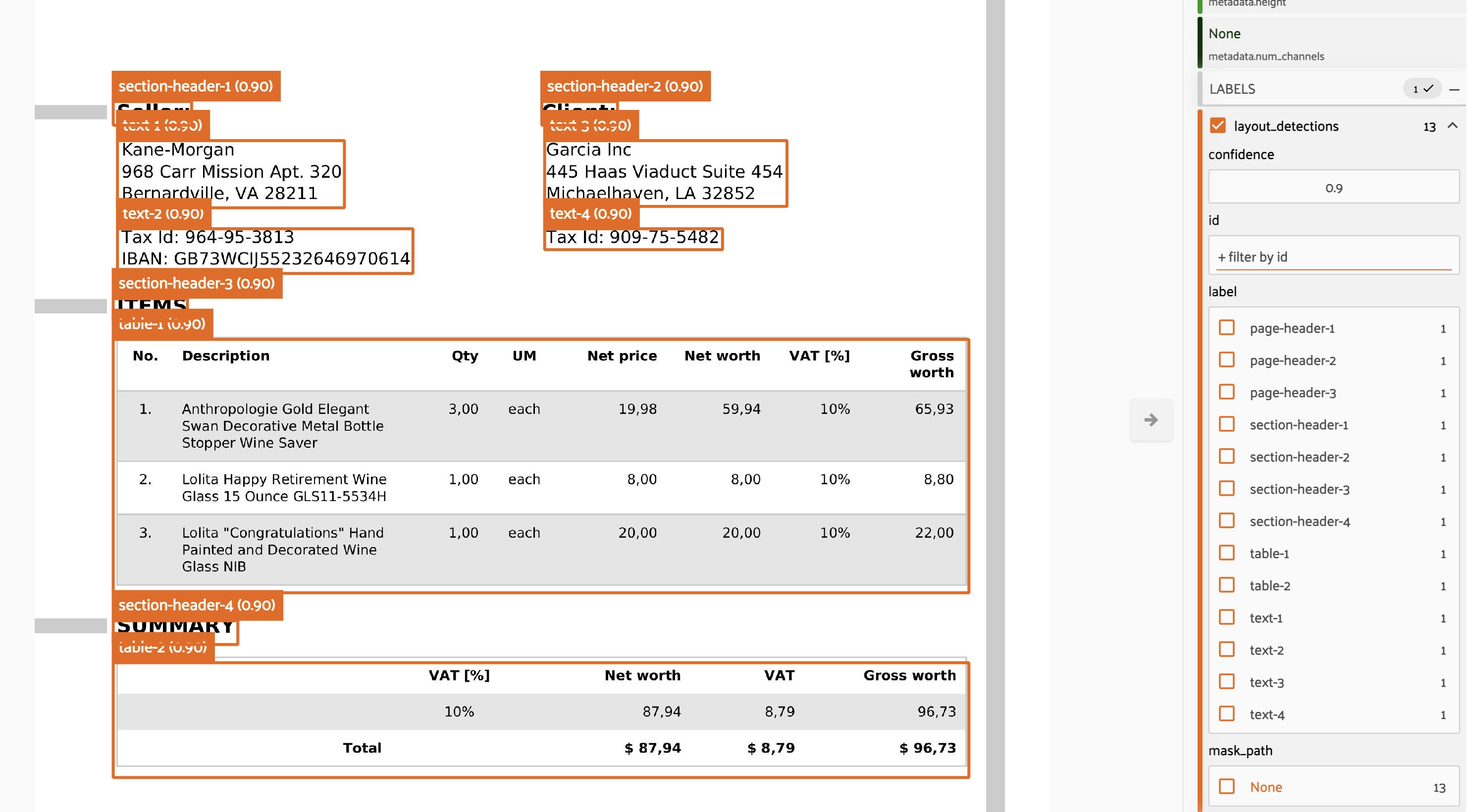
### Layout Detection
Analyze document layout and identify structural elements with precise localization using the `document.layout-detection` domain. Identifies text regions, columns, headers, footers, tables, figures, and provides bounding boxes for each layout element.
## Key Features
* **Seamless Integration**: Native FiftyOne operators for all VLM Run capabilities
* **Visual Grounding**: Precise bounding box localization for detected objects and extracted data
* **Multiple Domains**: Access 50+ specialized processing domains (object detection, document analysis, video transcription)
* **Interactive Visualization**: View and validate extraction results directly in FiftyOne's UI
* **Batch Processing**: Process entire datasets with immediate or delegated execution modes
* **Custom Schemas**: Use pre-built domains or define custom extraction schemas
## Use Cases
1. **Computer Vision Dataset Annotation**: Automatically annotate images with object detections, classifications, and segmentations
2. **Document Processing Pipelines**: Extract structured data from invoices, forms, and documents with visual grounding
3. **Video Analysis Workflows**: Transcribe and analyze video content with temporal grounding
4. **Quality Assurance**: Validate model outputs by comparing VLM Run extractions with ground truth
5. **Data Exploration**: Rapidly explore and filter datasets based on visual content
## Installation
Install the VLM Run plugin directly from GitHub:
```bash theme={"theme":{"light":"github-light","dark":"dark-plus"}}
fiftyone plugins download \
https://github.com/vlm-run/vlmrun-voxel51-plugin
```
Install the required dependencies:
```bash theme={"theme":{"light":"github-light","dark":"dark-plus"}}
fiftyone plugins requirements @vlm-run/vlmrun-voxel51-plugin --install
```
Refer to the [FiftyOne Plugins documentation](https://docs.voxel51.com/plugins/index.html) for more information about managing plugins.
## Configuration
Set your VLM Run API key as an environment variable:
```bash theme={"theme":{"light":"github-light","dark":"dark-plus"}}
export VLMRUN_API_KEY="your-api-key-here"
```
You can obtain an API key from [vlm.run](https://vlm.run). Alternatively, you can provide the API key directly when running operators in the FiftyOne App.
## Getting Started
1. Launch the FiftyOne App with your dataset:
```python theme={"theme":{"light":"github-light","dark":"dark-plus"}}
import fiftyone as fo
import fiftyone.zoo as foz
# Load a sample dataset
dataset = foz.load_zoo_dataset("quickstart", max_samples=10)
session = fo.launch_app(dataset)
```
2. Press `` ` `` or click the `Browse operations` action to open the Operators list
3. Select any of the VLM Run operators to process your data
## Available Operators
### Object Detection
Detect and localize common objects in images with bounding box coordinates using VLM Run's `image.object-detection` domain. The operator adds detections to your dataset with normalized bounding boxes, confidence scores, and object labels.
### Person Detection
Specialized person detection with enhanced accuracy for human-centric applications using the `image.person-detection` domain. Optimized for challenging scenarios including crowds and occlusions.
### Document Analysis
Extract text and analyze document structure from PDFs and images using the `document.markdown` domain. Extracts text content with spatial coordinates, document structure (headers, paragraphs, sections), tables and figures with bounding boxes, and reading order information.
### Invoice Parsing
Extract structured data from invoice documents with field-level visual grounding using the `document.invoice` domain. Extracts invoice totals, line items, vendor information, dates, and payment terms with optional visual grounding for each field.
### Layout Detection
Analyze document layout and identify structural elements with precise localization using the `document.layout-detection` domain. Identifies text regions, columns, headers, footers, tables, figures, and provides bounding boxes for each layout element.
 ### Video Transcription
Transcribe audio and analyze video content with multiple analysis modes using VLM Run's video understanding capabilities. Supported modes include:
* **transcription**: Audio-to-text transcription with timestamps
* **comprehensive**: Full video analysis (audio + visual + activities)
* **objects**: Object detection across video frames
* **scenes**: Scene classification and changes
* **activities**: Activity and action recognition
Each mode provides temporal information and can be combined for comprehensive video understanding.
## Visual Grounding
When enabled, visual grounding provides bounding box coordinates in normalized xywh format:
* `x`: horizontal position of top-left corner (0-1)
* `y`: vertical position of top-left corner (0-1)
* `w`: width of the bounding box (0-1)
* `h`: height of the bounding box (0-1)
This allows for precise localization of detected objects, text regions, or document elements directly on your images, which is essential for validation and compliance workflows.
## Execution Modes
All operators support two execution modes:
* **Immediate**: Process immediately in the FiftyOne App (default)
* **Delegated**: Queue for background processing (requires [orchestrator setup](https://docs.voxel51.com/plugins/using_plugins.html#delegating-plugin-operations))
## Supported Formats
* **Images**: JPEG, PNG, BMP, TIFF, and other common formats
* **Documents**: PDF files and document images
* **Videos**: MP4, AVI, MOV, MKV, WEBM, FLV, WMV, M4V
## Example Workflow
A typical workflow using VLM Run with FiftyOne:
1. **Load Dataset**: Import your images, documents, or videos into FiftyOne
2. **Select Operator**: Choose a VLM Run operator (e.g., object detection, invoice parsing)
3. **Configure Parameters**: Set domain-specific options and enable visual grounding if needed
4. **Execute**: Run the operator on selected samples or entire dataset
5. **Visualize Results**: View extracted data and bounding boxes in FiftyOne's UI
6. **Validate & Export**: Filter, validate, and export results for downstream use
This integration streamlines the entire visual AI pipeline from data ingestion to validated structured outputs.
## Community
**Need help?** Join our [Discord](https://discord.gg/AMApC2UzVY) channel or [contact our support team](mailto:support@vlm.run) for assistance with the VLM Run FiftyOne integration.
## Learn More
* [VLM Run Plugin GitHub Repository](https://github.com/vlm-run/vlmrun-voxel51-plugin)
* [Voxel51 Plugin Documentation](https://docs.voxel51.com/plugins/plugins_ecosystem/vlmrun_voxel51_plugin.html)
* [FiftyOne Documentation](https://docs.voxel51.com)
* [VLM Run API Reference](/api-reference)
### Video Transcription
Transcribe audio and analyze video content with multiple analysis modes using VLM Run's video understanding capabilities. Supported modes include:
* **transcription**: Audio-to-text transcription with timestamps
* **comprehensive**: Full video analysis (audio + visual + activities)
* **objects**: Object detection across video frames
* **scenes**: Scene classification and changes
* **activities**: Activity and action recognition
Each mode provides temporal information and can be combined for comprehensive video understanding.
## Visual Grounding
When enabled, visual grounding provides bounding box coordinates in normalized xywh format:
* `x`: horizontal position of top-left corner (0-1)
* `y`: vertical position of top-left corner (0-1)
* `w`: width of the bounding box (0-1)
* `h`: height of the bounding box (0-1)
This allows for precise localization of detected objects, text regions, or document elements directly on your images, which is essential for validation and compliance workflows.
## Execution Modes
All operators support two execution modes:
* **Immediate**: Process immediately in the FiftyOne App (default)
* **Delegated**: Queue for background processing (requires [orchestrator setup](https://docs.voxel51.com/plugins/using_plugins.html#delegating-plugin-operations))
## Supported Formats
* **Images**: JPEG, PNG, BMP, TIFF, and other common formats
* **Documents**: PDF files and document images
* **Videos**: MP4, AVI, MOV, MKV, WEBM, FLV, WMV, M4V
## Example Workflow
A typical workflow using VLM Run with FiftyOne:
1. **Load Dataset**: Import your images, documents, or videos into FiftyOne
2. **Select Operator**: Choose a VLM Run operator (e.g., object detection, invoice parsing)
3. **Configure Parameters**: Set domain-specific options and enable visual grounding if needed
4. **Execute**: Run the operator on selected samples or entire dataset
5. **Visualize Results**: View extracted data and bounding boxes in FiftyOne's UI
6. **Validate & Export**: Filter, validate, and export results for downstream use
This integration streamlines the entire visual AI pipeline from data ingestion to validated structured outputs.
## Community
**Need help?** Join our [Discord](https://discord.gg/AMApC2UzVY) channel or [contact our support team](mailto:support@vlm.run) for assistance with the VLM Run FiftyOne integration.
## Learn More
* [VLM Run Plugin GitHub Repository](https://github.com/vlm-run/vlmrun-voxel51-plugin)
* [Voxel51 Plugin Documentation](https://docs.voxel51.com/plugins/plugins_ecosystem/vlmrun_voxel51_plugin.html)
* [FiftyOne Documentation](https://docs.voxel51.com)
* [VLM Run API Reference](/api-reference)

