> ## Documentation Index
> Fetch the complete documentation index at: https://docs.vlm.run/llms.txt
> Use this file to discover all available pages before exploring further.
# Classifying Images
> Learn how to classify images into categories like animals, landscapes, and objects using AI.
While traditional image processing systems often rely on simple feature detection or rule-based approaches, `vlm-1` can intelligently classify images based on their content, composition, and visual characteristics. This enables robust classification of images into various categories, even when they come in different styles, lighting conditions, or perspectives.
For example, below is a diagram showing how an image can be classified into different types, and how each type can have its own custom post-processing logic.
```mermaid theme={"theme":{"light":"github-light","dark":"dark-plus"}}
flowchart TD
A([Image]) --> B{Classify}
B --> C1([News])
B --> C2([Entertainment])
B --> C3([Advertising])
B --> C4([Other])
style A fill:#eee,stroke:#333,stroke-width:1px
style C1 fill:#fff,stroke:#333,stroke-width:1px
style C2 fill:#fff,stroke:#333,stroke-width:1px
style C3 fill:#fff,stroke:#333,stroke-width:1px
style C4 fill:#fff,stroke:#333,stroke-width:1px
```
## Classifying TV Images
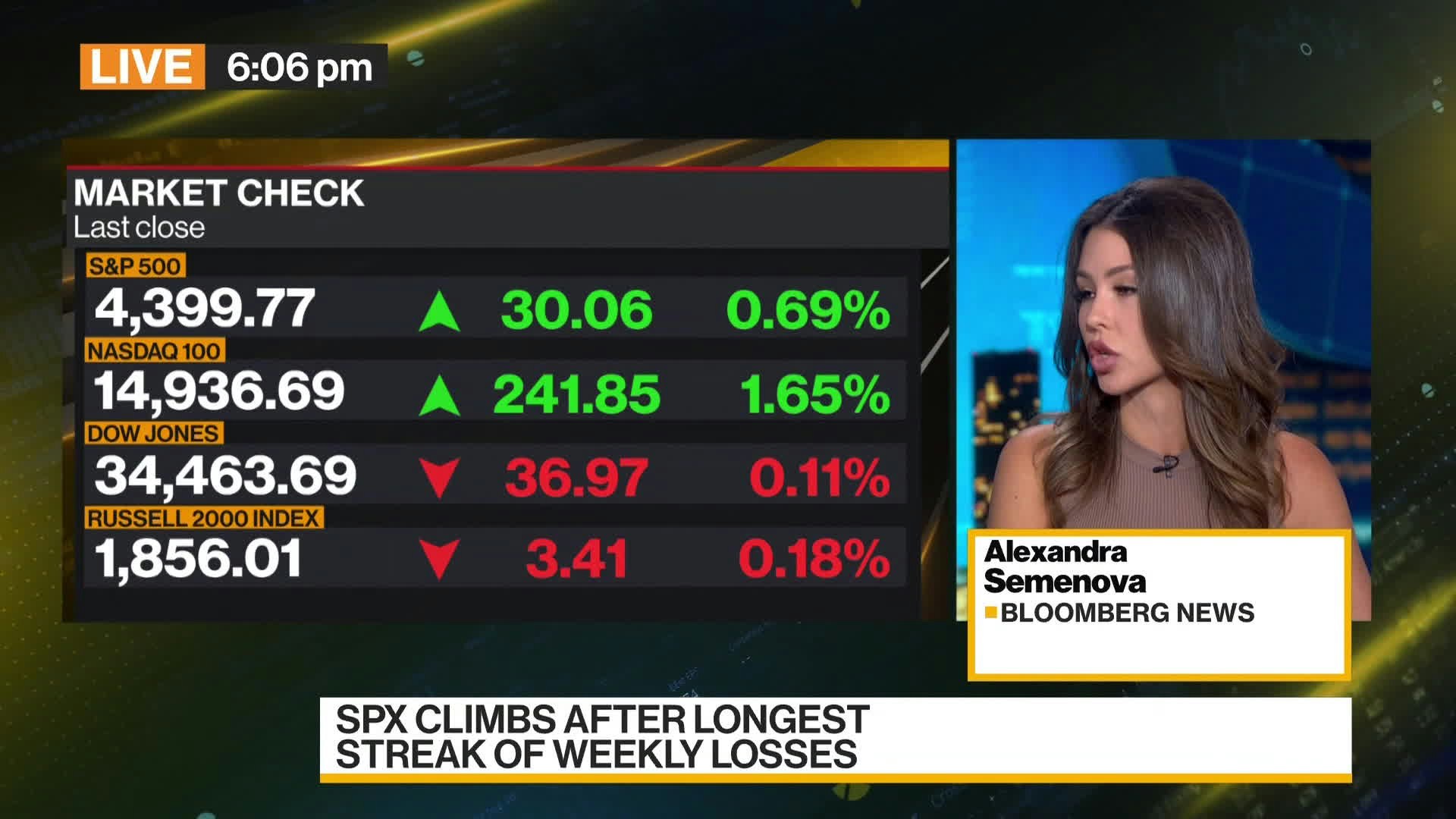
Let's look at a TV image classification example to see how `vlm-1` can be used to automatically analyze and categorize television content. In this example, we'll use `vlm-1` to classify TV screenshots and frames into categories like news broadcasts, entertainment shows, commercials, and other programming types. This classification enables automated content monitoring, ad detection, and intelligent media archiving by identifying the type of TV content being shown.
 ### Define a custom schema for image classification
In the sections below, we'll showcase how to use the API for image classification. `vlm-1` can automatically classify images based on their content and visual characteristics, providing both a classification and a rationale for its decision. First, let's create a custom schema that will be used to classify the images.
```python theme={"theme":{"light":"github-light","dark":"dark-plus"}}
from typing import Literal
from pydantic import BaseModel, Field
class ImageClassification(BaseModel):
rationale: str = Field(..., description="A rationale for the classification, based on the visual content and features of the image. Keep it short and concise, yet detailed enough to justify the classification.")
image_type: Literal["news", "entertainment", "advertising", "other"] = Field(..., description="The type of image being processed")
confidence: Literal["hi", "med", "lo"] = Field(..., description="Confidence score for the classification, based on the rationale provided and the visual features of the image. For ambiguous images, the confidence score should be `lo`.")
```
### Classify images
Once you have defined your custom schema, you can use **`vlm-1`** to classify images according to this schema. The classification will be validated against the schema you defined, ensuring that it conforms to the expected structure and types. First, let's look at an example of how to classify a single image.
```python Python theme={"theme":{"light":"github-light","dark":"dark-plus"}}
from pathlib import Path
from vlmrun.client import VLMRun
from vlmrun.client.types import PredictionResponse, GenerationConfig
# Initialize the client
client = VLMRun(api_key="")
# Classify a single image
path = Path("path/to/image.jpg")
prediction: PredictionResponse = client.image.generate(
file=path,
domain="image.classification",
config=GenerationConfig(response_model=ImageClassification)
)
response_dict = prediction.response.model_dump()
print(response_dict)
```
### Sample Image Classification
Let's take a look at the sample output for a typical animal image.
```json theme={"theme":{"light":"github-light","dark":"dark-plus"}}
{
"rationale": "The image contains financial market data and a news presenter from Bloomberg News, indicating a broadcast of financial news. The financial indices are highlighted, and stock performance is shown, which is typical for a news segment on economic updates.",
"image_type": "news",
"confidence": "hi"
}
```
Let's breakdown the output into their respective components:
* **`rationale`**: A detailed explanation of why it classified the image as a news, based on visual features and content. This allows the developer or user to introspect on the classification and make any necessary adjustments downstream to the model.
* **`image_type`**: The correct image classification type, in this case `news`.
* **`confidence`**: A qualitative confidence level of "high", indicating strong certainty in the classification based on the clear presence of financial market data and a news presenter.
## Fine-tuning Image Classification
This feature is currently only available for our enterprise-tier customers. If you are interested in using this feature, please [contact us](mailto:support@vlm.run).
For **enterprise use-cases** where you need to fine-tune the model for **custom image types** and **improved accuracy**, you can use our [fine-tuning guides](/guides/fine-tune) to customize the model performance and scalability needs. This can include fine-tuning the model on your own image collections, customizing the classification schema, or adding new image types to the classification system. Fine-tuning can help you improve the accuracy and performance of the model for your specific image types, and also help you scale the model to handle larger volumes of images with more efficient, lightweight fine-tuned models that are optimized for your specific use-case. Contact us at [support@vlm.run](mailto:support@vlm.run) to learn more about how we can help you with your fine-tuning needs.
## Try our Image -> JSON API today
Head over to our [Image -> JSON](/api-reference/v1/post-image-generate) to start building your own document processing pipeline with [VLM Run](https://vlm.run). Sign-up for access on our [platform](https://app.vlm.run).
### Define a custom schema for image classification
In the sections below, we'll showcase how to use the API for image classification. `vlm-1` can automatically classify images based on their content and visual characteristics, providing both a classification and a rationale for its decision. First, let's create a custom schema that will be used to classify the images.
```python theme={"theme":{"light":"github-light","dark":"dark-plus"}}
from typing import Literal
from pydantic import BaseModel, Field
class ImageClassification(BaseModel):
rationale: str = Field(..., description="A rationale for the classification, based on the visual content and features of the image. Keep it short and concise, yet detailed enough to justify the classification.")
image_type: Literal["news", "entertainment", "advertising", "other"] = Field(..., description="The type of image being processed")
confidence: Literal["hi", "med", "lo"] = Field(..., description="Confidence score for the classification, based on the rationale provided and the visual features of the image. For ambiguous images, the confidence score should be `lo`.")
```
### Classify images
Once you have defined your custom schema, you can use **`vlm-1`** to classify images according to this schema. The classification will be validated against the schema you defined, ensuring that it conforms to the expected structure and types. First, let's look at an example of how to classify a single image.
```python Python theme={"theme":{"light":"github-light","dark":"dark-plus"}}
from pathlib import Path
from vlmrun.client import VLMRun
from vlmrun.client.types import PredictionResponse, GenerationConfig
# Initialize the client
client = VLMRun(api_key="")
# Classify a single image
path = Path("path/to/image.jpg")
prediction: PredictionResponse = client.image.generate(
file=path,
domain="image.classification",
config=GenerationConfig(response_model=ImageClassification)
)
response_dict = prediction.response.model_dump()
print(response_dict)
```
### Sample Image Classification
Let's take a look at the sample output for a typical animal image.
```json theme={"theme":{"light":"github-light","dark":"dark-plus"}}
{
"rationale": "The image contains financial market data and a news presenter from Bloomberg News, indicating a broadcast of financial news. The financial indices are highlighted, and stock performance is shown, which is typical for a news segment on economic updates.",
"image_type": "news",
"confidence": "hi"
}
```
Let's breakdown the output into their respective components:
* **`rationale`**: A detailed explanation of why it classified the image as a news, based on visual features and content. This allows the developer or user to introspect on the classification and make any necessary adjustments downstream to the model.
* **`image_type`**: The correct image classification type, in this case `news`.
* **`confidence`**: A qualitative confidence level of "high", indicating strong certainty in the classification based on the clear presence of financial market data and a news presenter.
## Fine-tuning Image Classification
This feature is currently only available for our enterprise-tier customers. If you are interested in using this feature, please [contact us](mailto:support@vlm.run).
For **enterprise use-cases** where you need to fine-tune the model for **custom image types** and **improved accuracy**, you can use our [fine-tuning guides](/guides/fine-tune) to customize the model performance and scalability needs. This can include fine-tuning the model on your own image collections, customizing the classification schema, or adding new image types to the classification system. Fine-tuning can help you improve the accuracy and performance of the model for your specific image types, and also help you scale the model to handle larger volumes of images with more efficient, lightweight fine-tuned models that are optimized for your specific use-case. Contact us at [support@vlm.run](mailto:support@vlm.run) to learn more about how we can help you with your fine-tuning needs.
## Try our Image -> JSON API today
Head over to our [Image -> JSON](/api-reference/v1/post-image-generate) to start building your own document processing pipeline with [VLM Run](https://vlm.run). Sign-up for access on our [platform](https://app.vlm.run).