> ## Documentation Index
> Fetch the complete documentation index at: https://docs.vlm.run/llms.txt
> Use this file to discover all available pages before exploring further.
# Visual Grounding
> Learn how to extract visual groundings / citations from documents.
In certain documents, users may want to visually ground the described visual content by localizing the visual elements in the document. For example, in technical documents, we may want to know exactly which table a specific JSON `table` object corresponds to visually. This process is known as [visual grounding](https://paperswithcode.com/task/visual-grounding/codeless).
For a hands-on tutorial, check out our [Visual Grounding Notebook](https://github.com/vlm-run/vlmrun-cookbook/blob/main/notebooks/04_visual_grounding.ipynb) [](https://colab.research.google.com/github/vlm-run/vlmrun-cookbook/blob/main/notebooks/04_visual_grounding.ipynb).
`vlm-1` provides the ability to extract visual groundings from documents with a simple interface. The extracted visual groundings can be used to understand the context of the visual elements in the document and to link them to the corresponding textual content. Let's take a look at an example showcasing visually grounding tables in a hardware spec-sheet.
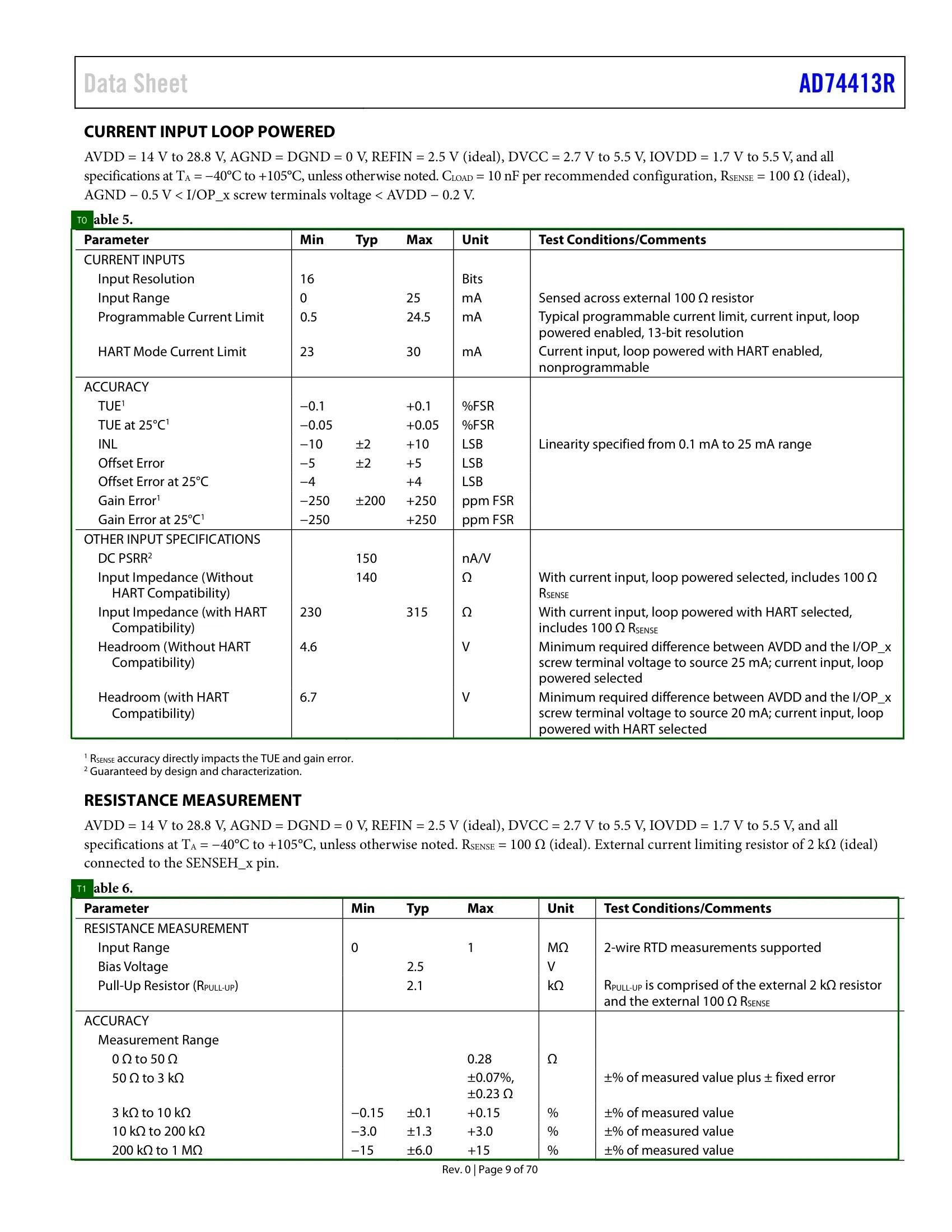 The corresponding JSON output shows the bounding box coordinates of the visual grounding for each table (`T1` and `T2`) in the document. This information can be used to link the visual elements to the corresponding textual content in the document.
```json theme={"theme":{"light":"github-light","dark":"dark-plus"}}
{
"id": "...",
"created_at": "...",
"completed_at": "...",
{
"charts": [],
"tables": [
{
"description": "This table details the specifications for the current input loop powered, including parameters like input resolution, input range, programmable current limit, HART mode current limit, accuracy in terms of TUE, INL, offset error, gain error, and other input specifications like DC PSRR, input impedance, and headroom. Each parameter is accompanied by its minimum, typical, and maximum values, their units, and specific test conditions or comments.",
"title": null,
"caption": "Table 5",
"markdown": "..."
"annotation": "T0",
"bbox": {
"xywh": [
0.07529411764705882,
0.18545454545454546,
0.8735294117647059,
0.4136363636363637
]
}
},
{
"description": "This table provides the specifications for resistance measurement, including input range, bias voltage, pull-up resistor, and accuracy for different measurement ranges. Each parameter is described with its minimum, typical, and maximum values, and its units, along with test conditions or comments.",
"title": null,
"caption": "Table 6",
"markdown": "...",
"annotation": "T0",
"bbox": {
"xywh": [
0.07470588235294118,
0.7281818181818182,
0.8688235294117648,
0.21272727272727276
]
}
}
]
}
}
```
## Try our Document -> JSON API today
Head over to our [Document -> JSON](/api-reference/v1/post-document-generate) to start building your own document processing pipeline with [VLM Run](https://vlm.run). Sign-up for access on our [platform](https://app.vlm.run).
The corresponding JSON output shows the bounding box coordinates of the visual grounding for each table (`T1` and `T2`) in the document. This information can be used to link the visual elements to the corresponding textual content in the document.
```json theme={"theme":{"light":"github-light","dark":"dark-plus"}}
{
"id": "...",
"created_at": "...",
"completed_at": "...",
{
"charts": [],
"tables": [
{
"description": "This table details the specifications for the current input loop powered, including parameters like input resolution, input range, programmable current limit, HART mode current limit, accuracy in terms of TUE, INL, offset error, gain error, and other input specifications like DC PSRR, input impedance, and headroom. Each parameter is accompanied by its minimum, typical, and maximum values, their units, and specific test conditions or comments.",
"title": null,
"caption": "Table 5",
"markdown": "..."
"annotation": "T0",
"bbox": {
"xywh": [
0.07529411764705882,
0.18545454545454546,
0.8735294117647059,
0.4136363636363637
]
}
},
{
"description": "This table provides the specifications for resistance measurement, including input range, bias voltage, pull-up resistor, and accuracy for different measurement ranges. Each parameter is described with its minimum, typical, and maximum values, and its units, along with test conditions or comments.",
"title": null,
"caption": "Table 6",
"markdown": "...",
"annotation": "T0",
"bbox": {
"xywh": [
0.07470588235294118,
0.7281818181818182,
0.8688235294117648,
0.21272727272727276
]
}
}
]
}
}
```
## Try our Document -> JSON API today
Head over to our [Document -> JSON](/api-reference/v1/post-document-generate) to start building your own document processing pipeline with [VLM Run](https://vlm.run). Sign-up for access on our [platform](https://app.vlm.run).