> ## Documentation Index
> Fetch the complete documentation index at: https://docs.vlm.run/llms.txt
> Use this file to discover all available pages before exploring further.
# Parsing Invoices
> Extract structured data from invoices.
Navigate over to the invoice-parsing playground in our [playground](https://app.vlm.run/playground/document.invoice) to see the invoice parsing in action.
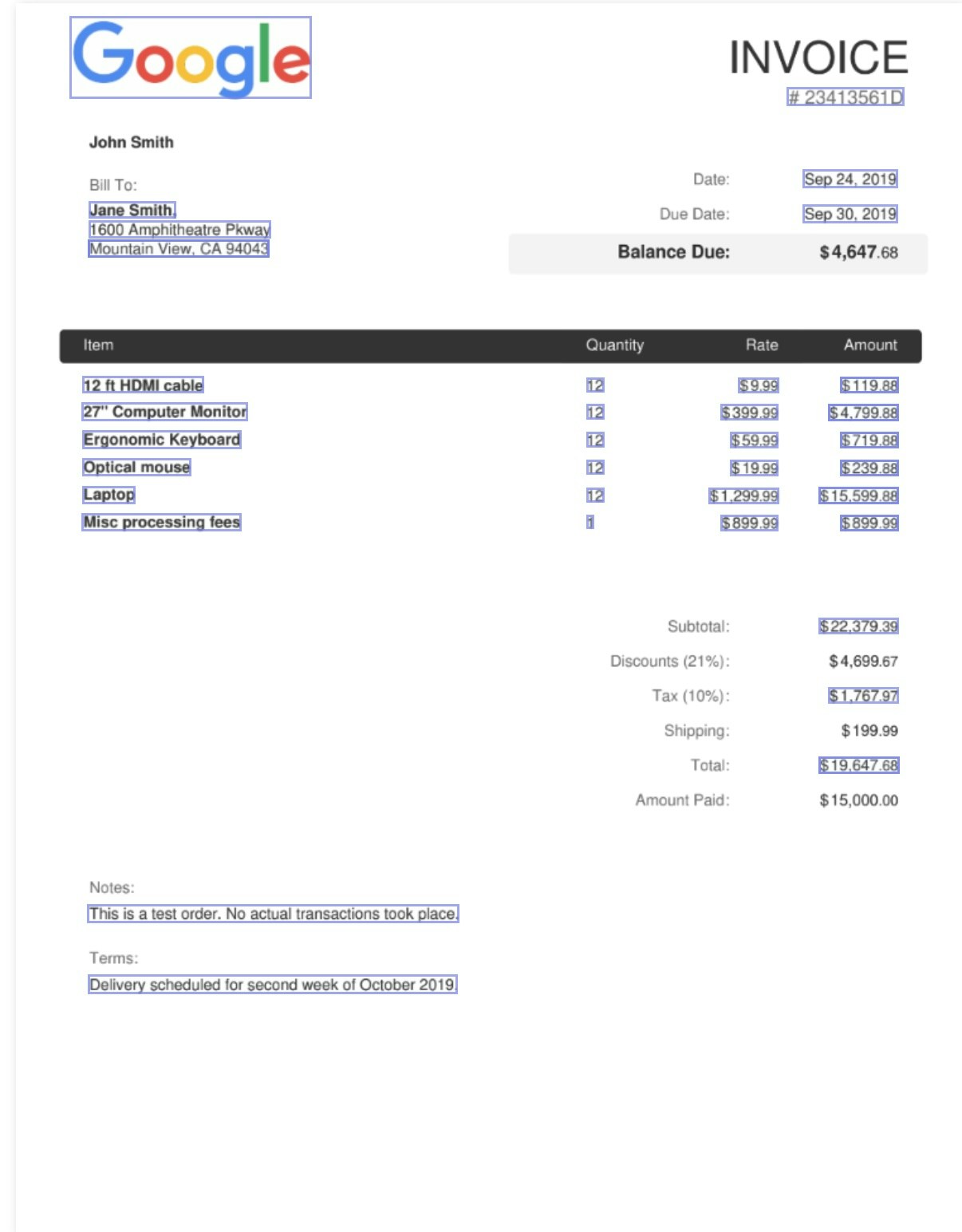
`vlm-1` can extract structured data from invoices, along with their [visual grounding](/guides/doc-ai/guide-visual-grounding) in PDF or image format. Here's a step-by-step guide on how to parse an invoice:
Here is a visualization of the parsed invoice along with the visual grounding that `vlm-1` can extract from an invoice. Notice that only the specific items requested in the schema are retrieved and visualized, unlike OCR which returns all text in the document with no context:
 For higher-quality results, we recommend enabling [Visual Grounding](/guides/doc-ai/guide-visual-grounding) to help the model understand the invoice and extract more accurate information. See [High-Accuracy Parsing with Grounding](#high-accuracy-parsing-with-grounding) for more details.
## Parsing Invoices in 2 Steps
```python Python theme={"theme":{"light":"github-light","dark":"dark-plus"}}
from pathlib import Path
from vlmrun.client import VLMRun
from vlmrun.client.types import FileResponse
# Initialize the client
client = VLMRun(api_key="")
# Submit the invoice for parsing
response: PredictionResponse = client.document.generate(
file=Path(""),
domain="document.invoice",
batch=True,
)
print(f"Job submitted:\n {response.model_dump()}")
```
```typescript Node.js SDK theme={"theme":{"light":"github-light","dark":"dark-plus"}}
import { VlmRun } from "vlmrun";
// Initialize the client
const client = new VlmRun({
apiKey: "",
});
// Submit the invoice for parsing
const response = await client.document.generate({
file: "",
domain: "document.invoice",
batch: true,
});
// Wait for the job to complete
const job = await client.predictions.wait(response.id);
console.log(job);
```
You should see a response like this:
```bash theme={"theme":{"light":"github-light","dark":"dark-plus"}}
Job submitted:
{
"id": "052cf2a8-2b84-45f5-a385-ccac2aae13bb",
"created_at": "2024-08-15T02:22:09.157788",
"response": null,
"status": "pending"
}
```
You can now wait for the job to complete by calling the `predictions.wait` method:
```python Python theme={"theme":{"light":"github-light","dark":"dark-plus"}}
# Wait for the job to complete
response: PredictionResponse = client.predictions.wait(
id=response.id,
timeout=120,
)
print(f"Job completed:\n {response.model_dump()}")
```
```typescript Node.js SDK theme={"theme":{"light":"github-light","dark":"dark-plus"}}
// Wait for the job to complete
const job = await client.predictions.wait(response.id);
console.log(job);
```
You should see a response like this:
```json [expandable] theme={"theme":{"light":"github-light","dark":"dark-plus"}}
{
"id": "052cf2a8-2b84-45f5-a385-ccac2aae13bb",
"created_at": "2024-08-15T02:22:09.157788",
"status": "completed",
"response": {
"currency": "USD",
"currency_metadata": {
"bboxes": [
{
"content": "$19,647.68",
"bbox": {
"xywh": [0.843, 0.611, 0.084, 0.014]
},
"page": 0
}
]
},
"customer": "Jane Smith",
"customer_billing_address": {
"city": "Mountain View",
"city_metadata": {
"bboxes": [
{
"content": "Mountain View, CA 94043",
"bbox": {
"xywh": [0.080, 0.194, 0.190, 0.014]
},
"page": 0
}
]
},
"country": null,
"country_metadata": null,
"postal_code": "94043",
"postal_code_metadata": {
"bboxes": [
{
"content": "Mountain View, CA 94043",
"bbox": {
"xywh": [0.080, 0.194, 0.190, 0.014]
},
"page": 0
}
]
},
}
...
"items": [...], // List of items in the invoice
...
"total": 19647.68,
"total_metadata": {
"bboxes": [
{
"content": "$19,647.68",
"bbox": {
"xywh": [...]
},
"page": 0
}
]
}
}
}
```
## High-Accuracy Parsing with Grounding
For higher-quality results, you can enable [Visual Grounding](/guides/doc-ai/guide-visual-grounding) to help the model understand the invoice and extract more accurate information. You can do this by setting the `config=GenerationConfig(grounding=True)` parameter when submitting the job (as shown below).
```python Python theme={"theme":{"light":"github-light","dark":"dark-plus"}}
from vlmrun.client.types import GenerationConfig
# Enable grounding when submitting the job
response: PredictionResponse = client.document.generate(
file=Path(""),
domain="document.invoice",
batch=True,
config=GenerationConfig(grounding=True),
)
```
```typescript Node.js SDK theme={"theme":{"light":"github-light","dark":"dark-plus"}}
// Enable grounding when submitting the job
const response = await client.document.generate({
file: "",
domain: "document.invoice",
batch: true,
config: { grounding: true },
});
```
## Try our Document -> JSON API today
Head over to our [Document -> JSON](/api-reference/v1/post-document-generate) to start building your own document processing pipeline with [VLM Run](https://vlm.run). Sign-up for access on our [platform](https://app.vlm.run).
For higher-quality results, we recommend enabling [Visual Grounding](/guides/doc-ai/guide-visual-grounding) to help the model understand the invoice and extract more accurate information. See [High-Accuracy Parsing with Grounding](#high-accuracy-parsing-with-grounding) for more details.
## Parsing Invoices in 2 Steps
```python Python theme={"theme":{"light":"github-light","dark":"dark-plus"}}
from pathlib import Path
from vlmrun.client import VLMRun
from vlmrun.client.types import FileResponse
# Initialize the client
client = VLMRun(api_key="")
# Submit the invoice for parsing
response: PredictionResponse = client.document.generate(
file=Path(""),
domain="document.invoice",
batch=True,
)
print(f"Job submitted:\n {response.model_dump()}")
```
```typescript Node.js SDK theme={"theme":{"light":"github-light","dark":"dark-plus"}}
import { VlmRun } from "vlmrun";
// Initialize the client
const client = new VlmRun({
apiKey: "",
});
// Submit the invoice for parsing
const response = await client.document.generate({
file: "",
domain: "document.invoice",
batch: true,
});
// Wait for the job to complete
const job = await client.predictions.wait(response.id);
console.log(job);
```
You should see a response like this:
```bash theme={"theme":{"light":"github-light","dark":"dark-plus"}}
Job submitted:
{
"id": "052cf2a8-2b84-45f5-a385-ccac2aae13bb",
"created_at": "2024-08-15T02:22:09.157788",
"response": null,
"status": "pending"
}
```
You can now wait for the job to complete by calling the `predictions.wait` method:
```python Python theme={"theme":{"light":"github-light","dark":"dark-plus"}}
# Wait for the job to complete
response: PredictionResponse = client.predictions.wait(
id=response.id,
timeout=120,
)
print(f"Job completed:\n {response.model_dump()}")
```
```typescript Node.js SDK theme={"theme":{"light":"github-light","dark":"dark-plus"}}
// Wait for the job to complete
const job = await client.predictions.wait(response.id);
console.log(job);
```
You should see a response like this:
```json [expandable] theme={"theme":{"light":"github-light","dark":"dark-plus"}}
{
"id": "052cf2a8-2b84-45f5-a385-ccac2aae13bb",
"created_at": "2024-08-15T02:22:09.157788",
"status": "completed",
"response": {
"currency": "USD",
"currency_metadata": {
"bboxes": [
{
"content": "$19,647.68",
"bbox": {
"xywh": [0.843, 0.611, 0.084, 0.014]
},
"page": 0
}
]
},
"customer": "Jane Smith",
"customer_billing_address": {
"city": "Mountain View",
"city_metadata": {
"bboxes": [
{
"content": "Mountain View, CA 94043",
"bbox": {
"xywh": [0.080, 0.194, 0.190, 0.014]
},
"page": 0
}
]
},
"country": null,
"country_metadata": null,
"postal_code": "94043",
"postal_code_metadata": {
"bboxes": [
{
"content": "Mountain View, CA 94043",
"bbox": {
"xywh": [0.080, 0.194, 0.190, 0.014]
},
"page": 0
}
]
},
}
...
"items": [...], // List of items in the invoice
...
"total": 19647.68,
"total_metadata": {
"bboxes": [
{
"content": "$19,647.68",
"bbox": {
"xywh": [...]
},
"page": 0
}
]
}
}
}
```
## High-Accuracy Parsing with Grounding
For higher-quality results, you can enable [Visual Grounding](/guides/doc-ai/guide-visual-grounding) to help the model understand the invoice and extract more accurate information. You can do this by setting the `config=GenerationConfig(grounding=True)` parameter when submitting the job (as shown below).
```python Python theme={"theme":{"light":"github-light","dark":"dark-plus"}}
from vlmrun.client.types import GenerationConfig
# Enable grounding when submitting the job
response: PredictionResponse = client.document.generate(
file=Path(""),
domain="document.invoice",
batch=True,
config=GenerationConfig(grounding=True),
)
```
```typescript Node.js SDK theme={"theme":{"light":"github-light","dark":"dark-plus"}}
// Enable grounding when submitting the job
const response = await client.document.generate({
file: "",
domain: "document.invoice",
batch: true,
config: { grounding: true },
});
```
## Try our Document -> JSON API today
Head over to our [Document -> JSON](/api-reference/v1/post-document-generate) to start building your own document processing pipeline with [VLM Run](https://vlm.run). Sign-up for access on our [platform](https://app.vlm.run).