> ## Documentation Index
> Fetch the complete documentation index at: https://docs.vlm.run/llms.txt
> Use this file to discover all available pages before exploring further.
# Parsing Intake Forms
> Extract structured data from healthcare documents like patient referrals, intake forms, and insurance cards.
Head over to our chat to see the healthcare patient referral parsing in action and explore more.
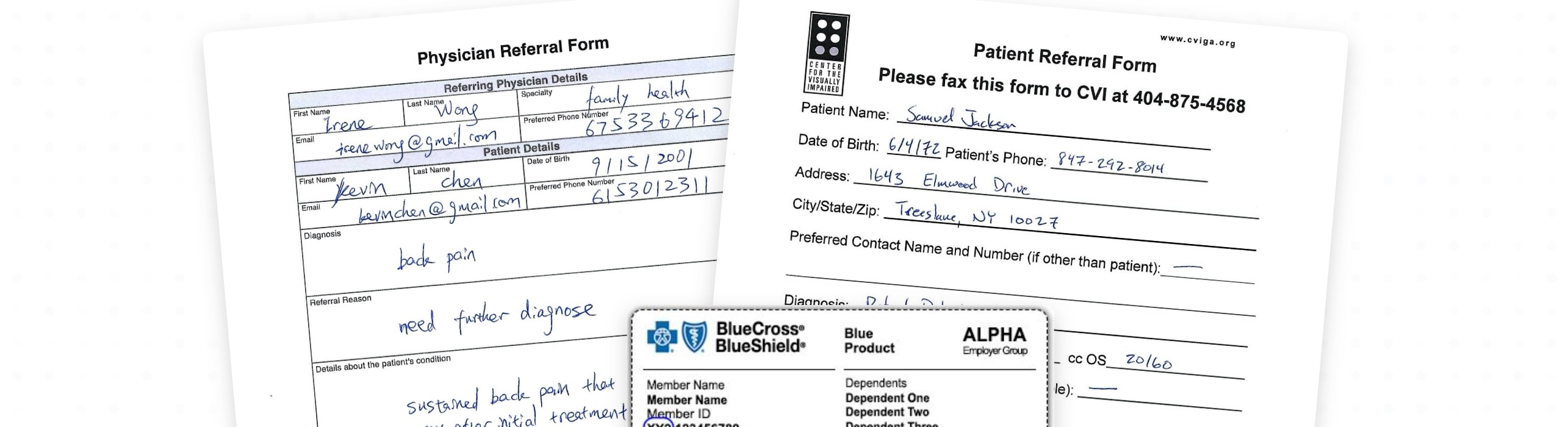
Healthcare back-office operations face a universal challenge: processing vast amounts of unstructured patient documents efficiently and accurately. From patient-intake forms to insurance cards, from medical history records to referrals, these documents come in countless formats, often as low-quality scans, faxes, or handwritten forms.
While traditional OCR tools struggle with the complexity of healthcare documents, `vlm-1` can extract structured data from patient referrals, intake forms, insurance cards, and other healthcare documents with high accuracy. This helps healthcare providers streamline their operations, reduce manual data entry, and focus on patient care.
Here's a step-by-step guide on how to process healthcare documents:
Use the [`/v1/files`](/api-reference/v1/files/post-file-upload) endpoint to upload the healthcare document you want to process.
```python Python theme={"theme":{"light":"github-light","dark":"dark-plus"}}
from vlmrun.client import VLMRun
from vlmrun.client.types import FileResponse
from pathlib import Path
# Initialize the client
client = VLMRun(api_key="")
# Upload the file
response: FileResponse = client.files.upload(
file=Path("")
)
print(f"Uploaded file:\n {response.model_dump()}")
```
```typescript Node.js SDK theme={"theme":{"light":"github-light","dark":"dark-plus"}}
import { VlmRun } from "vlmrun";
// Initialize the client
const client = new VlmRun({
apiKey: "",
});
// Upload the file
const fileResponse = await client.files.upload(
filePath: ""
);
console.log(fileResponse);
```
You should see a response like this:
```bash theme={"theme":{"light":"github-light","dark":"dark-plus"}}
Uploaded file:
{
'id': '1e76cfd9-ba99-49b2-a8fe-2c8efaad2649',
'filename': 'file-20240815-7UvOUQ-patient_referral.pdf',
'bytes': 62430,
'purpose': 'assistants',
'created_at': '2024-08-15T02:22:06.716130',
'object': 'file'
}
```
Submit the uploaded file to the [`/v1/document/generate`](/api-reference/v1/post-document-generate) endpoint to start the document processing job. Specify the appropriate healthcare domain based on the document type.
```python Python theme={"theme":{"light":"github-light","dark":"dark-plus"}}
from vlmrun.client.types import PredictionResponse, GenerationConfig
from pathlib import Path
# Submit the document for processing with patient referral domain
response: PredictionResponse = client.document.generate(
file=Path("path/to/file.pdf"),
domain="healthcare.patient-referral",
config=GenerationConfig(grounding=True) # Enable visual grounding
)
print(f"Healthcare document processing job submitted:\n {response.model_dump()}")
```
```typescript Node.js SDK theme={"theme":{"light":"github-light","dark":"dark-plus"}}
const response = await client.document.generate({
file: "path/to/file.pdf",
domain: "healthcare.patient-referral",
config: {
grounding: true // Enable visual grounding
}
});
console.log(response);
```
You should see a response like this:
```bash theme={"theme":{"light":"github-light","dark":"dark-plus"}}
Healthcare document processing job submitted:
{
"id": "052cf2a8-2b84-45f5-a385-ccac2aae13bb",
"created_at": "2024-08-15T02:22:09.157788",
"response": null,
"status": "pending"
}
```
You can now wait for the job to complete by calling the `predictions.wait` method:
```python Python theme={"theme":{"light":"github-light","dark":"dark-plus"}}
# Wait for the job to complete
response: PredictionResponse = client.predictions.wait(
id=response.id,
timeout=120,
)
print(f"Job completed:\n {response.model_dump()}")
```
```typescript Node.js SDK theme={"theme":{"light":"github-light","dark":"dark-plus"}}
// Wait for the job to complete
const job = await client.predictions.wait(response.id);
console.log(job);
```
## Healthcare Document Types
VLM Run supports various healthcare document types, each with its own specialized schema. For a complete list of supported healthcare domains, visit the [Healthcare Domains section in our hub](https://app.vlm.run/dashboard/hub#healthcare).
For higher-quality results, we always recommend enabling [Visual Grounding](/guides/doc-ai/guide-visual-grounding) to help the model understand the invoice and extract more accurate information. See [High-Accuracy Parsing with Grounding](#high-accuracy-parsing-with-grounding) for more details.
### Patient Referrals
Patient referrals contain critical information about the patient, referring provider, and reason for referral. VLM Run can extract this information with high accuracy.
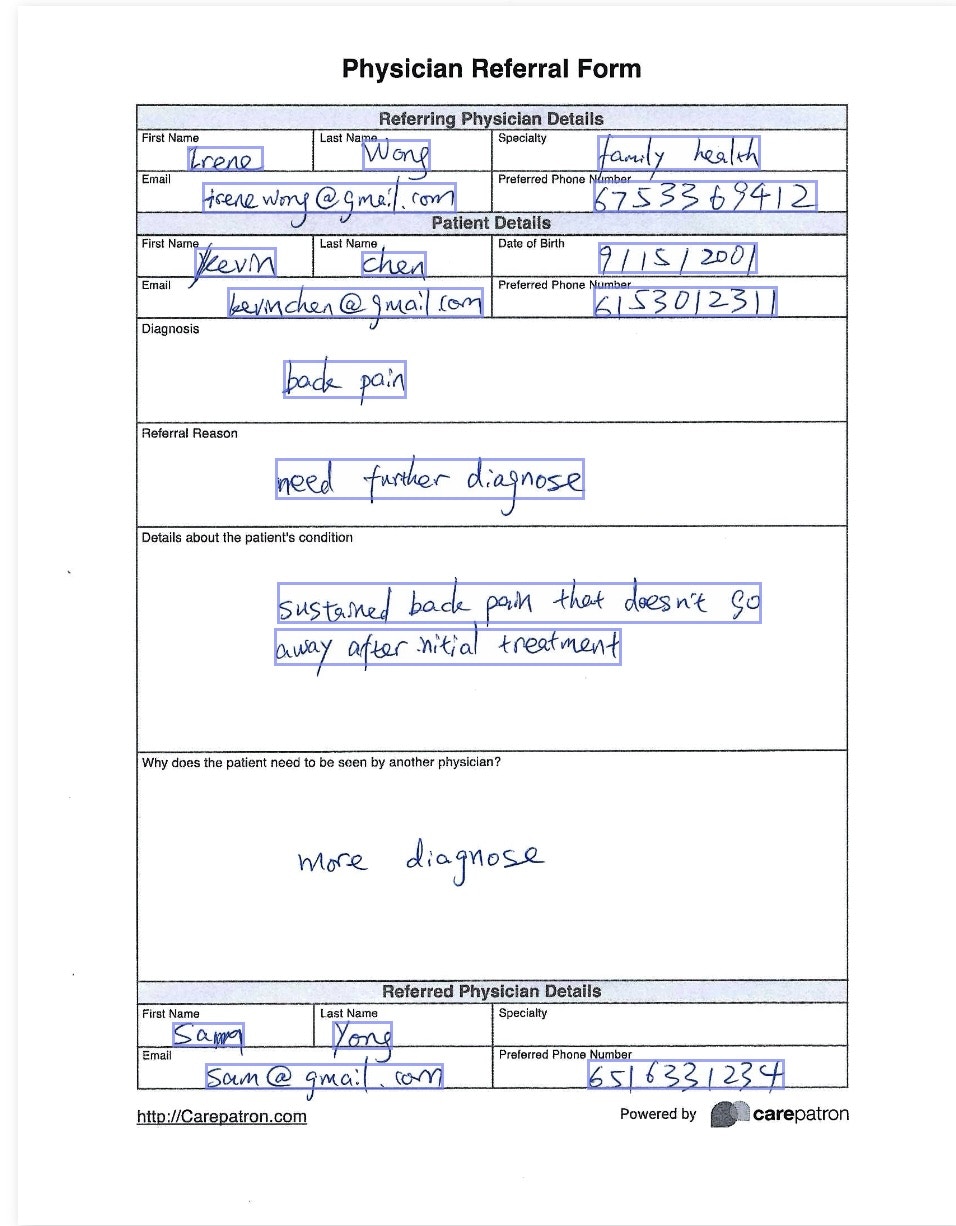
Here is a visualization of the parsed patient referral along with the visual grounding that `vlm-1` can extract from a patient referral form:
Here is an example of the code to parse a patient referral form:
```python theme={"theme":{"light":"github-light","dark":"dark-plus"}}
from vlmrun.client import VLMRun
from vlmrun.client.types import PredictionResponse, GenerationConfig
from pathlib import Path
# Initialize the client
client = VLMRun(api_key="")
# Process a patient referral
response: PredictionResponse = client.document.generate(
file=Path("path/to/file.pdf"),
domain="healthcare.patient-referral",
config=GenerationConfig(grounding=True)
)
# Wait for the prediction to complete
response = client.predictions.wait(response.id)
print(response.response)
```
Here is an example of the structured JSON output that `vlm-1` can extract from a patient referral form. You can also navigate to our [chat](https://chat.vlm.run/c/92c10df4-83d6-481a-bc9a-4ed3f66f5397) to see the JSON output in action:
```json [expandable] theme={"theme":{"light":"github-light","dark":"dark-plus"}}
{
"id": "052cf2a8-2b84-45f5-a385-ccac2aae13bb",
"created_at": "2024-08-15T02:22:09.157788",
"status": "completed",
"response": {
"referral": {
"patient": {
"contact": [
{
"value": "kerimchen@gmail.com",
"value_metadata": {
"bboxes": [
{
"content": "kerimchen@gmail.com",
"bbox": {
"xywh": [
0.22692793931731986,
0.2333984375,
0.2692793931731985,
0.025390625
]
},
"page": 0
}
]
}
},
{
"value": "6153012311",
"value_metadata": {
"bboxes": [
{
"content": "6153012311",
"bbox": {
"xywh": [
0.611251580278129,
0.23291015625,
0.19405815423514539,
0.025390625
]
},
"page": 0
}
]
}
}
],
"dateOfBirth": "2001-09-15",
"dateOfBirth_metadata": {
"bboxes": [
{
"content": "9/15/2001",
"bbox": {
"xywh": [
0.6163084702907712,
0.19677734375,
0.1675094816687737,
0.0263671875
]
},
"page": 0
}
]
},
"medicalHistory": {
"medicalConditions": [
{
"note": "sustained back pain that doesn't go away after initial treatment",
"note_metadata": {
"bboxes": [
{
"content": "sustained back pain that doesn't go",
"bbox": {
"xywh": [
0.27939317319848295,
0.47265625,
0.5094816687737042,
0.0341796875
]
},
"page": 0
},
{
"content": "away after initial treatment",
"bbox": {
"xywh": [
0.27623261694058154,
0.51025390625,
0.3647281921618205,
0.03125
]
},
"page": 0
}
]
},
"text": "back pain",
"text_metadata": {
"bboxes": [
{
"content": "back pain",
"bbox": {
"xywh": [
0.28508217446270545,
0.29296875,
0.13084702907711757,
0.03125
]
},
"page": 0
}
]
},
}
],
},
"name": "Kevin Chen",
"name_metadata": {
"bboxes": [
{
"content": "Kevin",
"bbox": {
"xywh": [
0.19152970922882429,
0.201171875,
0.08786346396965866,
0.025390625
]
},
"page": 0
},
{
"content": "Chen",
"bbox": {
"xywh": [
0.3672566371681416,
0.20458984375,
0.06890012642225031,
0.0205078125
]
},
"page": 0
}
]
}
},
"reasonForReferral": "need further diagnose",
"reasonForReferral_metadata": {
"bboxes": [
{
"content": "need further diagnose",
"bbox": {
"xywh": [
0.27686472819216185,
0.37255859375,
0.32616940581542353,
0.03369140625
]
},
"page": 0
}
]
},
"receivingProvider": {
"contact": [
{
"system": "email",
"value": "sam@gmail.com",
"value_metadata": {
"bboxes": [
{
"content": "sam@gmail.com",
"bbox": {
"xywh": [
0.20353982300884957,
0.86328125,
0.2509481668773704,
0.02197265625
]
},
"page": 0
}
]
}
},
{
"system": "phone",
"value": "6516331234",
"value_metadata": {
"bboxes": [
{
"content": "6516331234",
"bbox": {
"xywh": [
0.6049304677623262,
0.85986328125,
0.2079646017699115,
0.025390625
]
},
"page": 0
}
]
}
}
],
"name": "Sam Yong",
"name_metadata": {
"bboxes": [
{
"content": "Sam",
"bbox": {
"xywh": [
0.16877370417193427,
0.830078125,
0.07648546144121365,
0.0205078125
]
},
"page": 0
},
{
"content": "Yong",
"bbox": {
"xywh": [
0.33691529709228824,
0.82958984375,
0.0638432364096081,
0.02294921875
]
},
"page": 0
}
]
},
},
"referringProvider": {
"contact": [
{
"system": "email",
"value": "irenewong@gmail.com",
"value_metadata": {
"bboxes": [
{
"content": "irenewong@gmail.com",
"bbox": {
"xywh": [
0.20037926675094817,
0.1484375,
0.26738305941845764,
0.02587890625
]
},
"page": 0
}
]
}
},
{
"system": "phone",
"value": "6753369412",
"value_metadata": {
"bboxes": [
{
"content": "6753369412",
"bbox": {
"xywh": [
0.6106194690265486,
0.146484375,
0.23640960809102401,
0.02685546875
]
},
"page": 0
}
]
}
}
],
"name": "Irene Wong",
"name_metadata": {
"bboxes": [
{
"content": "Irene",
"bbox": {
"xywh": [
0.18394437420986093,
0.119140625,
0.08091024020227561,
0.0205078125
]
},
"page": 0
},
{
"content": "Wong",
"bbox": {
"xywh": [
0.36788874841972186,
0.11376953125,
0.07269279393173199,
0.025390625
]
},
"page": 0
}
]
},
"specialty": "family health",
"specialty_metadata": {
"bboxes": [
{
"content": "family health",
"bbox": {
"xywh": [
0.6150442477876106,
0.10986328125,
0.17193426042983564,
0.029296875
]
},
"page": 0
}
]
}
}
}
}
}
```
### Insurance Cards
Insurance cards contain information about the patient's insurance coverage, including policy numbers, group numbers, and contact information. VLM Run can extract this information accurately.
```python theme={"theme":{"light":"github-light","dark":"dark-plus"}}
# Process an insurance card
response: PredictionResponse = client.document.generate(
file=Path("path/to/file.pdf"),
domain="healthcare.medical-insurance-card",
config=GenerationConfig(grounding=True)
)
# Wait for the prediction to complete
response = client.predictions.wait(response.id)
print(response.response)
```
### Patient Intake Forms
Patient intake forms contain comprehensive information about the patient's medical history, current medications, allergies, and more. VLM Run can extract this information with high accuracy.
```python theme={"theme":{"light":"github-light","dark":"dark-plus"}}
# Process a patient intake form
response: PredictionResponse = client.document.generate(
file=Path("path/to/file.pdf"),
domain="healthcare.patient-intake",
config=GenerationConfig(grounding=True)
)
# Wait for the prediction to complete
response = client.predictions.wait(response.id)
print(response.response)
```
### Medical History Forms
Medical history forms contain detailed information about the patient's past medical conditions, surgeries, and family medical history. VLM Run can extract this information accurately.
```python theme={"theme":{"light":"github-light","dark":"dark-plus"}}
# Process a medical history form
response: PredictionResponse = client.document.generate(
file=Path("path/to/file.pdf"),
domain="healthcare.medical-history",
config=GenerationConfig(grounding=True)
)
# Wait for the prediction to complete
response = client.predictions.wait(response.id)
print(response.response)
```
## Custom JSON Schemas for Healthcare-Specific Needs
Healthcare organizations often have specific data extraction needs. VLM Run allows you to define custom JSON schemas to extract exactly the data you need from healthcare documents.
```python theme={"theme":{"light":"github-light","dark":"dark-plus"}}
# Define a custom schema for patient referrals
custom_schema = {
"type": "object",
"properties": {
"patient": {
"type": "object",
"properties": {
"name": {"type": "string"},
"birth_date": {"type": "string", "format": "date"},
"gender": {"type": "string", "enum": ["male", "female", "other"]},
"contact_number": {"type": "string"},
"email": {"type": "string", "format": "email"}
},
"required": ["name", "birth_date"]
},
"referral": {
"type": "object",
"properties": {
"reason": {"type": "string"},
"date": {"type": "string", "format": "date"},
"urgency": {"type": "string", "enum": ["routine", "urgent", "emergency"]},
"notes": {"type": "string"}
},
"required": ["reason", "date"]
},
"referring_provider": {
"type": "object",
"properties": {
"name": {"type": "string"},
"npi": {"type": "string"},
"facility": {"type": "string"},
"contact_number": {"type": "string"}
},
"required": ["name"]
}
}
}
# Process a patient referral with the custom schema
response: PredictionResponse = client.document.generate(
file=Path("path/to/file.pdf"),
json_schema=custom_schema,
config=GenerationConfig(grounding=True)
)
# Wait for the prediction to complete
response = client.predictions.wait(response.id)
print(response.response)
```
## Visual Grounding for Verification and Compliance
In healthcare, it's crucial to verify the accuracy of extracted data. VLM Run's [visual grounding feature](/guides/doc-ai/guide-visual-grounding) provides a clear link between the extracted data and its location in the original document, making it easier to verify the accuracy of the extraction and maintain an audit trail for compliance purposes.
```python theme={"theme":{"light":"github-light","dark":"dark-plus"}}
# Process a patient referral with visual grounding
response: PredictionResponse = client.document.generate(
file=Path("path/to/file.pdf"),
domain="healthcare.patient-referral",
config=GenerationConfig(grounding=True)
)
# Wait for the prediction to complete
response = client.predictions.wait(response.id)
# The response will include bounding boxes for each extracted field
print(response.response)
```
Example response with visual grounding:
```json theme={"theme":{"light":"github-light","dark":"dark-plus"}}
{
"patient": {
"name": "John Doe",
"name_metadata": {
"bbox": {
"xywh": [0.1, 0.2, 0.05, 0.02]
}
},
"birth_date": "1980-05-15",
"birth_date_metadata": {
"bbox": {
"xywh": [0.1, 0.23, 0.05, 0.02]
}
},
"gender": "male",
"gender_metadata": {
"bbox": {
"xywh": [0.1, 0.26, 0.05, 0.02]
}
}
},
"referral": {
"reason": "Chronic back pain",
"reason_metadata": {
"bbox": {
"xywh": [0.3, 0.2, 0.15, 0.02]
}
},
"date": "2024-03-01",
"date_metadata": {
"bbox": {
"xywh": [0.3, 0.23, 0.15, 0.02]
}
},
"urgency": "routine",
"urgency_metadata": {
"bbox": {
"xywh": [0.3, 0.26, 0.15, 0.02]
}
}
}
}
```
## Confidence Scoring for Data Accuracy
In healthcare, data accuracy is paramount. VLM Run provides confidence scores for each extracted field, allowing you to identify fields that may require manual verification.
```python theme={"theme":{"light":"github-light","dark":"dark-plus"}}
# Process a patient referral with confidence scoring
response: PredictionResponse = client.document.generate(
file=Path("path/to/file.pdf"),
domain="healthcare.patient-referral",
config=GenerationConfig(
confidence=True,
grounding=True
)
)
# Wait for the prediction to complete
response = client.predictions.wait(response.id)
# The response will include confidence scores for each field
print(response.response)
```
Example response with confidence scores:
```json theme={"theme":{"light":"github-light","dark":"dark-plus"}}
{
"patient": {
"name": "John Doe",
"confidence": "high",
"birth_date": "1980-05-15",
"confidence": "high",
"gender": "male",
"confidence": "high"
},
"referral": {
"reason": "Chronic back pain",
"confidence": "high",
"date": "2024-03-01",
"confidence": "medium",
"urgency": "routine",
"confidence": "low"
}
}
```
## Batch Processing
For healthcare organizations that need to process large volumes of documents, VLM Run supports batch processing. This allows you to submit multiple documents for processing and retrieve the results asynchronously.
```python theme={"theme":{"light":"github-light","dark":"dark-plus"}}
# Upload multiple files
file_paths = ["path/to/referral1.pdf", "path/to/referral2.pdf", "path/to/referral3.pdf"]
for file_path in file_paths:
response = client.files.upload(file=Path(file_path))
# Submit batch processing jobs
job_ids = []
for file_path in file_paths:
response = client.document.generate(
file=Path(file_path),
domain="healthcare.patient-referral",
batch=True,
config=GenerationConfig(grounding=True)
)
job_ids.append(response.id)
# Wait for all jobs to complete
results = []
for job_id in job_ids:
while True:
response = client.document.get(job_id)
if response.status == "completed":
results.append(response)
break
elif response.status == "failed":
print(f"Job {job_id} failed")
break
time.sleep(5) # Poll every 5 seconds
# Process the results
for result in results:
print(f"Document ID: {result.id}")
print(f"Patient: {result.response['patient']['name']}")
print(f"Referral Reason: {result.response['referral']['reason']}")
print("---")
```
## HIPAA Compliance and Data Security
VLM Run is designed with healthcare compliance in mind:
* 🏥 **HIPAA Compliance**: VLM Run's infrastructure is HIPAA-compliant, ensuring patient data is handled securely
* 🔒 **Data Encryption**: All data is encrypted in transit and at rest
* 🔑 **Access Controls**: Robust authentication and authorization mechanisms
* 📝 **Audit Logging**: Comprehensive audit trails for all data access and processing
## Use Cases
VLM Run's healthcare document processing capabilities can be applied to a wide range of use cases:
* 📋 **Patient Onboarding Automation**: Streamline the patient onboarding process by automatically extracting data from intake forms, insurance cards, and medical history forms. This reduces manual data entry, minimizes errors, and accelerates the onboarding process.
* 🔄 **Referral Management**: Efficiently process patient referrals by automatically extracting patient information, referring provider details, and referral reasons. This helps healthcare providers prioritize referrals based on urgency and ensure timely patient care.
* 💳 **Insurance Verification**: Automate the insurance verification process by extracting policy information from insurance cards and verifying coverage details. This reduces claim denials and improves revenue cycle management.
* 📁 **Medical Records Digitization**: Convert paper medical records into structured digital data for easier storage, retrieval, and analysis. This improves data accessibility and enables better patient care through comprehensive medical history access.
## Related Guides
Learn how to classify healthcare documents by type before processing.
General guide for parsing various document types.
Learn more about visual grounding for document verification.
Create custom schemas for healthcare-specific data extraction.
Head over to our chat to see the healthcare patient referral parsing in action and explore more.
## Try our Document -> JSON API today
Head over to our [Document -> JSON](/api-reference/v1/post-document-generate) to start building your own document processing pipeline with [VLM Run](https://vlm.run). Sign-up for access on our [platform](https://app.vlm.run).
 Here's a step-by-step guide on how to process healthcare documents:
 Here is an example of the code to parse a patient referral form:
```python theme={"theme":{"light":"github-light","dark":"dark-plus"}}
from vlmrun.client import VLMRun
from vlmrun.client.types import PredictionResponse, GenerationConfig
from pathlib import Path
# Initialize the client
client = VLMRun(api_key="
Here is an example of the code to parse a patient referral form:
```python theme={"theme":{"light":"github-light","dark":"dark-plus"}}
from vlmrun.client import VLMRun
from vlmrun.client.types import PredictionResponse, GenerationConfig
from pathlib import Path
# Initialize the client
client = VLMRun(api_key="