> ## Documentation Index
> Fetch the complete documentation index at: https://docs.vlm.run/llms.txt
> Use this file to discover all available pages before exploring further.
# Structured Responses
> Extract JSON from images, videos, and documents with type-safety.
Navigate over to the [hub](https://github.com/vlm-run/vlmrun-hub) to see the structured responses for various domains in action.
Foundation vision models like [OpenAI's **GPT4o**](https://openai.com/index/hello-gpt-4o/) and [Anthropic's **Claude Vision**](https://docs.anthropic.com/en/docs/build-with-claude/vision) support question answering over visual inputs, a.k.a. *chat with images*.
However, we believe chat is **NOT** the ideal interface for many software workflows, especially those that require automation. Instead, developers want **strongly-typed** and **validated outputs** that can be easily integrated into their existing software workflows.
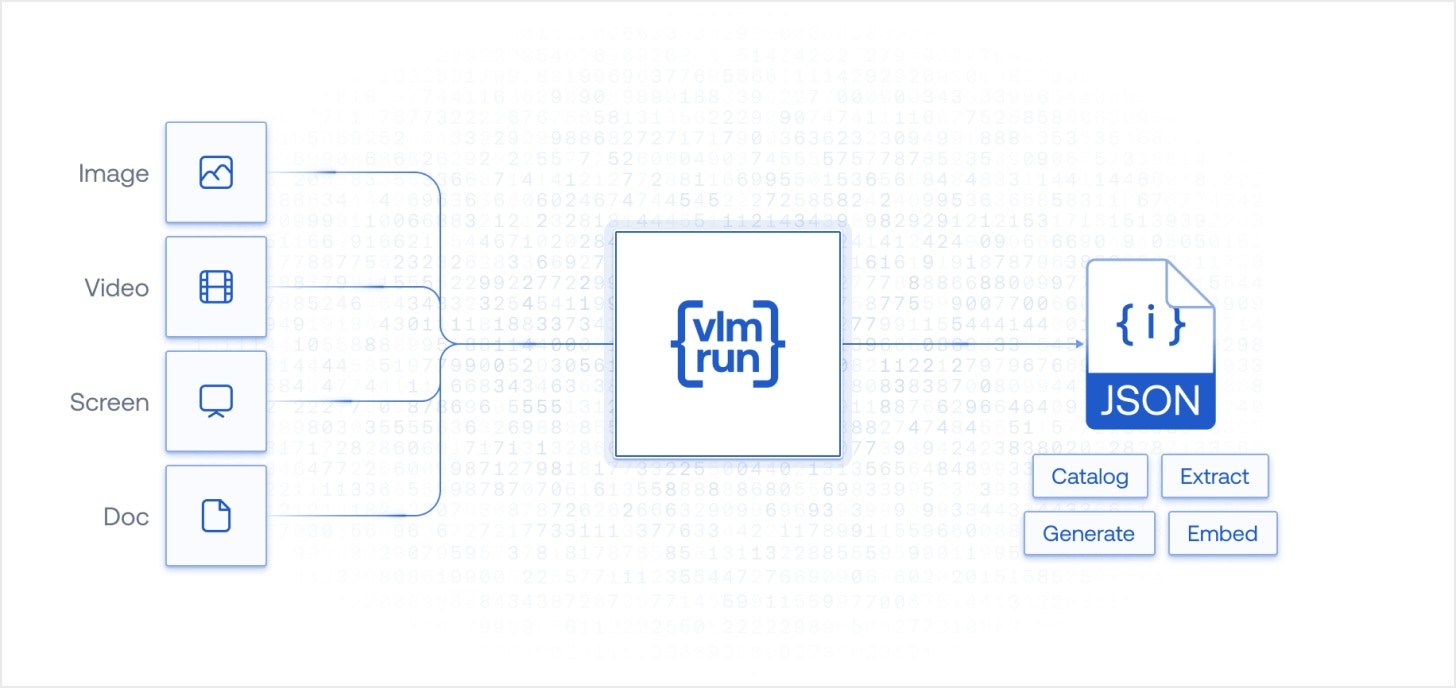 Our internal VLMs are built on exactly this insight - instead of free-form text outputs,
we define our API in terms of fixed types for specific domains (e.g. PDF presentations, TV news, audio / video podcasts etc). The schemas defined can be arbitrarily nested, and can include lists, dictionaries, and other complex types that can richly capture the information contained in the input.
In other words, **`vlm-1`** is purpose-built for what is popularly known as [**JSON mode**](https://platform.openai.com/docs/guides/json-mode). This mode is particularly useful for developers who want to build automation workflows, data pipelines, or other software systems that require structured data as output.
## Extract Structured Data
With our [pre-defined domains](/hub.mdx), you can quickly extract structured data from images, videos, and other visual content in a single API call. The extracted data will be validated against the schema you defined, ensuring that it conforms to the expected structure and types.
```python Python theme={"theme":{"light":"github-light","dark":"dark-plus"}}
from pathlib import Path
from vlmrun.client import VLMRun
from vlmrun.client.types import PredictionResponse
# Initialize the client
client = VLMRun(api_key="")
# Process the file or image with the predefined schema
path: Path = Path("path/to/invoice.pdf")
prediction: PredictionResponse = client.document.generate(
file=path,
domain="document.invoice",
)
response_dict = prediction.response.model_dump()
```
```typescript Node.js SDK theme={"theme":{"light":"github-light","dark":"dark-plus"}}
import { VlmRun } from "vlmrun";
// Initialize the client
const client = new VlmRun({ apiKey: '' });
// Process the file or image with the predefined schema
const fileResponse = await client.files.upload(filePath: "")
const prediction = await client.document.generate({
fileId: fileResponse.file_id,
domain: "document.invoice"
});
console.log(prediction);
```
## Illustrative Examples
Here is an example of the structured JSON output that `vlm-1` can extract from an invoice:
Our internal VLMs are built on exactly this insight - instead of free-form text outputs,
we define our API in terms of fixed types for specific domains (e.g. PDF presentations, TV news, audio / video podcasts etc). The schemas defined can be arbitrarily nested, and can include lists, dictionaries, and other complex types that can richly capture the information contained in the input.
In other words, **`vlm-1`** is purpose-built for what is popularly known as [**JSON mode**](https://platform.openai.com/docs/guides/json-mode). This mode is particularly useful for developers who want to build automation workflows, data pipelines, or other software systems that require structured data as output.
## Extract Structured Data
With our [pre-defined domains](/hub.mdx), you can quickly extract structured data from images, videos, and other visual content in a single API call. The extracted data will be validated against the schema you defined, ensuring that it conforms to the expected structure and types.
```python Python theme={"theme":{"light":"github-light","dark":"dark-plus"}}
from pathlib import Path
from vlmrun.client import VLMRun
from vlmrun.client.types import PredictionResponse
# Initialize the client
client = VLMRun(api_key="")
# Process the file or image with the predefined schema
path: Path = Path("path/to/invoice.pdf")
prediction: PredictionResponse = client.document.generate(
file=path,
domain="document.invoice",
)
response_dict = prediction.response.model_dump()
```
```typescript Node.js SDK theme={"theme":{"light":"github-light","dark":"dark-plus"}}
import { VlmRun } from "vlmrun";
// Initialize the client
const client = new VlmRun({ apiKey: '' });
// Process the file or image with the predefined schema
const fileResponse = await client.files.upload(filePath: "")
const prediction = await client.document.generate({
fileId: fileResponse.file_id,
domain: "document.invoice"
});
console.log(prediction);
```
## Illustrative Examples
Here is an example of the structured JSON output that `vlm-1` can extract from an invoice:
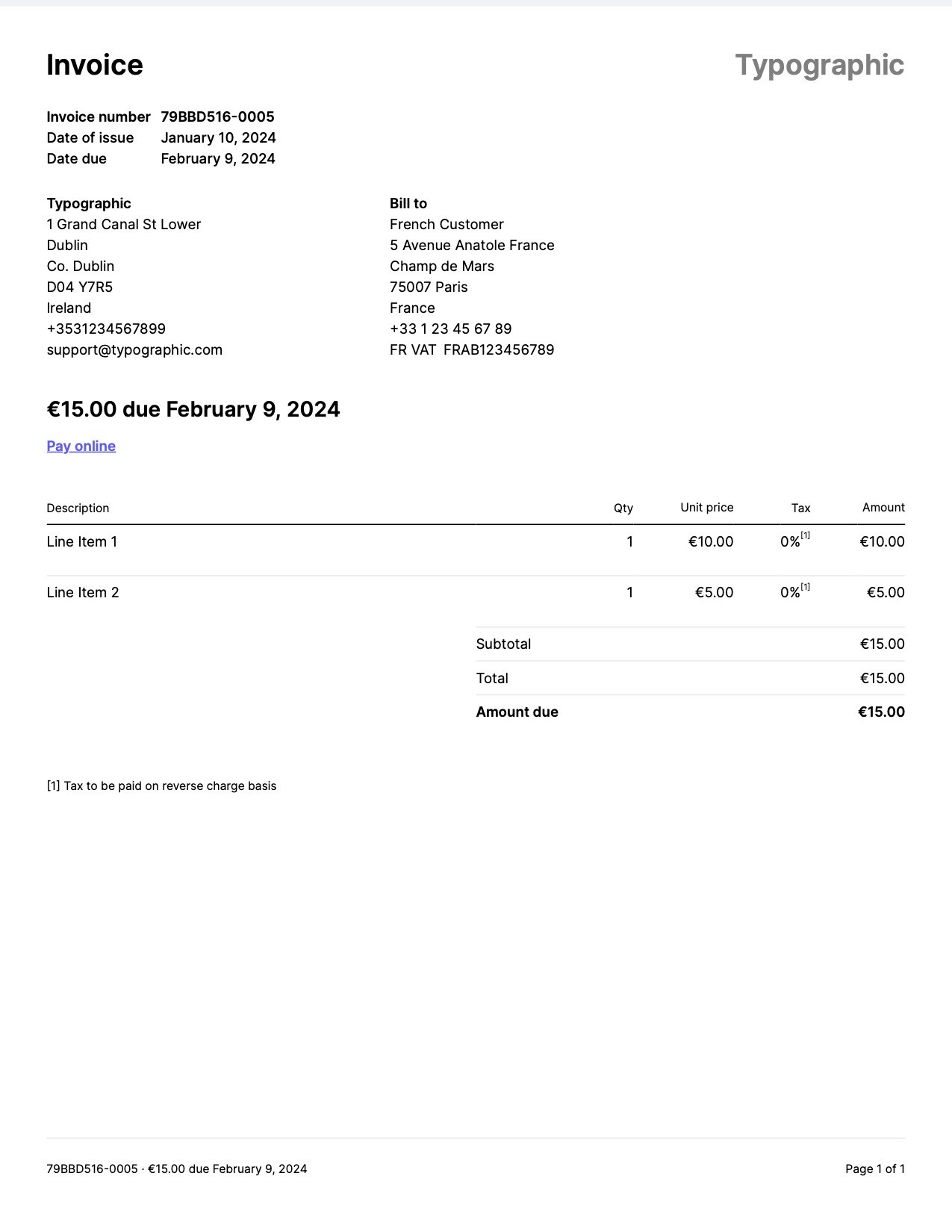 You should see a response like this:
```bash Response [expandable] theme={"theme":{"light":"github-light","dark":"dark-plus"}}
{
"invoice_id": "79BBD516-0005",
"period_start": null,
"period_end": null,
"invoice_issue_date": "2024-01-10",
"invoice_due_date": "2024-02-09",
"order_id": null,
"customer_id": null,
"issuer": "Typographic",
"issuer_address": {
"street": "1 Grand Canal St Lower",
"city": "Dublin",
"state": "Co. Dublin",
"postal_code": "D04 Y7R5",
"country": "Ireland"
},
"customer": "French Customer",
"customer_email": null,
"customer_phone": "+33 1 23 45 67 89",
"customer_billing_address": {
"street": "5 Avenue Anatole France",
"city": "Champ de Mars",
"state": "Paris",
"postal_code": "75007",
"country": "France"
},
"customer_shipping_address": null,
"items": [
{
"description": "Line Item 1",
"quantity": 1,
"currency": "EUR",
"unit_price": 10.0,
"total_price": 10.0
},
{
"description": "Line Item 2",
"quantity": 1,
"currency": "EUR",
"unit_price": 5.0,
"total_price": 5.0
}
],
"subtotal": 15.0,
"tax": 0.0,
"total": 15.0,
"currency": "EUR",
"notes": "[1] Tax to be paid on reverse charge basis",
"others": {
"due_amount": 15.0,
"vat_number": "FRAB123456789",
"support_email": "support@typographic.com",
"contact_phone": "+353123456789"
}
}
```
As you can see, `vlm-1` can extract a wide range of detailed information from the invoice, including vendor and customer details, line items, payment terms, and more. This structured data can be easily integrated into various financial systems, accounting software, or used for automated invoice processing.
## Custom Schemas
In addition to the [pre-defined schemas](/hub.mdx) we provide, **`vlm-1`** also supports custom schemas that allows you to define your own schema for a specific domain or use-case. This gives you the flexibility to extract structured data that conforms to your specific needs and requirements, while still leveraging all the vision-based reasoning capabilities of **`vlm-1`** (see [Capabilities section](/capabilities/) for more details). See the next section on [Custom Schemas](/capabilities/custom-schemas) for more details.
## Try our Document -> JSON API today
Head over to our [Document -> JSON](/api-reference/v1/post-document-generate) to start building your own document processing pipeline with [VLM Run](https://vlm.run). Sign-up for access on our [platform](https://app.vlm.run).
You should see a response like this:
```bash Response [expandable] theme={"theme":{"light":"github-light","dark":"dark-plus"}}
{
"invoice_id": "79BBD516-0005",
"period_start": null,
"period_end": null,
"invoice_issue_date": "2024-01-10",
"invoice_due_date": "2024-02-09",
"order_id": null,
"customer_id": null,
"issuer": "Typographic",
"issuer_address": {
"street": "1 Grand Canal St Lower",
"city": "Dublin",
"state": "Co. Dublin",
"postal_code": "D04 Y7R5",
"country": "Ireland"
},
"customer": "French Customer",
"customer_email": null,
"customer_phone": "+33 1 23 45 67 89",
"customer_billing_address": {
"street": "5 Avenue Anatole France",
"city": "Champ de Mars",
"state": "Paris",
"postal_code": "75007",
"country": "France"
},
"customer_shipping_address": null,
"items": [
{
"description": "Line Item 1",
"quantity": 1,
"currency": "EUR",
"unit_price": 10.0,
"total_price": 10.0
},
{
"description": "Line Item 2",
"quantity": 1,
"currency": "EUR",
"unit_price": 5.0,
"total_price": 5.0
}
],
"subtotal": 15.0,
"tax": 0.0,
"total": 15.0,
"currency": "EUR",
"notes": "[1] Tax to be paid on reverse charge basis",
"others": {
"due_amount": 15.0,
"vat_number": "FRAB123456789",
"support_email": "support@typographic.com",
"contact_phone": "+353123456789"
}
}
```
As you can see, `vlm-1` can extract a wide range of detailed information from the invoice, including vendor and customer details, line items, payment terms, and more. This structured data can be easily integrated into various financial systems, accounting software, or used for automated invoice processing.
## Custom Schemas
In addition to the [pre-defined schemas](/hub.mdx) we provide, **`vlm-1`** also supports custom schemas that allows you to define your own schema for a specific domain or use-case. This gives you the flexibility to extract structured data that conforms to your specific needs and requirements, while still leveraging all the vision-based reasoning capabilities of **`vlm-1`** (see [Capabilities section](/capabilities/) for more details). See the next section on [Custom Schemas](/capabilities/custom-schemas) for more details.
## Try our Document -> JSON API today
Head over to our [Document -> JSON](/api-reference/v1/post-document-generate) to start building your own document processing pipeline with [VLM Run](https://vlm.run). Sign-up for access on our [platform](https://app.vlm.run).