> ## Documentation Index
> Fetch the complete documentation index at: https://docs.vlm.run/llms.txt
> Use this file to discover all available pages before exploring further.
# Introduction
> Introducing VLM Run Orion – the first visual agent that sees, reasons, and acts.
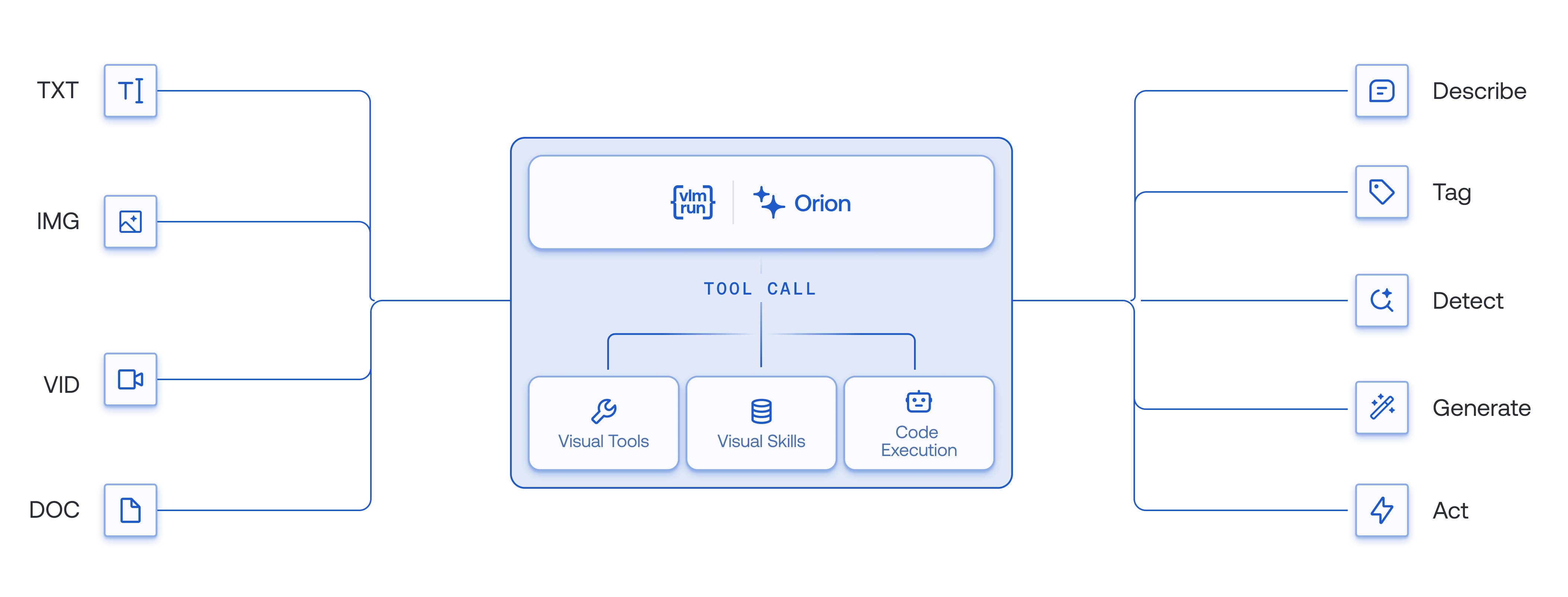 Today's frontier Vision-Language Models like GPT, Claude, and Gemini can describe images and answer questions, but they operate as monolithic inference engines. They generate descriptive outputs but cannot *act* on visual data with the precision, determinism, or compositional control required for production-grade workflows.
[Orion](https://vlm.run/orion) introduces a new paradigm for agentic visual reasoning and execution. Unlike monolithic VLMs, Orion orchestrates specialized computer vision tools – OCR, detection, segmentation, keypoint localization, diffusion, and geometric analysis – to execute complex multi-step visual workflows from natural language instructions. This marks the transition from passive visual understanding to **autonomous, tool-augmented visual intelligence** that bridges neural perception with symbolic execution.
Looking to chat with VLM Run's Orion agents? Visit [chat.vlm.run](https://chat.vlm.run).
Read more about [VLM Run Orion](https://vlm.run/orion) in our [technical whitepaper](https://vlm.run/orion/whitepaper).
## Agents Supported
Orion is available in two families, **Orion-1** (tool-calling agents) and **Orion-2** (code-execution agents), each with `fast`, `auto`, and `pro` tiers.
### Orion-1: Tool-Calling Agents
Orion-1 agents orchestrate specialized CV tools (OCR, detection, segmentation, etc.) via structured tool calls. Each tool invocation is a discrete API call managed by the agent.
Our fast visual agent for simple multi-modal workflows. Optimized for speed and quick responses.
Automatically selects the best model, tool and thinking budget based on your task complexity. Balanced performance and capability.
Our most capable visual agent for complex, multi-step workflows. Handles long tool-trajectories and advanced reasoning with a high thinking budget.
### Orion-2: Code-Execution Agents
Orion-2 agents write and execute Python code in a secure sandbox, composing CV operations programmatically. This enables multi-step pipelines, iterative refinement, and complex data transformations within a single turn. See the [Code Execution](/agents/code-execution) guide for details.
Fast code-execution agent for quick pipelines. Uses lightweight models for rapid iteration.
Automatically routes to the best backend model (Qwen, Gemma, or frontier models) based on task complexity. Default tier for Orion-2.
Most capable code-execution agent for complex multi-step pipelines with extended reasoning budgets.
Orion-2 also supports pinned backend variants for advanced use cases: `vlmrun-orion-2:qwen3.6-35b-a3b`, `vlmrun-orion-2:gemma4-26b-a4b`, `vlmrun-orion-2:kimi-2.6`, `vlmrun-orion-2:gpt-5.5`, and `vlmrun-orion-2:claude-opus-4.8`.
## What makes VLM Run Agents unique?
Here are some key features of VLM Run Agents that set it apart from other AI agent platforms:
Execute complex multi-step visual workflows with adaptive context management across extended conversations.
Comprehensive suite of specialized tools across document, image, video, and multimodal processing—composable into multi-stage pipelines.
Use our OpenAI Chat Completions endpoint to interact with VLM Run's Orion agents with just 2 lines of code change.
Our agents are SOC2-Type 2 and HIPAA-compliant, production-ready with automatic validation, with support for full traceability and auditability.
## How is VLM Run's Orion different from frontier models?
Unlike monolithic Vision-Language Models (VLMs like GPT-5, Claude 4.5, and Gemini 2.5), VLM Run's Orion family of visual agents delivers comprehensive capabilities across all modalities and tasks. The table below highlights key differences that matter for building production-grade visual workflows:
Today's frontier Vision-Language Models like GPT, Claude, and Gemini can describe images and answer questions, but they operate as monolithic inference engines. They generate descriptive outputs but cannot *act* on visual data with the precision, determinism, or compositional control required for production-grade workflows.
[Orion](https://vlm.run/orion) introduces a new paradigm for agentic visual reasoning and execution. Unlike monolithic VLMs, Orion orchestrates specialized computer vision tools – OCR, detection, segmentation, keypoint localization, diffusion, and geometric analysis – to execute complex multi-step visual workflows from natural language instructions. This marks the transition from passive visual understanding to **autonomous, tool-augmented visual intelligence** that bridges neural perception with symbolic execution.
Looking to chat with VLM Run's Orion agents? Visit [chat.vlm.run](https://chat.vlm.run).
Read more about [VLM Run Orion](https://vlm.run/orion) in our [technical whitepaper](https://vlm.run/orion/whitepaper).
## Agents Supported
Orion is available in two families, **Orion-1** (tool-calling agents) and **Orion-2** (code-execution agents), each with `fast`, `auto`, and `pro` tiers.
### Orion-1: Tool-Calling Agents
Orion-1 agents orchestrate specialized CV tools (OCR, detection, segmentation, etc.) via structured tool calls. Each tool invocation is a discrete API call managed by the agent.
Our fast visual agent for simple multi-modal workflows. Optimized for speed and quick responses.
Automatically selects the best model, tool and thinking budget based on your task complexity. Balanced performance and capability.
Our most capable visual agent for complex, multi-step workflows. Handles long tool-trajectories and advanced reasoning with a high thinking budget.
### Orion-2: Code-Execution Agents
Orion-2 agents write and execute Python code in a secure sandbox, composing CV operations programmatically. This enables multi-step pipelines, iterative refinement, and complex data transformations within a single turn. See the [Code Execution](/agents/code-execution) guide for details.
Fast code-execution agent for quick pipelines. Uses lightweight models for rapid iteration.
Automatically routes to the best backend model (Qwen, Gemma, or frontier models) based on task complexity. Default tier for Orion-2.
Most capable code-execution agent for complex multi-step pipelines with extended reasoning budgets.
Orion-2 also supports pinned backend variants for advanced use cases: `vlmrun-orion-2:qwen3.6-35b-a3b`, `vlmrun-orion-2:gemma4-26b-a4b`, `vlmrun-orion-2:kimi-2.6`, `vlmrun-orion-2:gpt-5.5`, and `vlmrun-orion-2:claude-opus-4.8`.
## What makes VLM Run Agents unique?
Here are some key features of VLM Run Agents that set it apart from other AI agent platforms:
Execute complex multi-step visual workflows with adaptive context management across extended conversations.
Comprehensive suite of specialized tools across document, image, video, and multimodal processing—composable into multi-stage pipelines.
Use our OpenAI Chat Completions endpoint to interact with VLM Run's Orion agents with just 2 lines of code change.
Our agents are SOC2-Type 2 and HIPAA-compliant, production-ready with automatic validation, with support for full traceability and auditability.
## How is VLM Run's Orion different from frontier models?
Unlike monolithic Vision-Language Models (VLMs like GPT-5, Claude 4.5, and Gemini 2.5), VLM Run's Orion family of visual agents delivers comprehensive capabilities across all modalities and tasks. The table below highlights key differences that matter for building production-grade visual workflows:
|
Task |
VLM Run Orion |
OpenAI GPT-5 |
Google Gemini 2.5 |
Anthropic Claude Sonnet 4.5 |
Alibaba Qwen3-VL 235B-A22B |
| Image / Video |
Understanding |
✓ |
⚠ |
✓ |
⚠ |
✓ |
| Reasoning |
✓ |
✗ |
✗ |
✗ |
✓ |
| Structured Outputs |
✓ |
✓ |
✓ |
✓ |
✓ |
| Multi-modal Tool-Calling |
✓ |
✗ |
✗ |
✗ |
⚠ |
| Specialized Skills |
✓ |
✗ |
⚠ |
⚠ |
✗ |
|
| Document |
Understanding |
✓ |
✓ |
✓ |
✓ |
✓ |
| Reasoning |
✓ |
✓ |
✓ |
✓ |
✗ |
| Structured Outputs |
✓ |
✓ |
✓ |
✓ |
✓ |
| Multi-modal Tool-Calling |
✓ |
⚠ |
⚠ |
⚠ |
✗ |
| Specialized Skills |
✓ |
✓ |
⚠ |
✓ |
✗ |
In the table above, we refer to **Specialized Skills** as tasks such as object localization, segmentation, image-generation / editing, or geometric tools typically found in specialized computer vision applications.
**Key advantages for developers:**
* **Mixed-modality Reasoning**: Only VLM Run's Orion agents provide full reasoning across images, documents, and video - critical for building multi-step visual workflows.
* **Multi-modal Tool-Calling**: With unique tool-calling support for images, videos and documents, VLM Run's Orion agents enable multi-modal reasoning and execution that other models cannot perform.
* **Production-Ready Structured Outputs**: Consistent structured output support across all modalities with automatic validation and retry logic
## Let's get started!
Below you'll find the API reference and code samples so you can start building intelligent agents for your use case.
Sign up for an API key on our [platform](https://app.vlm.run/?utm_source=docs\&utm_medium=link\&utm_campaign=chat), then check out some of our [cookbooks](https://github.com/autonomi-ai/vlm-cookbook) to learn how to use VLM Run Agents to build sophisticated visual AI workflows.
Chat with our visual agent direcly in your browser.
See the complete catalog of visual AI capabilities and tools.
Enough talk, show me the code.
Various cookbooks showcasing VLM Run Agents in action.