> ## Documentation Index
> Fetch the complete documentation index at: https://docs.vlm.run/llms.txt
> Use this file to discover all available pages before exploring further.
# Segmentation
> Create precise pixel-level segmentation masks for objects, regions, and features in images
Create precise pixel-level segmentation masks for objects, regions, and features in images. Perfect for medical imaging, autonomous driving, photo editing, and augmented reality applications.
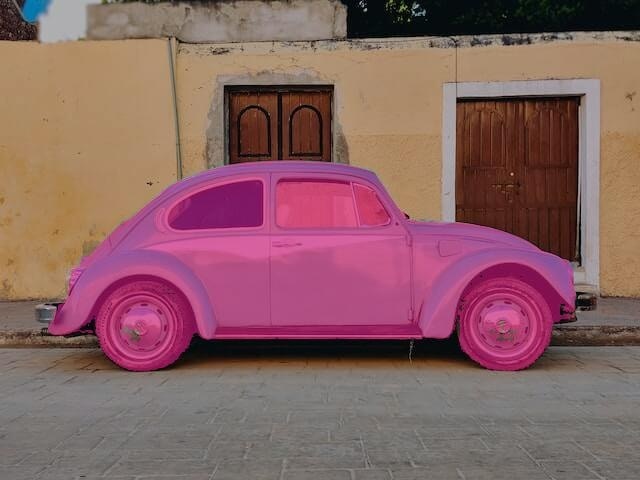
Object Segmentation
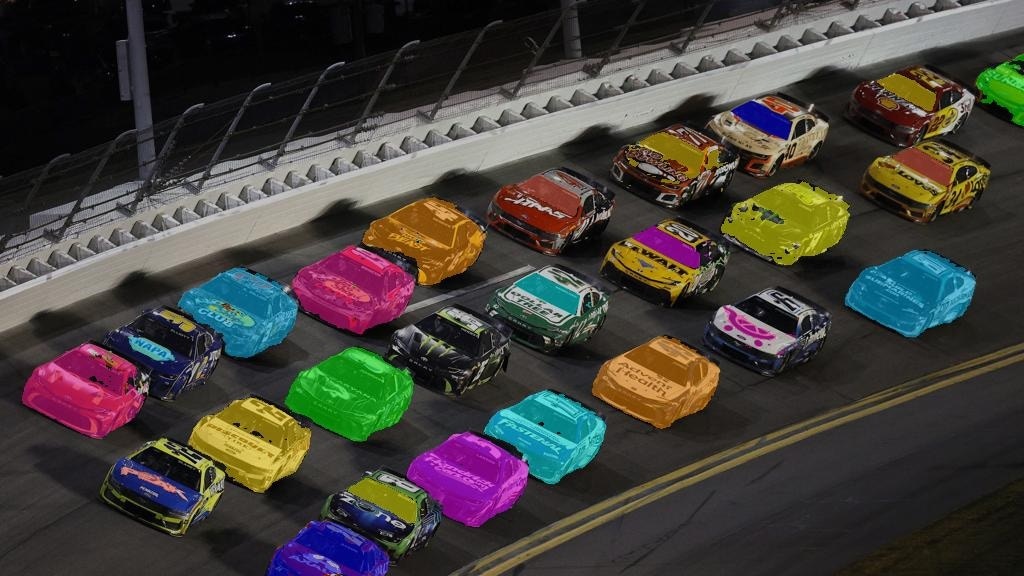
Face Segmentation

## Usage Example
For best results, we recommend using the [Structured Outputs API](/agents/structured-responses) to get responses in a structured and validated data format.
```python Python theme={"theme":{"light":"github-light","dark":"dark-plus"}}
from vlmrun.client import VLMRun
# Initialize the VLMRun client
client = VLMRun(api_key="")
# Segment objects in the image
response = client.agent.completions.create(
model="vlmrun-orion-1:auto",
messages=[
{
"role": "user",
"content": [
{"type": "text", "text": "Segment all the cars in this image"},
{"type": "image_url", "image_url": {"url": "https://storage.googleapis.com/vlm-data-public-prod/hub/examples/image.object-detection/nascar.jpg", "detail": "auto"}}
]
}
],
)
print(response.choices[0].message.content)
```
```python Python - Structured Outputs theme={"theme":{"light":"github-light","dark":"dark-plus"}}
from vlmrun.client import VLMRun
from pydantic import BaseModel, Field
# Define the response schema
class SegmentationMask(BaseModel):
label: str = Field(..., description="Name of the segmented object")
mask_url: str = Field(..., description="Pre-signed URL to the PNG mask")
class Segmentations(BaseModel):
segmentations: list[SegmentationMask] = Field(..., description="List of segmentations")
# Initialize the VLMRun client
client = VLMRun(api_key="")
# Segment objects with structured output
response = client.agent.completions.create(
model="vlmrun-orion-1:auto",
messages=[
{
"role": "user",
"content": [
{"type": "text", "text": "Segment all the cars in this image"},
{"type": "image_url", "image_url": {"url": "https://storage.googleapis.com/vlm-data-public-prod/hub/examples/image.object-detection/nascar.jpg", "detail": "auto"}}
]
}
],
response_format={"type": "json_schema", "schema": Segmentations.model_json_schema()},
)
# Validate the response
result = Segmentations.model_validate_json(response.choices[0].message.content)
# >>> Segmentations(segmentations=[SegmentationMask(label="car", mask_url="https://..."), ...])
```
```typescript Node.js theme={"theme":{"light":"github-light","dark":"dark-plus"}}
import { VlmRun } from "vlmrun";
const client = new VlmRun({
apiKey: "",
baseURL: "https://api.vlm.run/v1"
});
const response = await client.agent.completions.create({
model: "vlmrun-orion-1:auto",
messages: [
{
role: "user",
content: [
{ type: "text", text: "Segment all the cars in this image" },
{ type: "image_url", image_url: { url: "https://storage.googleapis.com/vlm-data-public-prod/hub/examples/image.object-detection/nascar.jpg", detail: "auto" } }
]
}
]
});
console.log(response.choices[0].message.content);
```
```typescript Node.js - Structured Outputs [expandable] theme={"theme":{"light":"github-light","dark":"dark-plus"}}
import { VlmRun } from "vlmrun";
import { z } from "zod";
import { zodToJsonSchema } from "zod-to-json-schema";
// Define the response schema with Zod
const SegmentationsSchema = z.object({
segmentations: z.array(z.object({
label: z.string().describe("Name of the segmented object"),
mask_url: z.string().describe("Pre-signed URL to the PNG mask")
})).describe("List of segmentations")
});
// Initialize the VLMRun client
const client = new VlmRun({
apiKey: "",
baseURL: "https://api.vlm.run/v1"
});
// Segment objects with structured output
const response = await client.agent.completions.create({
model: "vlmrun-orion-1:auto",
messages: [
{
role: "user",
content: [
{ type: "text", text: "Segment all the cars in this image" },
{ type: "image_url", image_url: { url: "https://storage.googleapis.com/vlm-data-public-prod/hub/examples/image.object-detection/nascar.jpg", detail: "auto" } }
]
}
],
response_format: {
type: "json_schema",
schema: zodToJsonSchema(SegmentationsSchema)
}
});
const result = SegmentationsSchema.parse(JSON.parse(response.choices[0].message.content));
```
## FAQ
* **Instance Segmentation**: Segment individual objects with unique masks
* **Semantic Segmentation**: Classify pixels by category or class
* **Panoptic Segmentation**: Combine instance and semantic segmentation
The segmentation masks come in the format of a list of objects with their masks. The masks are in PNG format that can be retrieved as a pre-signed URL, per object instance.
Orion supports promptable segmentation, where you can describe in natural language the object(s) you want to segment (e.g., "segment the writing-related items in this image"). For best results, clearly describe the object(s) of interest. Below are some common examples of classes that can be segmented:
Common Objects
- People: person, face, hand, foot
- Vehicles: car, truck, bus, motorcycle, bicycle
- Animals: dog, cat, bird, horse, cow, sheep
- Furniture: chair, table, bed, sofa, desk
- Electronics: laptop, phone, tv, keyboard, mouse
Specialized Categories
- Medical: organ, tissue, lesion, bone
- Nature: tree, grass, sky, water, mountain
- Indoor: wall, floor, ceiling, door, window
- Outdoor: road, sidewalk, building, sign, traffic\_light
PNG Masks
- Binary or grayscale images where each pixel value represents a segment ID
- Compatible with most image editing software
- Small file size for simple segmentations
Other Formats (Coming soon!): JSON Polygons and COCO Format