> ## Documentation Index
> Fetch the complete documentation index at: https://docs.vlm.run/llms.txt
> Use this file to discover all available pages before exploring further.
# Generate & Edit
> Generate and edit images from text prompts, sketches, or existing images with creative control
Generate and edit images from text prompts, sketches, or existing images with creative control. Perfect for creative content generation, marketing and advertising, product visualization, and artistic expression.

Image-to-Image

Image-Inpainting

Style Transfer

## Example Usage
For best results, we recommend using the [Structured Outputs API](/agents/structured-responses) to get responses in a structured and validated data format.
### Text-to-Image
Generate images from text descriptions with creative control over style, composition, and details.
Generate an image of a cat flying through the sky and clouds, with the background of a green city with river
```python Python theme={"theme":{"light":"github-light","dark":"dark-plus"}}
from vlmrun.client import VLMRun
# Initialize the VLMRun client
client = VLMRun(api_key="")
# Generate the image
response = client.agent.completions.create(
model="vlmrun-orion-1:auto",
messages=[
{
"role": "user",
"content": "Generate an image of a modern building as a cyberpunk-style futuristic structure with neon lights and holographic elements"
}
]
)
print(response.choices[0].message.content)
# >>> {"url": "https://.../image.jpg"}
```
```python Python - Structured Outputs theme={"theme":{"light":"github-light","dark":"dark-plus"}}
from vlmrun.client import VLMRun
from pydantic import BaseModel, Field
# Define the response schema
class ImageGenerationResponse(BaseModel):
url: str = Field(..., description="The URL of the generated image")
# Initialize the VLMRun client
client = VLMRun(api_key="")
# Generate the image with structured output
response = client.agent.completions.create(
model="vlmrun-orion-1:auto",
messages=[
{
"role": "user",
"content": "Generate an image of a modern building as a cyberpunk-style futuristic structure with neon lights and holographic elements"
}
],
response_format={"type": "json_schema", "schema": ImageGenerationResponse.model_json_schema()}
)
# Validate the response
result = ImageGenerationResponse.model_validate_json(response.choices[0].message.content)
# >>> ImageGenerationResponse(url="https://.../image.jpg")
```
```typescript Node.js theme={"theme":{"light":"github-light","dark":"dark-plus"}}
import { VlmRun } from "vlmrun";
const client = new VlmRun({
apiKey: "",
baseURL: "https://api.vlm.run/v1"
});
const response = await client.agent.completions.create({
model: "vlmrun-orion-1:auto",
messages: [
{
role: "user",
content: "Generate an image of a modern building as a cyberpunk-style futuristic structure with neon lights and holographic elements"
}
]
});
console.log(response.choices[0].message.content);
```
```typescript Node.js - Structured Outputs [expandable] theme={"theme":{"light":"github-light","dark":"dark-plus"}}
import { VlmRun } from "vlmrun";
import { z } from "zod";
import { zodToJsonSchema } from "zod-to-json-schema";
// Define the response schema with Zod
const ImageGenerationResponseSchema = z.object({
url: z.string().describe("The URL of the generated image")
});
// Initialize the VLMRun client
const client = new VlmRun({
apiKey: "",
baseURL: "https://api.vlm.run/v1"
});
// Generate the image with structured output
const response = await client.agent.completions.create({
model: "vlmrun-orion-1:auto",
messages: [
{
role: "user",
content: "Generate an image of a modern building as a cyberpunk-style futuristic structure with neon lights and holographic elements"
}
],
response_format: {
type: "json_schema",
schema: zodToJsonSchema(ImageGenerationResponseSchema)
}
});
const result = ImageGenerationResponseSchema.parse(JSON.parse(response.choices[0].message.content));
```
### Image-to-Image
Transform existing images by applying new styles, enhancing details, or changing specific elements while preserving the original structure.
Reference Dog Image
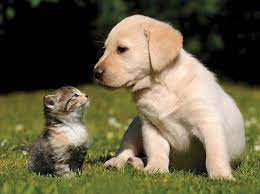
Dog flying through space
```python Python theme={"theme":{"light":"github-light","dark":"dark-plus"}}
from vlmrun.client import VLMRun
# Initialize the VLMRun client
client = VLMRun(api_key="")
# Generate the image
response = client.agent.completions.create(
model="vlmrun-orion-1:auto",
messages=[
{
"role": "user",
"content": [
{"type": "text", "text": "Transform the image of my dog on the right into a flying dog with superman cape, with majestic background"},
{"type": "image_url", "image_url": {"url": "https://storage.googleapis.com/vlm-data-public-prod/hub/examples/image.object-detection/dog-cat.jpg", "detail": "auto"}}
]
}
]
)
print(response.choices[0].message.content)
# >>> {"url": "https://.../image.jpg"}
```
```python Python - Structured Outputs theme={"theme":{"light":"github-light","dark":"dark-plus"}}
from vlmrun.client import VLMRun
from pydantic import BaseModel, Field
# Define the response schema
class ImageGenerationResponse(BaseModel):
url: str = Field(..., description="The URL of the generated image")
# Initialize the VLMRun client
client = VLMRun(api_key="")
# Transform the image with structured output
response = client.agent.completions.create(
model="vlmrun-orion-1:auto",
messages=[
{
"role": "user",
"content": [
{"type": "text", "text": "Transform the image of my dog on the right into a flying dog with superman cape, with majestic background"},
{"type": "image_url", "image_url": {"url": "https://storage.googleapis.com/vlm-data-public-prod/hub/examples/image.object-detection/dog-cat.jpg", "detail": "auto"}}
]
}
],
response_format={"type": "json_schema", "schema": ImageGenerationResponse.model_json_schema()}
)
# Validate the response
result = ImageGenerationResponse.model_validate_json(response.choices[0].message.content)
```
```typescript Node.js theme={"theme":{"light":"github-light","dark":"dark-plus"}}
import { VlmRun } from "vlmrun";
const client = new VlmRun({
apiKey: "",
baseURL: "https://api.vlm.run/v1"
});
const response = await client.agent.completions.create({
model: "vlmrun-orion-1:auto",
messages: [
{
role: "user",
content: [
{ type: "text", text: "Transform the image of my dog on the right into a flying dog with superman cape, with majestic background" },
{ type: "image_url", image_url: { url: "https://storage.googleapis.com/vlm-data-public-prod/hub/examples/image.object-detection/dog-cat.jpg", detail: "auto" } }
]
}
]
});
console.log(response.choices[0].message.content);
```
```typescript Node.js - Structured Outputs [expandable] theme={"theme":{"light":"github-light","dark":"dark-plus"}}
import { VlmRun } from "vlmrun";
import { z } from "zod";
import { zodToJsonSchema } from "zod-to-json-schema";
// Define the response schema with Zod
const ImageGenerationResponseSchema = z.object({
url: z.string().describe("The URL of the generated image")
});
// Initialize the VLMRun client
const client = new VlmRun({
apiKey: "",
baseURL: "https://api.vlm.run/v1"
});
// Transform the image with structured output
const response = await client.agent.completions.create({
model: "vlmrun-orion-1:auto",
messages: [
{
role: "user",
content: [
{ type: "text", text: "Transform the image of my dog on the right into a flying dog with superman cape, with majestic background" },
{ type: "image_url", image_url: { url: "https://storage.googleapis.com/vlm-data-public-prod/hub/examples/image.object-detection/dog-cat.jpg", detail: "auto" } }
]
}
],
response_format: {
type: "json_schema",
schema: zodToJsonSchema(ImageGenerationResponseSchema)
}
});
const result = ImageGenerationResponseSchema.parse(JSON.parse(response.choices[0].message.content));
```
### Image Inpainting
Fill in missing areas, remove unwanted objects, or add new elements to existing images seamlessly.
Reference Dog Image
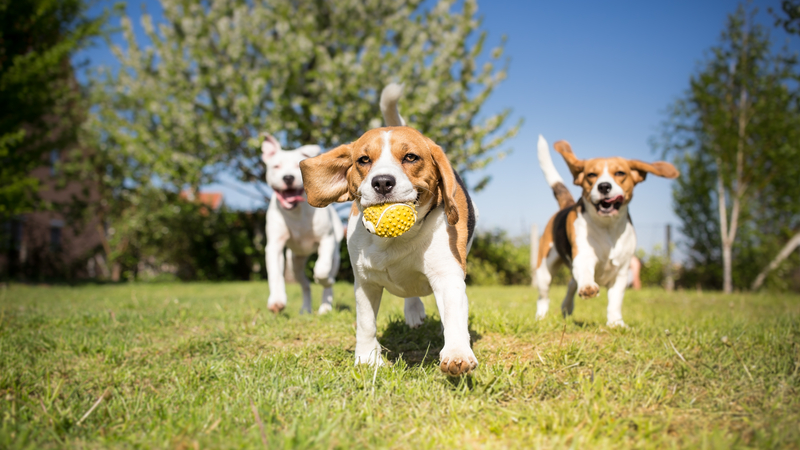
Reference Car Image

```python Python theme={"theme":{"light":"github-light","dark":"dark-plus"}}
from vlmrun.client import VLMRun
# Initialize the VLMRun client
client = VLMRun(api_key="")
# Generate the image
response = client.agent.completions.create(
model="vlmrun-orion-1:auto",
messages=[
{
"role": "user",
"content": [
{"type": "text", "text": "Given two images: the first with a dog in front holding a yellow ball, inpaint her driving the car shown in the second image."},
{"type": "image_url", "image_url": {"url": "https://storage.googleapis.com/vlm-data-public-prod/hub/examples/image.object-detection/dogs.jpg", "detail": "auto"}},
{"type": "image_url", "image_url": {"url": "https://storage.googleapis.com/vlm-data-public-prod/hub/examples/image.caption/car.jpg", "detail": "auto"}}
]
}
]
)
print(response.choices[0].message.content)
# >>> {"url": "https://.../image.jpg"}
```
```python Python - Structured Outputs theme={"theme":{"light":"github-light","dark":"dark-plus"}}
from vlmrun.client import VLMRun
from pydantic import BaseModel, Field
# Define the response schema
class ImageGenerationResponse(BaseModel):
url: str = Field(..., description="The URL of the generated image")
# Initialize the VLMRun client
client = VLMRun(api_key="")
# Inpaint the image with structured output
response = client.agent.completions.create(
model="vlmrun-orion-1:auto",
messages=[
{
"role": "user",
"content": [
{"type": "text", "text": "Given two images: the first with a dog in front holding a yellow ball, inpaint her driving the car shown in the second image."},
{"type": "image_url", "image_url": {"url": "https://storage.googleapis.com/vlm-data-public-prod/hub/examples/image.object-detection/dogs.jpg", "detail": "auto"}},
{"type": "image_url", "image_url": {"url": "https://storage.googleapis.com/vlm-data-public-prod/hub/examples/image.caption/car.jpg", "detail": "auto"}}
]
}
],
response_format={"type": "json_schema", "schema": ImageGenerationResponse.model_json_schema()}
)
# Validate the response
result = ImageGenerationResponse.model_validate_json(response.choices[0].message.content)
```
```typescript Node.js theme={"theme":{"light":"github-light","dark":"dark-plus"}}
import { VlmRun } from "vlmrun";
const client = new VlmRun({
apiKey: "",
baseURL: "https://api.vlm.run/v1"
});
const response = await client.agent.completions.create({
model: "vlmrun-orion-1:auto",
messages: [
{
role: "user",
content: [
{ type: "text", text: "Given two images: the first with a dog in front holding a yellow ball, inpaint her driving the car shown in the second image." },
{ type: "image_url", image_url: { url: "https://storage.googleapis.com/vlm-data-public-prod/hub/examples/image.object-detection/dogs.jpg", detail: "auto" } },
{ type: "image_url", image_url: { url: "https://storage.googleapis.com/vlm-data-public-prod/hub/examples/image.caption/car.jpg", detail: "auto" } }
]
}
]
});
console.log(response.choices[0].message.content);
```
```typescript Node.js - Structured Outputs [expandable] theme={"theme":{"light":"github-light","dark":"dark-plus"}}
import { VlmRun } from "vlmrun";
import { z } from "zod";
import { zodToJsonSchema } from "zod-to-json-schema";
// Define the response schema with Zod
const ImageGenerationResponseSchema = z.object({
url: z.string().describe("The URL of the generated image")
});
// Initialize the VLMRun client
const client = new VlmRun({
apiKey: "",
baseURL: "https://api.vlm.run/v1"
});
// Inpaint the image with structured output
const response = await client.agent.completions.create({
model: "vlmrun-orion-1:auto",
messages: [
{
role: "user",
content: [
{ type: "text", text: "Given two images: the first with a dog in front holding a yellow ball, inpaint her driving the car shown in the second image." },
{ type: "image_url", image_url: { url: "https://storage.googleapis.com/vlm-data-public-prod/hub/examples/image.object-detection/dogs.jpg", detail: "auto" } },
{ type: "image_url", image_url: { url: "https://storage.googleapis.com/vlm-data-public-prod/hub/examples/image.caption/car.jpg", detail: "auto" } }
]
}
],
response_format: {
type: "json_schema",
schema: zodToJsonSchema(ImageGenerationResponseSchema)
}
});
const result = ImageGenerationResponseSchema.parse(JSON.parse(response.choices[0].message.content));
```
### Style Transfer
Apply artistic styles from reference images to transform the visual appearance while preserving content. In the example below, we apply the Van Gogh's "Starry Night" painting style to a photo of a city skyline at night.
Reference Van Gogh Image

Reference City Image

```python Python theme={"theme":{"light":"github-light","dark":"dark-plus"}}
from vlmrun.client import VLMRun
# Initialize the VLMRun client
client = VLMRun(api_key="")
# Generate the image
response = client.agent.completions.create(
model="vlmrun-orion-1:auto",
messages=[
{
"role": "user",
"content": [
{"type": "text", "text": "Given two images: the first with a Van Gogh painting, and the second with a city skyline at night, apply the Van Gogh painting style to the city skyline."},
{"type": "image_url", "image_url": {"url": "https://storage.googleapis.com/vlm-data-public-prod/hub/examples/image.generation/starry-night.jpg", "detail": "auto"}},
{"type": "image_url", "image_url": {"url": "https://storage.googleapis.com/vlm-data-public-prod/hub/examples/image.generation/sf-golden-gate.jpg", "detail": "auto"}}
]
}
]
)
print(response.choices[0].message.content)
# >>> {"url": "https://.../image.jpg"}
```
```python Python - Structured Outputs theme={"theme":{"light":"github-light","dark":"dark-plus"}}
from vlmrun.client import VLMRun
from pydantic import BaseModel, Field
# Define the response schema
class ImageGenerationResponse(BaseModel):
url: str = Field(..., description="The URL of the generated image")
# Initialize the VLMRun client
client = VLMRun(api_key="")
# Apply style transfer with structured output
response = client.agent.completions.create(
model="vlmrun-orion-1:auto",
messages=[
{
"role": "user",
"content": [
{"type": "text", "text": "Given two images: the first with a Van Gogh painting, and the second with a city skyline at night, apply the Van Gogh painting style to the city skyline."},
{"type": "image_url", "image_url": {"url": "https://storage.googleapis.com/vlm-data-public-prod/hub/examples/image.generation/starry-night.jpg", "detail": "auto"}},
{"type": "image_url", "image_url": {"url": "https://storage.googleapis.com/vlm-data-public-prod/hub/examples/image.generation/sf-golden-gate.jpg", "detail": "auto"}}
]
}
],
response_format={"type": "json_schema", "schema": ImageGenerationResponse.model_json_schema()}
)
# Validate the response
result = ImageGenerationResponse.model_validate_json(response.choices[0].message.content)
```
```typescript Node.js theme={"theme":{"light":"github-light","dark":"dark-plus"}}
import { VlmRun } from "vlmrun";
const client = new VlmRun({
apiKey: "",
baseURL: "https://api.vlm.run/v1"
});
const response = await client.agent.completions.create({
model: "vlmrun-orion-1:auto",
messages: [
{
role: "user",
content: [
{ type: "text", text: "Given two images: the first with a Van Gogh painting, and the second with a city skyline at night, apply the Van Gogh painting style to the city skyline." },
{ type: "image_url", image_url: { url: "https://storage.googleapis.com/vlm-data-public-prod/hub/examples/image.generation/starry-night.jpg", detail: "auto" } },
{ type: "image_url", image_url: { url: "https://storage.googleapis.com/vlm-data-public-prod/hub/examples/image.generation/sf-golden-gate.jpg", detail: "auto" } }
]
}
]
});
console.log(response.choices[0].message.content);
```
```typescript Node.js - Structured Outputs [expandable] theme={"theme":{"light":"github-light","dark":"dark-plus"}}
import { VlmRun } from "vlmrun";
import { z } from "zod";
import { zodToJsonSchema } from "zod-to-json-schema";
// Define the response schema with Zod
const ImageGenerationResponseSchema = z.object({
url: z.string().describe("The URL of the generated image")
});
// Initialize the VLMRun client
const client = new VlmRun({
apiKey: "",
baseURL: "https://api.vlm.run/v1"
});
// Apply style transfer with structured output
const response = await client.agent.completions.create({
model: "vlmrun-orion-1:auto",
messages: [
{
role: "user",
content: [
{ type: "text", text: "Given two images: the first with a Van Gogh painting, and the second with a city skyline at night, apply the Van Gogh painting style to the city skyline." },
{ type: "image_url", image_url: { url: "https://storage.googleapis.com/vlm-data-public-prod/hub/examples/image.generation/starry-night.jpg", detail: "auto" } },
{ type: "image_url", image_url: { url: "https://storage.googleapis.com/vlm-data-public-prod/hub/examples/image.generation/sf-golden-gate.jpg", detail: "auto" } }
]
}
],
response_format: {
type: "json_schema",
schema: zodToJsonSchema(ImageGenerationResponseSchema)
}
});
const result = ImageGenerationResponseSchema.parse(JSON.parse(response.choices[0].message.content));
```
## FAQ
* **Photorealistic**: Ultra-realistic images with fine details
* **High Detail**: Ultra-realistic images with fine details
* **Natural Lighting**: Realistic lighting and shadows
* **Professional Quality**: Suitable for commercial and professional use
* **Multiple Subjects**: People, objects, landscapes, architecture
* **Be Specific**: Include details about style, composition, lighting, and mood
* **Use Keywords**: Include relevant art terms, techniques, and descriptors
* **Reference Styles**: Mention specific artists, art movements, or visual styles
* **Technical Details**: Specify resolution, quality, and output format needs