> ## Documentation Index
> Fetch the complete documentation index at: https://docs.vlm.run/llms.txt
> Use this file to discover all available pages before exploring further.
# Layout Detection
> Identify and analyze document structure with visual result previews showing highlighted extractions and field overlays
## Usage Example
For best results, we recommend using the [Structured Outputs API](/agents/structured-responses) to get responses in a structured and validated data format.
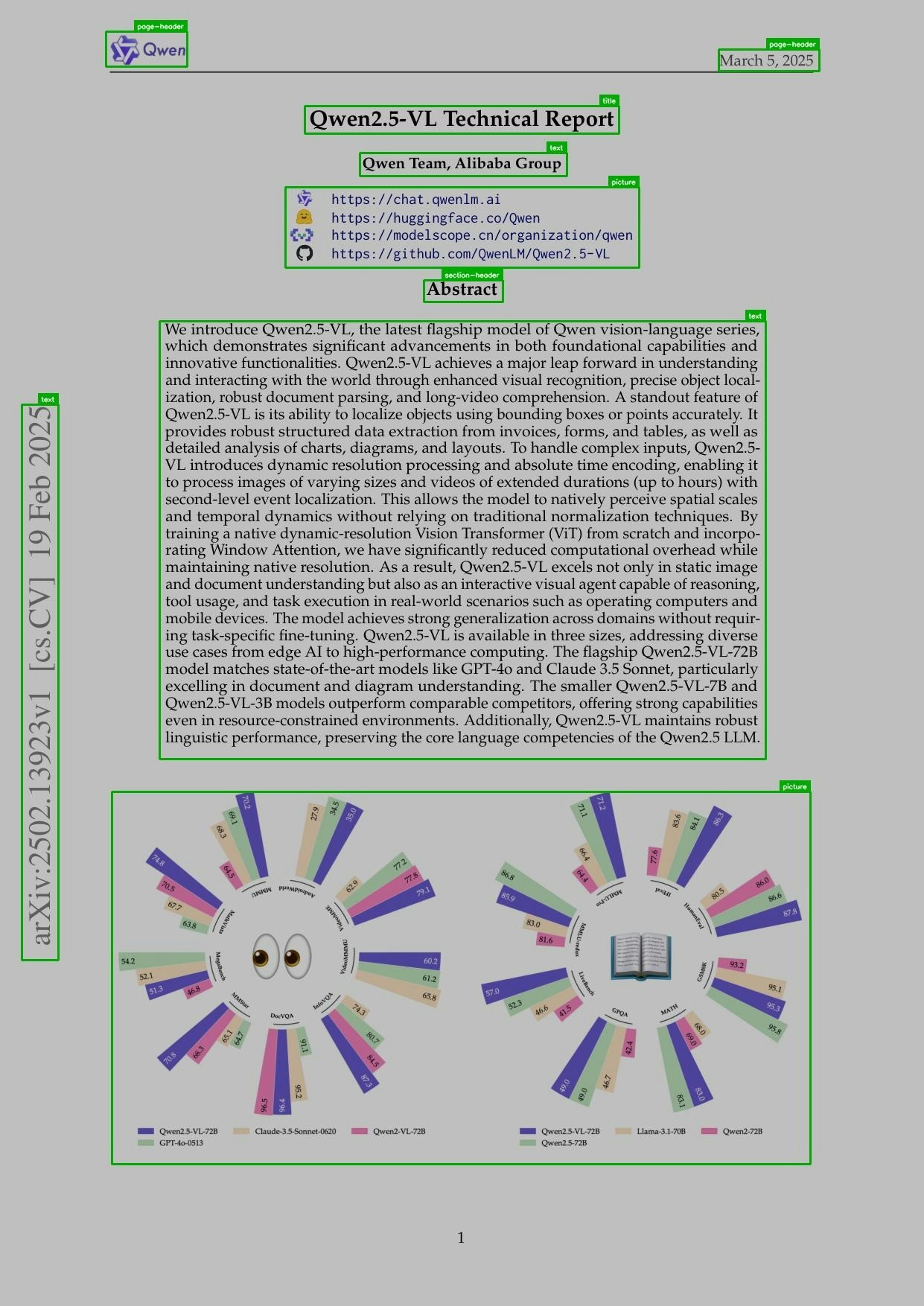
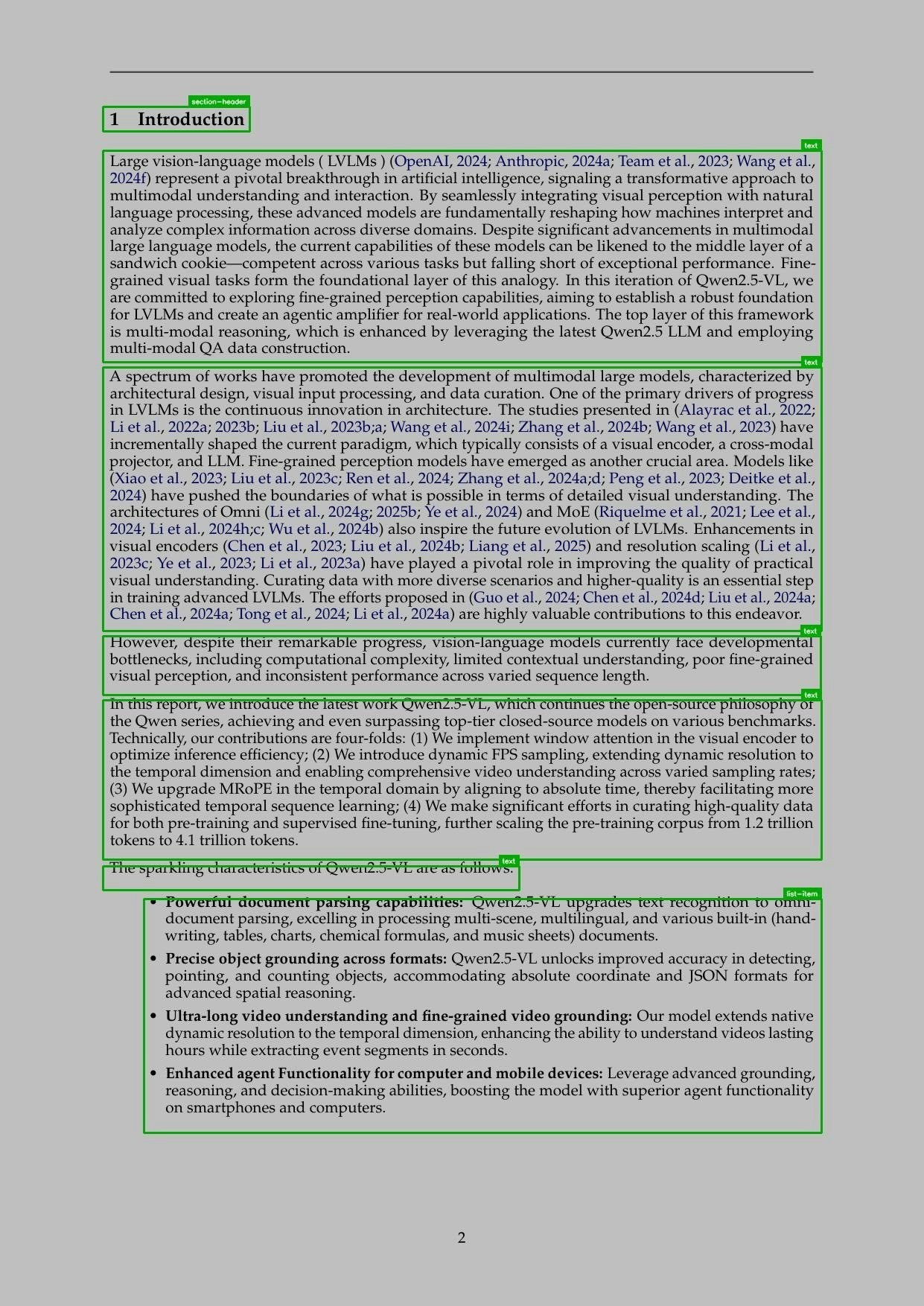
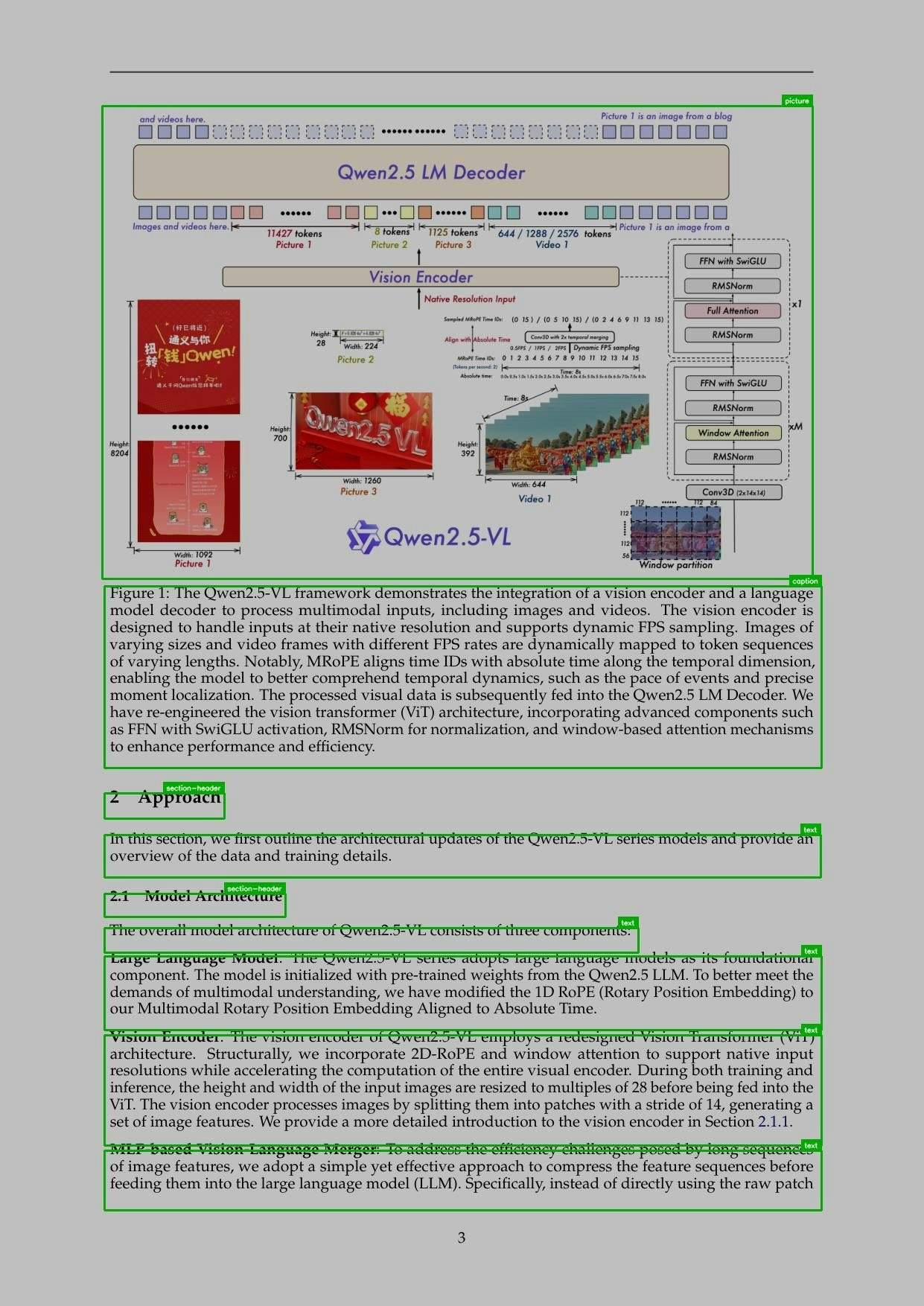
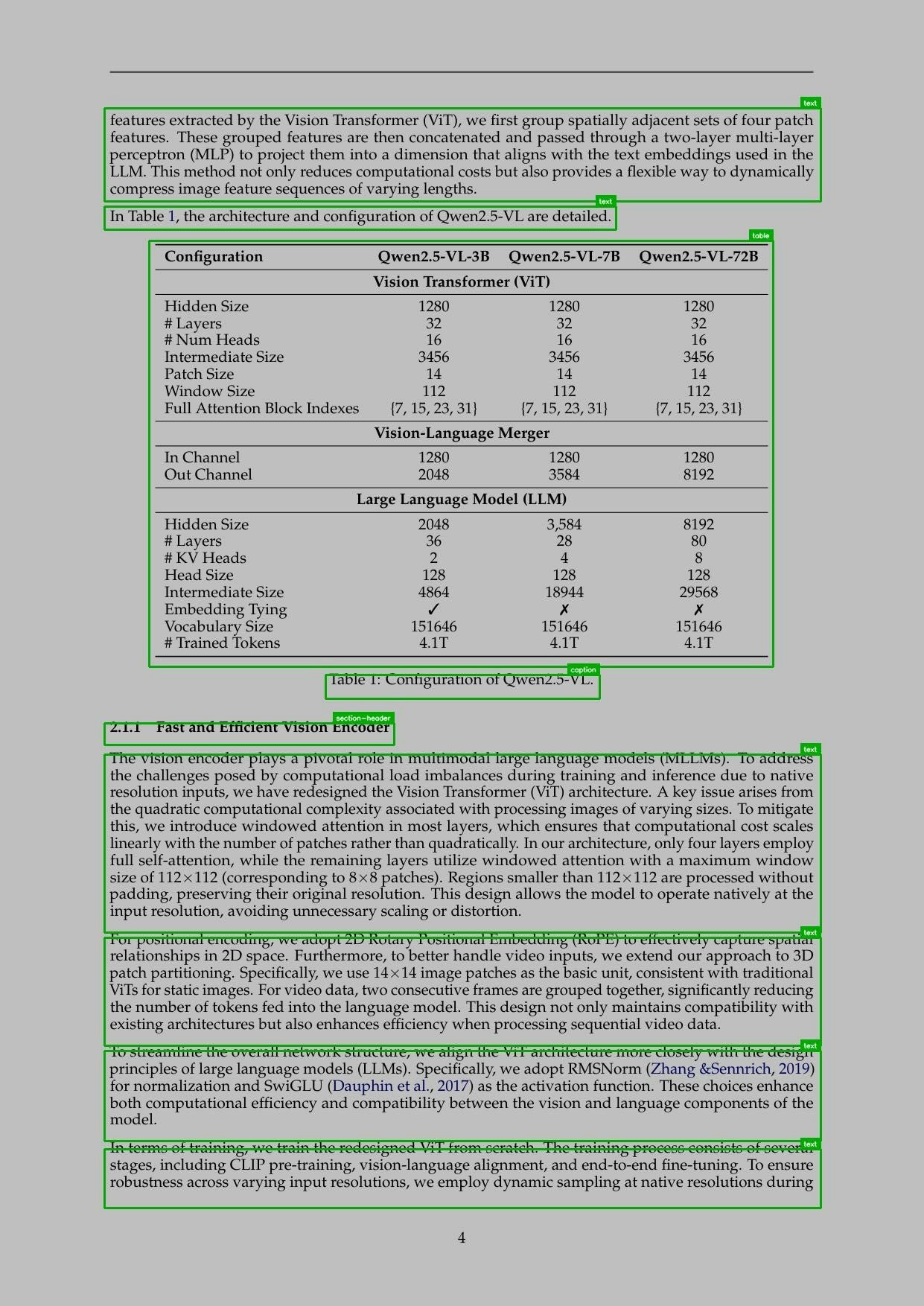
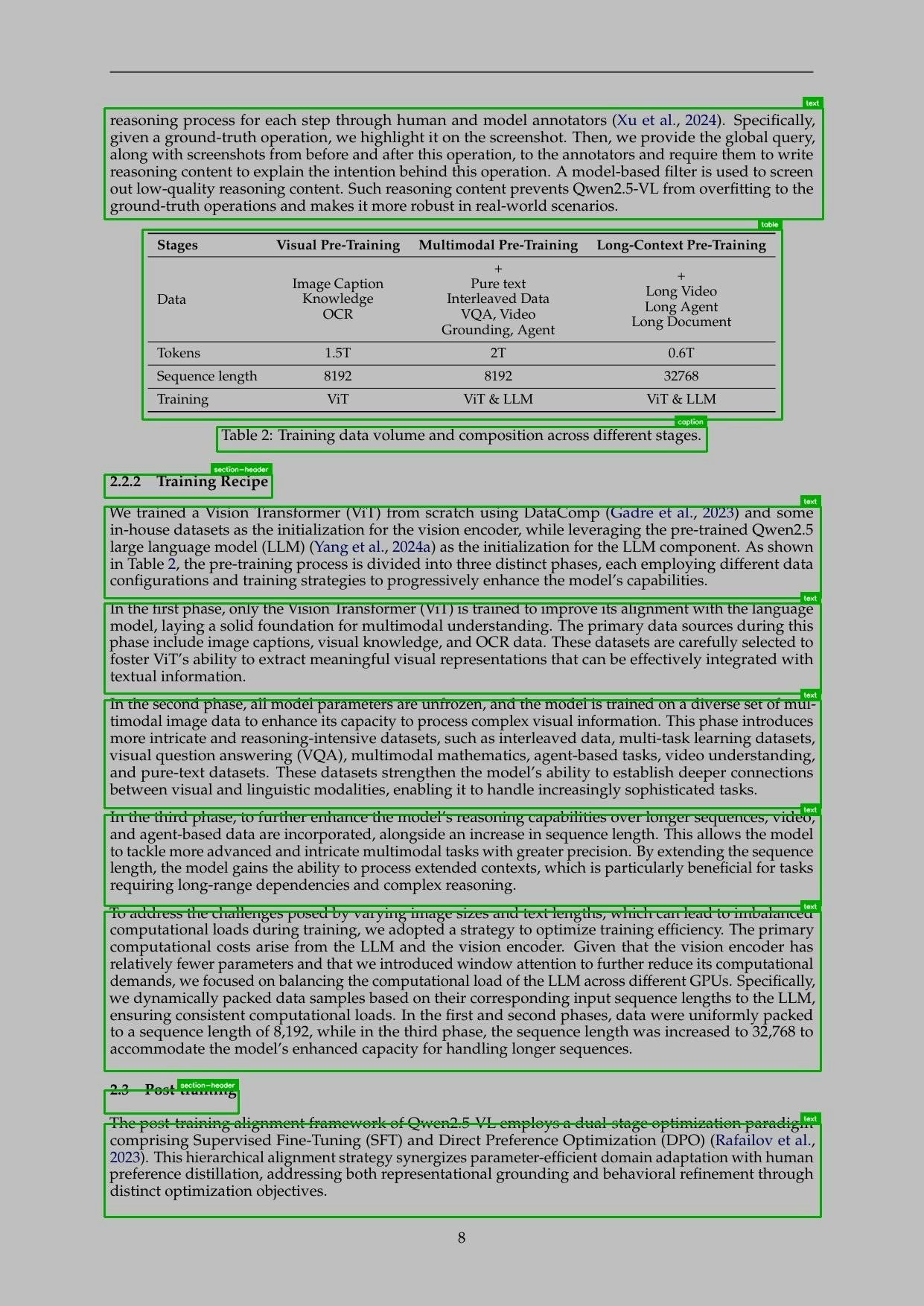
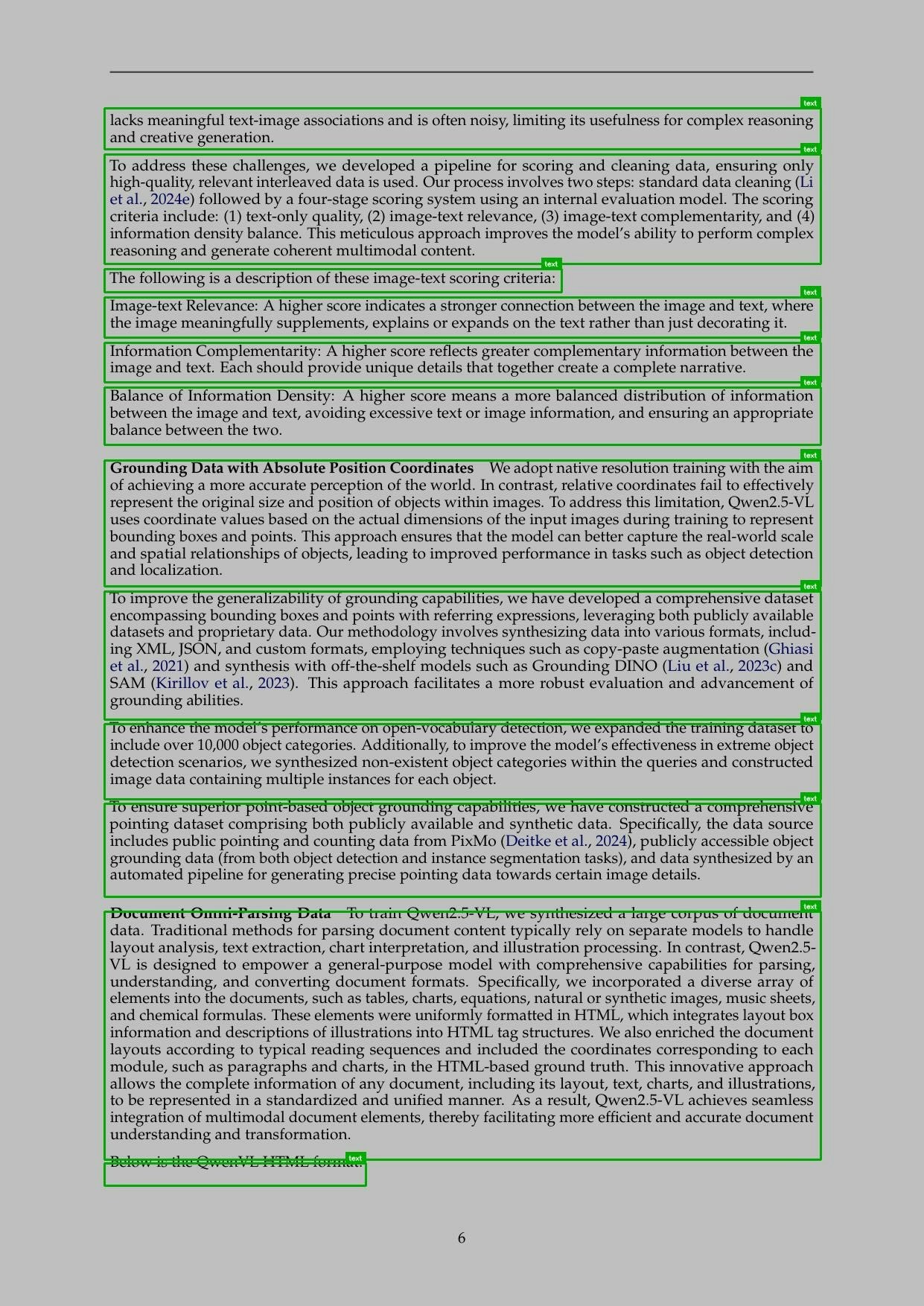
The following examples can detect headers, paragraphs, tables, lists, figures, and other document elements. The response schema includes bounding boxes, reading order and more.
```python Python theme={"theme":{"light":"github-light","dark":"dark-plus"}}
from vlmrun.client import VLMRun
# Initialize the VLMRun client
client = VLMRun(api_key="")
# Analyze document layout
response = client.agent.completions.create(
model="vlmrun-orion-1:auto",
messages=[
{
"role": "user",
"content": [
{"type": "text", "text": "Analyze the document layout and identify all elements with bounding boxes"},
{"type": "image_url", "image_url": {"url": "https://storage.googleapis.com/vlm-data-public-prod/hub/examples/document.layout/qwen-25-vl-tech-report.jpg", "detail": "auto"}}
]
}
]
)
print(response.choices[0].message.content)
```
```python Python - Structured Outputs theme={"theme":{"light":"github-light","dark":"dark-plus"}}
from vlmrun.client import VLMRun
from pydantic import BaseModel, Field
# Define the response schema
class LayoutElement(BaseModel):
type: str = Field(..., description="Type of layout element")
xywh: tuple[float, float, float, float] = Field(..., description="Bounding box (x, y, w, h)")
class LayoutResponse(BaseModel):
elements: list[LayoutElement] = Field(..., description="List of layout elements")
# Initialize the VLMRun client
client = VLMRun(api_key="")
# Analyze document layout with structured output
response = client.agent.completions.create(
model="vlmrun-orion-1:auto",
messages=[
{
"role": "user",
"content": [
{"type": "text", "text": "Analyze the document layout and identify all elements with bounding boxes"},
{"type": "image_url", "image_url": {"url": "https://storage.googleapis.com/vlm-data-public-prod/hub/examples/document.layout/qwen-25-vl-tech-report.jpg", "detail": "auto"}}
]
}
],
response_format={"type": "json_schema", "schema": LayoutResponse.model_json_schema()},
)
# Validate the response
result = LayoutResponse.model_validate_json(response.choices[0].message.content)
# >>> LayoutResponse(elements=[LayoutElement(type="caption", xywh=(...)), ...])
```
```typescript Node.js theme={"theme":{"light":"github-light","dark":"dark-plus"}}
import { VlmRun } from "vlmrun";
const client = new VlmRun({
apiKey: "",
baseURL: "https://api.vlm.run/v1"
});
const response = await client.agent.completions.create({
model: "vlmrun-orion-1:auto",
messages: [
{
role: "user",
content: [
{ type: "text", text: "Analyze the document layout and identify all elements with bounding boxes" },
{ type: "image_url", image_url: { url: "https://storage.googleapis.com/vlm-data-public-prod/hub/examples/document.layout/qwen-25-vl-tech-report.jpg", detail: "auto" } }
]
}
]
});
console.log(response.choices[0].message.content);
```
```typescript Node.js - Structured Outputs [expandable] theme={"theme":{"light":"github-light","dark":"dark-plus"}}
import { VlmRun } from "vlmrun";
import { z } from "zod";
import { zodToJsonSchema } from "zod-to-json-schema";
// Define the response schema with Zod
const LayoutResponseSchema = z.object({
elements: z.array(z.object({
type: z.string().describe("Type of layout element"),
xywh: z.array(z.number()).describe("Bounding box (x, y, w, h)")
})).describe("List of layout elements")
});
// Initialize the VLMRun client
const client = new VlmRun({
apiKey: "",
baseURL: "https://api.vlm.run/v1"
});
// Analyze document layout with structured output
const response = await client.agent.completions.create({
model: "vlmrun-orion-1:auto",
messages: [
{
role: "user",
content: [
{ type: "text", text: "Analyze the document layout and identify all elements with bounding boxes" },
{ type: "image_url", image_url: { url: "https://storage.googleapis.com/vlm-data-public-prod/hub/examples/document.layout/qwen-25-vl-tech-report.jpg", detail: "auto" } }
]
}
],
response_format: {
type: "json_schema",
schema: zodToJsonSchema(LayoutResponseSchema)
}
});
const result = LayoutResponseSchema.parse(JSON.parse(response.choices[0].message.content));
```
## FAQ
* **Headers**: H1-H6 level headers with hierarchical structure
* **Paragraphs**: Body text blocks with proper text flow
* **Titles**: Main title of the document
* **Tables**: Structured data with row/column detection
* **Figures**: Images, charts, diagrams, and visual elements
* **Lists**: Bulleted and numbered list structures
* **Captions**: Figure and table captions with associations
* **Footnotes**: Footnotes with references and content
* **Formulas**: Mathematical formulas and equations
* **Pictures**: Images and visual elements
* **Section Headers**: Section headers and titles
The bounding boxes come in the format of `xywh`, where `x` and `y` are the top-left corner coordinates, and `w` and `h` are the width and height of the bounding box. All values are in pixels relative to the document image.
The reading order indicates the sequence in which elements should be read, following the natural document flow from top to bottom and left to right. This is useful for accessibility and content extraction.
Yes, the layout detection can process multi-page documents. Each page is analyzed separately, and the results include page-specific bounding boxes and reading orders.