> ## Documentation Index
> Fetch the complete documentation index at: https://docs.vlm.run/llms.txt
> Use this file to discover all available pages before exploring further.
# Agent Creation
> Create reusable AI agents with custom prompts for automated document and visual processing workflows
 # Agent Creation
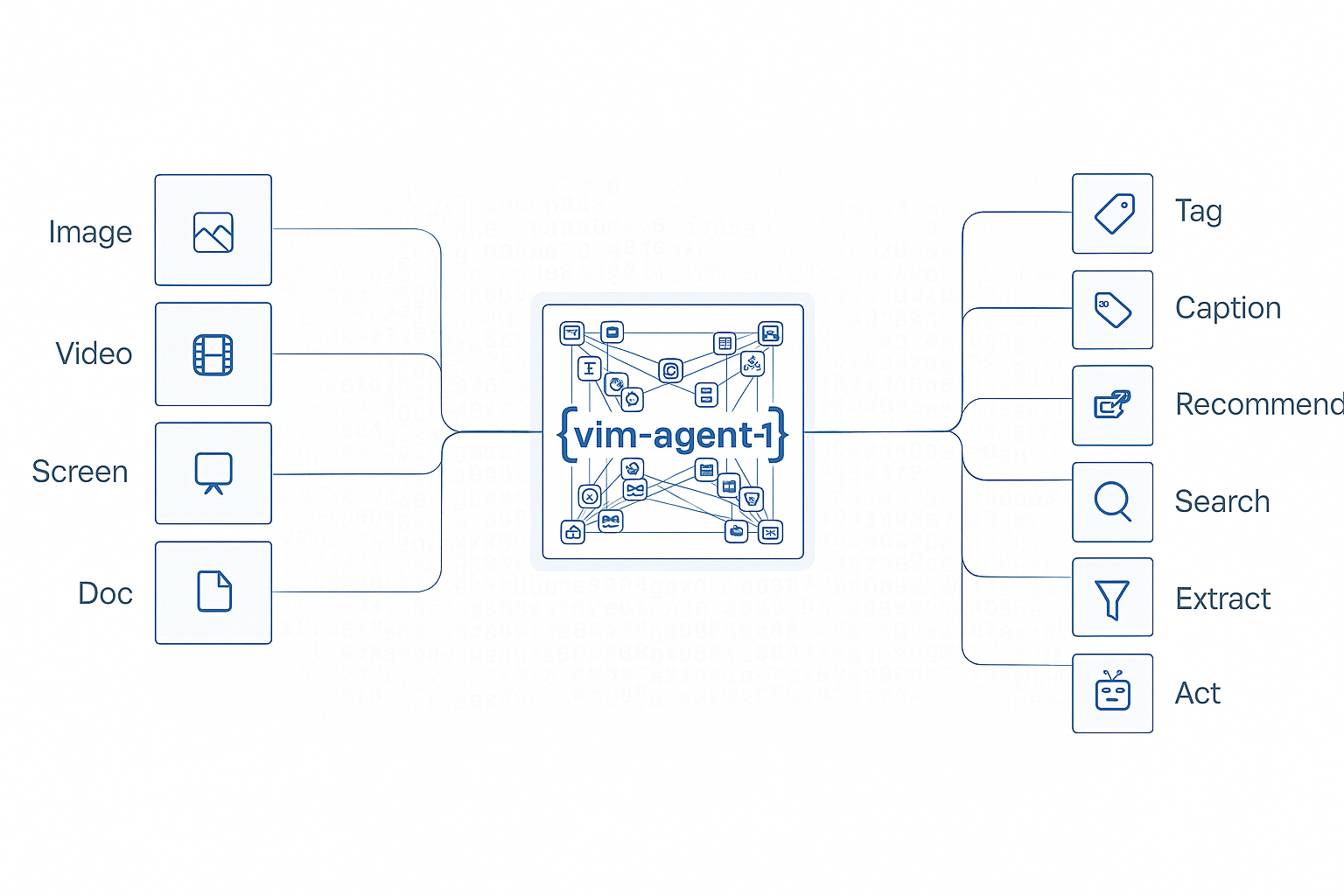
Create reusable AI agents with custom prompts and JSON schemas for automated extraction and processing of documents, images, and other visual content. Define once, execute many times with consistent results.
## Key Features
* **Reusable Workflows**: Define an agent once, execute it repeatedly with different inputs
* **Custom Prompts**: Specify exactly what information to extract using natural language
* **Structured Outputs**: Define JSON schemas for type-safe, validated responses
* **Version Control**: Manage different versions of agents for different use cases
* **Easy Integration**: Simple API for creating agents programmatically or via UI
## Use Cases
Extract invoice details like amounts, dates, and vendor information automatically
Parse receipts from various stores into a unified structured format
Pull structured data from filled forms, applications, and surveys
Extract information from driver's licenses, passports, and identity documents
## Industry Applications
* **Healthcare**: Clinical documentation - extract patient information from medical forms
* **Legal & Finance**: Contract lifecycle management - parse contract terms and clauses
* **Retail**: Product cataloging - extract product details from images
* **Public Sector**: Citizen services - process government forms and applications
## Configuration Options
The following fields can be used when creating an agent. Only `prompt` is required.
| Field | Required | Description |
| ------------- | -------- | ----------------------------------------------------------------------------------------------------------------------------------------------- |
| `prompt` | Yes | Natural language description of what information to extract from the input files |
| `json_schema` | No | JSON Schema defining the structure of the expected output. If not provided, the system will automatically generate a schema based on the prompt |
| `temperature` | No | Controls randomness in the output (0.0-1.0). Lower values produce more deterministic results. Defaults to `0.0` |
| `max_tokens` | No | Maximum number of tokens in the generated response. Defaults to `4096` |
## Example: Creating a Basic Agent
Create a simple agent for extracting invoice information:
```python Python theme={"theme":{"light":"github-light","dark":"dark-plus"}}
from vlmrun.client import VLMRun
from vlmrun.client.types import AgentCreationResponse, AgentCreationConfig
# Initialize the client
client = VLMRun(api_key="")
# Create the agent
response: AgentCreationResponse = client.agent.create(
config=AgentCreationConfig(
prompt="Extract the invoice_id, date, total amount, and vendor name from the invoice."
)
)
print(f"Agent created: {response.agent.name}:{response.agent.version}")
print(f"Agent ID: {response.agent.id}")
```
```typescript Node.js SDK theme={"theme":{"light":"github-light","dark":"dark-plus"}}
import { VlmRun } from "vlmrun";
// Initialize the client
const client = new VlmRun({
baseUrl: "https://api.vlm.run/v1",
apiKey: ""
});
// Create the agent
const response = await client.agent.create({
config: {
prompt: "Extract the invoice_id, date, total amount, and vendor name from the invoice."
}
});
console.log(`Agent created: ${response.agent.name}:${response.agent.version}`);
console.log(`Agent ID: ${response.agent.id}`);
```
```curl cURL theme={"theme":{"light":"github-light","dark":"dark-plus"}}
curl --request POST \
--url https://api.vlm.run/v1/agent/create \
--header 'Authorization: Bearer ' \
--header 'Content-Type: application/json' \
--data '{
"config": {
"prompt": "Extract the invoice_id, date, total amount, and vendor name from the invoice."
}
}'
```
### Response Format
```json theme={"theme":{"light":"github-light","dark":"dark-plus"}}
{
"agent": {
"id": "agt_abc123xyz",
"name": "invoice-extractor",
"version": "v1",
"status": "active",
"created_at": "2025-09-30T10:30:00Z",
"config": {
"prompt": "Extract the invoice_id, date, total amount, and vendor name from the invoice.",
"temperature": 0.0,
"max_tokens": 4096,
"json_schema": {
"type": "object",
"properties": {
"invoice_id": {"type": "string"},
"date": {"type": "string"},
"total_amount": {"type": "number"},
"vendor_name": {"type": "string"}
},
"required": ["invoice_id", "date", "total_amount", "vendor_name"]
}
}
}
}
```
## Example: Creating an Agent with Custom Schema
For more control over output structure, provide a custom JSON schema:
```python Python theme={"theme":{"light":"github-light","dark":"dark-plus"}}
from vlmrun.client import VLMRun
from vlmrun.client.types import AgentCreationResponse, AgentCreationConfig
client = VLMRun(api_key="")
# Define custom JSON schema
custom_schema = {
"type": "object",
"properties": {
"store_name": {"type": "string"},
"transaction_date": {"type": "string", "format": "date"},
"items": {
"type": "array",
"items": {
"type": "object",
"properties": {
"name": {"type": "string"},
"quantity": {"type": "integer"},
"price": {"type": "number"}
},
"required": ["name", "quantity", "price"]
}
},
"subtotal": {"type": "number"},
"tax": {"type": "number"},
"total": {"type": "number"}
},
"required": ["store_name", "transaction_date", "items", "total"]
}
# Create the agent with schema
response: AgentCreationResponse = client.agent.create(
config=AgentCreationConfig(
prompt="Extract all receipt information including store name, date, items, and totals.",
json_schema=custom_schema,
temperature=0.1
)
)
print(f"Agent ID: {response.agent.id}")
print(f"Schema properties: {list(response.agent.config.json_schema['properties'].keys())}")
```
```typescript Node.js SDK theme={"theme":{"light":"github-light","dark":"dark-plus"}}
import { VlmRun } from "vlmrun";
const client = new VlmRun({
baseUrl: "https://api.vlm.run/v1",
apiKey: ""
});
// Define custom JSON schema
const customSchema = {
type: "object",
properties: {
store_name: { type: "string" },
transaction_date: { type: "string", format: "date" },
items: {
type: "array",
items: {
type: "object",
properties: {
name: { type: "string" },
quantity: { type: "integer" },
price: { type: "number" }
},
required: ["name", "quantity", "price"]
}
},
subtotal: { type: "number" },
tax: { type: "number" },
total: { type: "number" }
},
required: ["store_name", "transaction_date", "items", "total"]
};
// Create the agent with schema
const response = await client.agent.create({
config: {
prompt: "Extract all receipt information including store name, date, items, and totals.",
json_schema: customSchema,
temperature: 0.1
}
});
console.log(`Agent ID: ${response.agent.id}`);
console.log(`Schema properties:`, Object.keys(response.agent.config.json_schema.properties));
```
### Response Format
```json theme={"theme":{"light":"github-light","dark":"dark-plus"}}
{
"agent": {
"id": "agt_xyz789def",
"name": "receipt-parser",
"version": "v1",
"status": "active",
"created_at": "2025-09-30T10:35:00Z",
"config": {
"prompt": "Extract all receipt information including store name, date, items, and totals.",
"temperature": 0.1,
"max_tokens": 4096,
"json_schema": {
"type": "object",
"properties": {
"store_name": {"type": "string"},
"transaction_date": {"type": "string", "format": "date"},
"items": {
"type": "array",
"items": {
"type": "object",
"properties": {
"name": {"type": "string"},
"quantity": {"type": "integer"},
"price": {"type": "number"}
},
"required": ["name", "quantity", "price"]
}
},
"subtotal": {"type": "number"},
"tax": {"type": "number"},
"total": {"type": "number"}
},
"required": ["store_name", "transaction_date", "items", "total"]
}
}
}
}
```
## Best Practices
* **Clear Prompts**: Write specific, unambiguous prompts describing exactly what to extract
* **Schema Definition**: Define JSON schemas for complex structures to ensure type safety
* **Temperature Control**: Use low temperature (0.0-0.2) for consistent extraction tasks
* **Field Naming**: Use clear, descriptive field names in your JSON schema
* **Testing**: Test agents with sample documents before production deployment
Create and manage your agents in the VLM Run platform
# Agent Creation
Create reusable AI agents with custom prompts and JSON schemas for automated extraction and processing of documents, images, and other visual content. Define once, execute many times with consistent results.
## Key Features
* **Reusable Workflows**: Define an agent once, execute it repeatedly with different inputs
* **Custom Prompts**: Specify exactly what information to extract using natural language
* **Structured Outputs**: Define JSON schemas for type-safe, validated responses
* **Version Control**: Manage different versions of agents for different use cases
* **Easy Integration**: Simple API for creating agents programmatically or via UI
## Use Cases
Extract invoice details like amounts, dates, and vendor information automatically
Parse receipts from various stores into a unified structured format
Pull structured data from filled forms, applications, and surveys
Extract information from driver's licenses, passports, and identity documents
## Industry Applications
* **Healthcare**: Clinical documentation - extract patient information from medical forms
* **Legal & Finance**: Contract lifecycle management - parse contract terms and clauses
* **Retail**: Product cataloging - extract product details from images
* **Public Sector**: Citizen services - process government forms and applications
## Configuration Options
The following fields can be used when creating an agent. Only `prompt` is required.
| Field | Required | Description |
| ------------- | -------- | ----------------------------------------------------------------------------------------------------------------------------------------------- |
| `prompt` | Yes | Natural language description of what information to extract from the input files |
| `json_schema` | No | JSON Schema defining the structure of the expected output. If not provided, the system will automatically generate a schema based on the prompt |
| `temperature` | No | Controls randomness in the output (0.0-1.0). Lower values produce more deterministic results. Defaults to `0.0` |
| `max_tokens` | No | Maximum number of tokens in the generated response. Defaults to `4096` |
## Example: Creating a Basic Agent
Create a simple agent for extracting invoice information:
```python Python theme={"theme":{"light":"github-light","dark":"dark-plus"}}
from vlmrun.client import VLMRun
from vlmrun.client.types import AgentCreationResponse, AgentCreationConfig
# Initialize the client
client = VLMRun(api_key="")
# Create the agent
response: AgentCreationResponse = client.agent.create(
config=AgentCreationConfig(
prompt="Extract the invoice_id, date, total amount, and vendor name from the invoice."
)
)
print(f"Agent created: {response.agent.name}:{response.agent.version}")
print(f"Agent ID: {response.agent.id}")
```
```typescript Node.js SDK theme={"theme":{"light":"github-light","dark":"dark-plus"}}
import { VlmRun } from "vlmrun";
// Initialize the client
const client = new VlmRun({
baseUrl: "https://api.vlm.run/v1",
apiKey: ""
});
// Create the agent
const response = await client.agent.create({
config: {
prompt: "Extract the invoice_id, date, total amount, and vendor name from the invoice."
}
});
console.log(`Agent created: ${response.agent.name}:${response.agent.version}`);
console.log(`Agent ID: ${response.agent.id}`);
```
```curl cURL theme={"theme":{"light":"github-light","dark":"dark-plus"}}
curl --request POST \
--url https://api.vlm.run/v1/agent/create \
--header 'Authorization: Bearer ' \
--header 'Content-Type: application/json' \
--data '{
"config": {
"prompt": "Extract the invoice_id, date, total amount, and vendor name from the invoice."
}
}'
```
### Response Format
```json theme={"theme":{"light":"github-light","dark":"dark-plus"}}
{
"agent": {
"id": "agt_abc123xyz",
"name": "invoice-extractor",
"version": "v1",
"status": "active",
"created_at": "2025-09-30T10:30:00Z",
"config": {
"prompt": "Extract the invoice_id, date, total amount, and vendor name from the invoice.",
"temperature": 0.0,
"max_tokens": 4096,
"json_schema": {
"type": "object",
"properties": {
"invoice_id": {"type": "string"},
"date": {"type": "string"},
"total_amount": {"type": "number"},
"vendor_name": {"type": "string"}
},
"required": ["invoice_id", "date", "total_amount", "vendor_name"]
}
}
}
}
```
## Example: Creating an Agent with Custom Schema
For more control over output structure, provide a custom JSON schema:
```python Python theme={"theme":{"light":"github-light","dark":"dark-plus"}}
from vlmrun.client import VLMRun
from vlmrun.client.types import AgentCreationResponse, AgentCreationConfig
client = VLMRun(api_key="")
# Define custom JSON schema
custom_schema = {
"type": "object",
"properties": {
"store_name": {"type": "string"},
"transaction_date": {"type": "string", "format": "date"},
"items": {
"type": "array",
"items": {
"type": "object",
"properties": {
"name": {"type": "string"},
"quantity": {"type": "integer"},
"price": {"type": "number"}
},
"required": ["name", "quantity", "price"]
}
},
"subtotal": {"type": "number"},
"tax": {"type": "number"},
"total": {"type": "number"}
},
"required": ["store_name", "transaction_date", "items", "total"]
}
# Create the agent with schema
response: AgentCreationResponse = client.agent.create(
config=AgentCreationConfig(
prompt="Extract all receipt information including store name, date, items, and totals.",
json_schema=custom_schema,
temperature=0.1
)
)
print(f"Agent ID: {response.agent.id}")
print(f"Schema properties: {list(response.agent.config.json_schema['properties'].keys())}")
```
```typescript Node.js SDK theme={"theme":{"light":"github-light","dark":"dark-plus"}}
import { VlmRun } from "vlmrun";
const client = new VlmRun({
baseUrl: "https://api.vlm.run/v1",
apiKey: ""
});
// Define custom JSON schema
const customSchema = {
type: "object",
properties: {
store_name: { type: "string" },
transaction_date: { type: "string", format: "date" },
items: {
type: "array",
items: {
type: "object",
properties: {
name: { type: "string" },
quantity: { type: "integer" },
price: { type: "number" }
},
required: ["name", "quantity", "price"]
}
},
subtotal: { type: "number" },
tax: { type: "number" },
total: { type: "number" }
},
required: ["store_name", "transaction_date", "items", "total"]
};
// Create the agent with schema
const response = await client.agent.create({
config: {
prompt: "Extract all receipt information including store name, date, items, and totals.",
json_schema: customSchema,
temperature: 0.1
}
});
console.log(`Agent ID: ${response.agent.id}`);
console.log(`Schema properties:`, Object.keys(response.agent.config.json_schema.properties));
```
### Response Format
```json theme={"theme":{"light":"github-light","dark":"dark-plus"}}
{
"agent": {
"id": "agt_xyz789def",
"name": "receipt-parser",
"version": "v1",
"status": "active",
"created_at": "2025-09-30T10:35:00Z",
"config": {
"prompt": "Extract all receipt information including store name, date, items, and totals.",
"temperature": 0.1,
"max_tokens": 4096,
"json_schema": {
"type": "object",
"properties": {
"store_name": {"type": "string"},
"transaction_date": {"type": "string", "format": "date"},
"items": {
"type": "array",
"items": {
"type": "object",
"properties": {
"name": {"type": "string"},
"quantity": {"type": "integer"},
"price": {"type": "number"}
},
"required": ["name", "quantity", "price"]
}
},
"subtotal": {"type": "number"},
"tax": {"type": "number"},
"total": {"type": "number"}
},
"required": ["store_name", "transaction_date", "items", "total"]
}
}
}
}
```
## Best Practices
* **Clear Prompts**: Write specific, unambiguous prompts describing exactly what to extract
* **Schema Definition**: Define JSON schemas for complex structures to ensure type safety
* **Temperature Control**: Use low temperature (0.0-0.2) for consistent extraction tasks
* **Field Naming**: Use clear, descriptive field names in your JSON schema
* **Testing**: Test agents with sample documents before production deployment
Create and manage your agents in the VLM Run platform