> ## Documentation Index
> Fetch the complete documentation index at: https://docs.vlm.run/llms.txt
> Use this file to discover all available pages before exploring further.
# Chat Completions
> Multi-turn messages with structured JSON output.
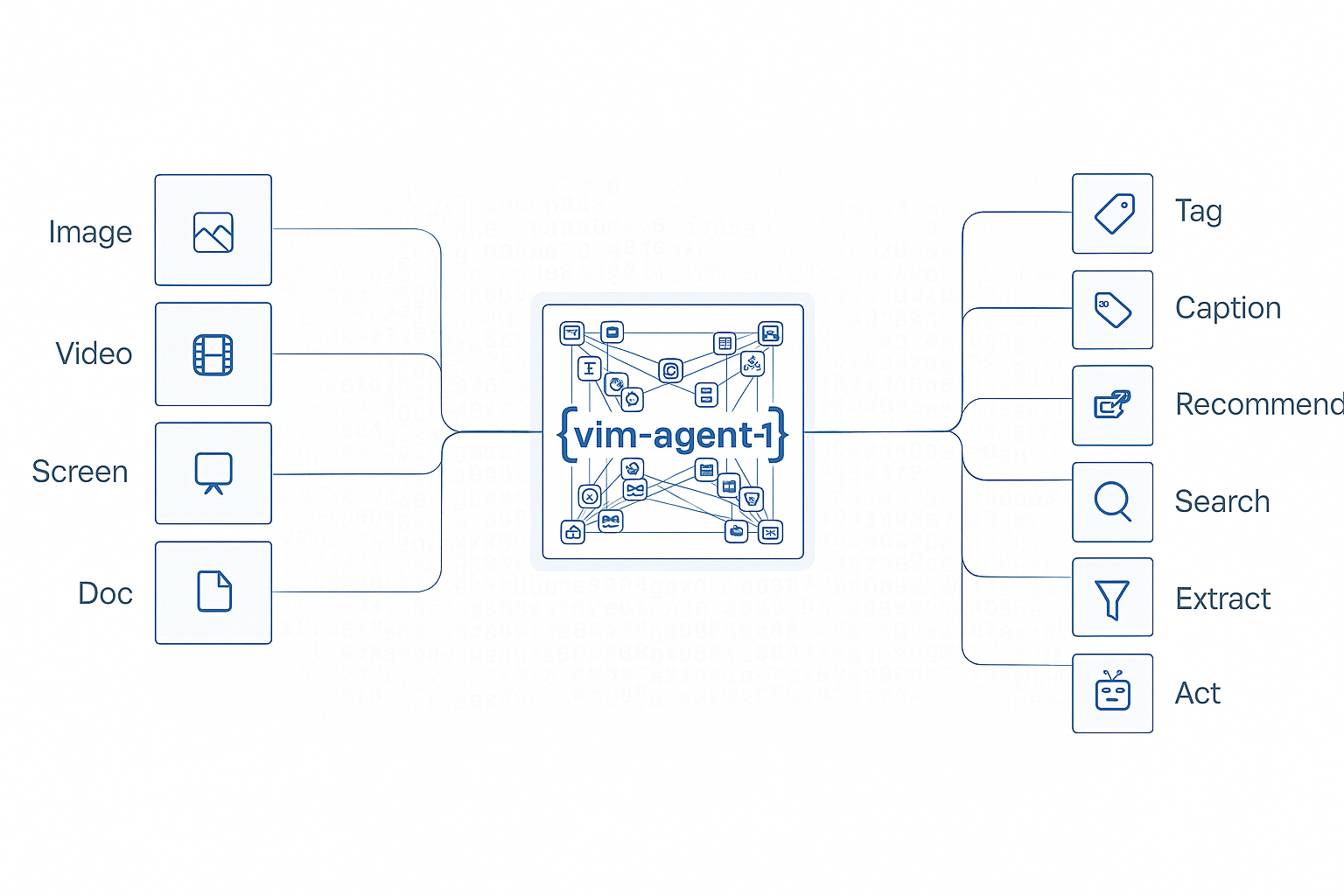 # Chat Completions
## Configuration Options
Only `messages` is required.
| Field | Required | Description |
| - | - | - |
| `messages` | Yes | Message objects with `role` (`system`, `user`, `assistant`) and `content`. The array is the conversation history. |
| `response_format` | No | JSON schema for structured output. |
| `model` | No | Orion-1 (tool-calling): `vlmrun-orion-1:fast`, `vlmrun-orion-1:auto`, `vlmrun-orion-1:pro`. Orion-2 (code-execution): `vlmrun-orion-2:fast`, `vlmrun-orion-2:auto`, `vlmrun-orion-2:pro`. Default: `vlmrun-orion-1`. |
| `temperature` | No | `0.0-0.3` for deterministic output. `0.7-1.0` for creative output. Default: `0.7`. |
| `max_tokens` | No | Maximum tokens in the response. Default: `4096`. |
| `stream` | No | Stream the response. Default: `false`. |
| `toolsets` | No | [Tool categories](/agents/inputs#toolset-selection) for this request: `core`, `image`, `image-gen`, `world_gen`, `viz`, `document`, `video`, `web`. Only tools from those categories are available. |
## Example: Basic Chat Completion
```python Python theme={"theme":{"light":"github-light","dark":"dark-plus"}}
from pathlib import Path
from vlmrun.client import VLMRun
client = VLMRun(api_key="")
# Upload the file
file = client.files.upload(file=Path("invoice.pdf"))
# Create chat completion with structured output
response = client.agent.completions.create(
model="vlmrun-orion-1:auto",
messages=[
{
"role": "system",
"content": "You are a precise invoice data extractor. Always respond with structured JSON."
},
{
"role": "user",
"content": [
{
"type": "text",
"text": "Extract the invoice number, date, total amount, and vendor name from this invoice."
},
{
"type": "image_url",
"image_url": {"url": file.public_url}
}
]
}
],
response_format={
"type": "json_schema",
"json_schema": {
"name": "invoice_extraction",
"schema": {
"type": "object",
"properties": {
"invoice_number": {"type": "string"},
"date": {"type": "string"},
"total_amount": {"type": "number"},
"vendor_name": {"type": "string"}
},
"required": ["invoice_number", "date", "total_amount", "vendor_name"]
}
}
}
)
print(response.choices[0].message.content)
```
```typescript Node.js SDK theme={"theme":{"light":"github-light","dark":"dark-plus"}}
import { VlmRun } from "vlmrun";
import { readFileSync } from 'fs';
const client = new VlmRun({
baseUrl: "https://api.vlm.run/v1",
apiKey: ""
});
// Upload the file
const file = await client.files.upload({ file: readFileSync("invoice.pdf") });
// Create chat completion with structured output
const response = await client.agent.completions.create({
model: "vlmrun-orion-1:auto",
messages: [
{
role: "system",
content: "You are a precise invoice data extractor. Always respond with structured JSON."
},
{
role: "user",
content: [
{
type: "text",
text: "Extract the invoice number, date, total amount, and vendor name from this invoice."
},
{
type: "image_url",
image_url: { url: file.publicUrl }
}
]
}
],
responseFormat: {
type: "json_schema",
jsonSchema: {
name: "invoice_extraction",
schema: {
type: "object",
properties: {
invoice_number: { type: "string" },
date: { type: "string" },
total_amount: { type: "number" },
vendor_name: { type: "string" }
},
required: ["invoice_number", "date", "total_amount", "vendor_name"]
}
}
}
});
console.log(response.choices[0].message.content);
```
```curl cURL theme={"theme":{"light":"github-light","dark":"dark-plus"}}
# Upload the file first
curl -X POST https://api.vlm.run/v1/files/upload \
-H "Authorization: Bearer " \
-F "file=@invoice.pdf"
# Create chat completion
curl -X POST https://api.vlm.run/v1/openai/chat/completions \
-H "Authorization: Bearer " \
-H "Content-Type: application/json" \
-d '{
"model": "vlmrun-orion-1:auto",
"messages": [
{
"role": "system",
"content": "You are a precise invoice data extractor. Always respond with structured JSON."
},
{
"role": "user",
"content": [
{
"type": "text",
"text": "Extract the invoice number, date, total amount, and vendor name from this invoice."
},
{
"type": "image_url",
"image_url": {
"url": ""
}
}
]
}
],
"response_format": {
"type": "json_schema",
"json_schema": {
"name": "invoice_extraction",
"schema": {
"type": "object",
"properties": {
"invoice_number": {"type": "string"},
"date": {"type": "string"},
"total_amount": {"type": "number"},
"vendor_name": {"type": "string"}
},
"required": ["invoice_number", "date", "total_amount", "vendor_name"]
}
}
}
}'
```
### Response Format
```json theme={"theme":{"light":"github-light","dark":"dark-plus"}}
{
"id": "chatcmpl_abc123xyz",
"object": "chat.completion",
"created": 1727692800,
"model": "vlm-1",
"choices": [
{
"index": 0,
"message": {
"role": "assistant",
"content": "{\"invoice_number\":\"INV-2024-001\",\"date\":\"2024-09-15\",\"total_amount\":1250.00,\"vendor_name\":\"Acme Corporation\"}"
},
"finish_reason": "stop"
}
],
"usage": {
"prompt_tokens": 1024,
"completion_tokens": 45,
"total_tokens": 1069
}
}
```
Pass `vlmrun-orion-2:auto` as `model` for code execution. The sample above uses `vlmrun-orion-1:auto`.
Orion-2 writes and executes Python pipelines in a sandbox.
Use it for multi-step tasks such as detect-crop-annotate.
See [Code Execution](/agents/code-execution).
## Example: Multi-Turn Conversation
```python Python theme={"theme":{"light":"github-light","dark":"dark-plus"}}
from pathlib import Path
from vlmrun.client import VLMRun
client = VLMRun(api_key="")
# Upload the file
file = client.files.upload(file=Path("contract.pdf"))
# First message: Initial extraction
messages = [
{
"role": "system",
"content": "You are a contract analyzer. Provide structured JSON responses."
},
{
"role": "user",
"content": [
{"type": "text", "text": "What are the key terms in this contract?"},
{"type": "image_url", "image_url": {"url": file.public_url}}
]
}
]
response1 = client.agent.completions.create(
messages=messages,
response_format={"type": "json_object"}
)
# Add assistant response to history
messages.append({
"role": "assistant",
"content": response1.choices[0].message.content
})
# Follow-up question
messages.append({
"role": "user",
"content": "What are the payment terms specifically?"
})
response2 = client.agent.completions.create(
messages=messages,
response_format={"type": "json_object"}
)
print(response2.choices[0].message.content)
```
```typescript Node.js SDK theme={"theme":{"light":"github-light","dark":"dark-plus"}}
import { VlmRun } from "vlmrun";
import { readFileSync } from 'fs';
const client = new VlmRun({
baseUrl: "https://api.vlm.run/v1",
apiKey: ""
});
// Upload the file
const file = await client.files.upload({ file: readFileSync("contract.pdf") });
// First message: Initial extraction
const messages = [
{
role: "system",
content: "You are a contract analyzer. Provide structured JSON responses."
},
{
role: "user",
content: [
{ type: "text", text: "What are the key terms in this contract?" },
{ type: "image_url", image_url: { url: file.publicUrl } }
]
}
];
const response1 = await client.agent.completions.create({
messages: messages,
responseFormat: { type: "json_object" }
});
// Add assistant response to history
messages.push({
role: "assistant",
content: response1.choices[0].message.content
});
// Follow-up question
messages.push({
role: "user",
content: "What are the payment terms specifically?"
});
const response2 = await client.agent.completions.create({
messages: messages,
responseFormat: { type: "json_object" }
});
console.log(response2.choices[0].message.content);
```
## Example: Streaming Response
```python Python theme={"theme":{"light":"github-light","dark":"dark-plus"}}
from pathlib import Path
from vlmrun.client import VLMRun
client = VLMRun(api_key="")
# Upload the file
file = client.files.upload(file=Path("report.pdf"))
# Stream chat completion
stream = client.agent.completions.create(
messages=[
{
"role": "user",
"content": [
{"type": "text", "text": "Summarize this report in JSON format"},
{"type": "image_url", "image_url": {"url": file.public_url}}
]
}
],
response_format={"type": "json_object"},
stream=True
)
# Process stream
for chunk in stream:
if chunk.choices[0].delta.content:
print(chunk.choices[0].delta.content, end="", flush=True)
```
```typescript Node.js SDK theme={"theme":{"light":"github-light","dark":"dark-plus"}}
import { VlmRun } from "vlmrun";
import { readFileSync } from 'fs';
const client = new VlmRun({
baseUrl: "https://api.vlm.run/v1",
apiKey: ""
});
// Upload the file
const file = await client.files.upload({ file: readFileSync("report.pdf") });
// Stream chat completion
const stream = await client.agent.completions.create({
messages: [
{
role: "user",
content: [
{ type: "text", text: "Summarize this report in JSON format" },
{ type: "image_url", image_url: { url: file.publicUrl } }
]
}
],
responseFormat: { type: "json_object" },
stream: true
});
// Process stream
for await (const chunk of stream) {
if (chunk.choices[0]?.delta?.content) {
process.stdout.write(chunk.choices[0].delta.content);
}
}
```
## JSON Schema Validation
```json theme={"theme":{"light":"github-light","dark":"dark-plus"}}
{
"response_format": {
"type": "json_schema",
"json_schema": {
"name": "customer_data",
"strict": true,
"schema": {
"type": "object",
"properties": {
"customer_id": {
"type": "string",
"description": "Unique customer identifier"
},
"name": {
"type": "object",
"properties": {
"first": {"type": "string"},
"last": {"type": "string"}
},
"required": ["first", "last"]
},
"contacts": {
"type": "array",
"items": {
"type": "object",
"properties": {
"type": {"type": "string", "enum": ["email", "phone"]},
"value": {"type": "string"}
},
"required": ["type", "value"]
}
}
},
"required": ["customer_id", "name", "contacts"],
"additionalProperties": false
}
}
}
}
```
## Response Format Types
| Type | Description |
| - | - |
| `text` | Plain text. No structure constraint. |
| `json_object` | Valid JSON. No schema. |
| `json_schema` | Strict JSON that matches the provided schema. |
## Message Content Types
### Text Content
```json theme={"theme":{"light":"github-light","dark":"dark-plus"}}
{
"role": "user",
"content": "Extract the invoice data"
}
```
### Multi-Modal Content
```json theme={"theme":{"light":"github-light","dark":"dark-plus"}}
{
"role": "user",
"content": [
{
"type": "text",
"text": "Analyze this document"
},
{
"type": "image_url",
"image_url": {
"url": "https://files.vlm.run/doc.pdf",
"detail": "high"
}
}
]
}
```
### Document Content
```json theme={"theme":{"light":"github-light","dark":"dark-plus"}}
{
"role": "user",
"content": [
{
"type": "text",
"text": "Review this contract"
},
{
"type": "document_url",
"document_url": {
"url": "https://files.vlm.run/contract.pdf"
}
}
]
}
```
Request and response fields.
This documentation is built and hosted on [Mintlify](https://mintlify.com), a developer documentation platform.
# Chat Completions
## Configuration Options
Only `messages` is required.
| Field | Required | Description |
| - | - | - |
| `messages` | Yes | Message objects with `role` (`system`, `user`, `assistant`) and `content`. The array is the conversation history. |
| `response_format` | No | JSON schema for structured output. |
| `model` | No | Orion-1 (tool-calling): `vlmrun-orion-1:fast`, `vlmrun-orion-1:auto`, `vlmrun-orion-1:pro`. Orion-2 (code-execution): `vlmrun-orion-2:fast`, `vlmrun-orion-2:auto`, `vlmrun-orion-2:pro`. Default: `vlmrun-orion-1`. |
| `temperature` | No | `0.0-0.3` for deterministic output. `0.7-1.0` for creative output. Default: `0.7`. |
| `max_tokens` | No | Maximum tokens in the response. Default: `4096`. |
| `stream` | No | Stream the response. Default: `false`. |
| `toolsets` | No | [Tool categories](/agents/inputs#toolset-selection) for this request: `core`, `image`, `image-gen`, `world_gen`, `viz`, `document`, `video`, `web`. Only tools from those categories are available. |
## Example: Basic Chat Completion
```python Python theme={"theme":{"light":"github-light","dark":"dark-plus"}}
from pathlib import Path
from vlmrun.client import VLMRun
client = VLMRun(api_key="")
# Upload the file
file = client.files.upload(file=Path("invoice.pdf"))
# Create chat completion with structured output
response = client.agent.completions.create(
model="vlmrun-orion-1:auto",
messages=[
{
"role": "system",
"content": "You are a precise invoice data extractor. Always respond with structured JSON."
},
{
"role": "user",
"content": [
{
"type": "text",
"text": "Extract the invoice number, date, total amount, and vendor name from this invoice."
},
{
"type": "image_url",
"image_url": {"url": file.public_url}
}
]
}
],
response_format={
"type": "json_schema",
"json_schema": {
"name": "invoice_extraction",
"schema": {
"type": "object",
"properties": {
"invoice_number": {"type": "string"},
"date": {"type": "string"},
"total_amount": {"type": "number"},
"vendor_name": {"type": "string"}
},
"required": ["invoice_number", "date", "total_amount", "vendor_name"]
}
}
}
)
print(response.choices[0].message.content)
```
```typescript Node.js SDK theme={"theme":{"light":"github-light","dark":"dark-plus"}}
import { VlmRun } from "vlmrun";
import { readFileSync } from 'fs';
const client = new VlmRun({
baseUrl: "https://api.vlm.run/v1",
apiKey: ""
});
// Upload the file
const file = await client.files.upload({ file: readFileSync("invoice.pdf") });
// Create chat completion with structured output
const response = await client.agent.completions.create({
model: "vlmrun-orion-1:auto",
messages: [
{
role: "system",
content: "You are a precise invoice data extractor. Always respond with structured JSON."
},
{
role: "user",
content: [
{
type: "text",
text: "Extract the invoice number, date, total amount, and vendor name from this invoice."
},
{
type: "image_url",
image_url: { url: file.publicUrl }
}
]
}
],
responseFormat: {
type: "json_schema",
jsonSchema: {
name: "invoice_extraction",
schema: {
type: "object",
properties: {
invoice_number: { type: "string" },
date: { type: "string" },
total_amount: { type: "number" },
vendor_name: { type: "string" }
},
required: ["invoice_number", "date", "total_amount", "vendor_name"]
}
}
}
});
console.log(response.choices[0].message.content);
```
```curl cURL theme={"theme":{"light":"github-light","dark":"dark-plus"}}
# Upload the file first
curl -X POST https://api.vlm.run/v1/files/upload \
-H "Authorization: Bearer " \
-F "file=@invoice.pdf"
# Create chat completion
curl -X POST https://api.vlm.run/v1/openai/chat/completions \
-H "Authorization: Bearer " \
-H "Content-Type: application/json" \
-d '{
"model": "vlmrun-orion-1:auto",
"messages": [
{
"role": "system",
"content": "You are a precise invoice data extractor. Always respond with structured JSON."
},
{
"role": "user",
"content": [
{
"type": "text",
"text": "Extract the invoice number, date, total amount, and vendor name from this invoice."
},
{
"type": "image_url",
"image_url": {
"url": ""
}
}
]
}
],
"response_format": {
"type": "json_schema",
"json_schema": {
"name": "invoice_extraction",
"schema": {
"type": "object",
"properties": {
"invoice_number": {"type": "string"},
"date": {"type": "string"},
"total_amount": {"type": "number"},
"vendor_name": {"type": "string"}
},
"required": ["invoice_number", "date", "total_amount", "vendor_name"]
}
}
}
}'
```
### Response Format
```json theme={"theme":{"light":"github-light","dark":"dark-plus"}}
{
"id": "chatcmpl_abc123xyz",
"object": "chat.completion",
"created": 1727692800,
"model": "vlm-1",
"choices": [
{
"index": 0,
"message": {
"role": "assistant",
"content": "{\"invoice_number\":\"INV-2024-001\",\"date\":\"2024-09-15\",\"total_amount\":1250.00,\"vendor_name\":\"Acme Corporation\"}"
},
"finish_reason": "stop"
}
],
"usage": {
"prompt_tokens": 1024,
"completion_tokens": 45,
"total_tokens": 1069
}
}
```
Pass `vlmrun-orion-2:auto` as `model` for code execution. The sample above uses `vlmrun-orion-1:auto`.
Orion-2 writes and executes Python pipelines in a sandbox.
Use it for multi-step tasks such as detect-crop-annotate.
See [Code Execution](/agents/code-execution).
## Example: Multi-Turn Conversation
```python Python theme={"theme":{"light":"github-light","dark":"dark-plus"}}
from pathlib import Path
from vlmrun.client import VLMRun
client = VLMRun(api_key="")
# Upload the file
file = client.files.upload(file=Path("contract.pdf"))
# First message: Initial extraction
messages = [
{
"role": "system",
"content": "You are a contract analyzer. Provide structured JSON responses."
},
{
"role": "user",
"content": [
{"type": "text", "text": "What are the key terms in this contract?"},
{"type": "image_url", "image_url": {"url": file.public_url}}
]
}
]
response1 = client.agent.completions.create(
messages=messages,
response_format={"type": "json_object"}
)
# Add assistant response to history
messages.append({
"role": "assistant",
"content": response1.choices[0].message.content
})
# Follow-up question
messages.append({
"role": "user",
"content": "What are the payment terms specifically?"
})
response2 = client.agent.completions.create(
messages=messages,
response_format={"type": "json_object"}
)
print(response2.choices[0].message.content)
```
```typescript Node.js SDK theme={"theme":{"light":"github-light","dark":"dark-plus"}}
import { VlmRun } from "vlmrun";
import { readFileSync } from 'fs';
const client = new VlmRun({
baseUrl: "https://api.vlm.run/v1",
apiKey: ""
});
// Upload the file
const file = await client.files.upload({ file: readFileSync("contract.pdf") });
// First message: Initial extraction
const messages = [
{
role: "system",
content: "You are a contract analyzer. Provide structured JSON responses."
},
{
role: "user",
content: [
{ type: "text", text: "What are the key terms in this contract?" },
{ type: "image_url", image_url: { url: file.publicUrl } }
]
}
];
const response1 = await client.agent.completions.create({
messages: messages,
responseFormat: { type: "json_object" }
});
// Add assistant response to history
messages.push({
role: "assistant",
content: response1.choices[0].message.content
});
// Follow-up question
messages.push({
role: "user",
content: "What are the payment terms specifically?"
});
const response2 = await client.agent.completions.create({
messages: messages,
responseFormat: { type: "json_object" }
});
console.log(response2.choices[0].message.content);
```
## Example: Streaming Response
```python Python theme={"theme":{"light":"github-light","dark":"dark-plus"}}
from pathlib import Path
from vlmrun.client import VLMRun
client = VLMRun(api_key="")
# Upload the file
file = client.files.upload(file=Path("report.pdf"))
# Stream chat completion
stream = client.agent.completions.create(
messages=[
{
"role": "user",
"content": [
{"type": "text", "text": "Summarize this report in JSON format"},
{"type": "image_url", "image_url": {"url": file.public_url}}
]
}
],
response_format={"type": "json_object"},
stream=True
)
# Process stream
for chunk in stream:
if chunk.choices[0].delta.content:
print(chunk.choices[0].delta.content, end="", flush=True)
```
```typescript Node.js SDK theme={"theme":{"light":"github-light","dark":"dark-plus"}}
import { VlmRun } from "vlmrun";
import { readFileSync } from 'fs';
const client = new VlmRun({
baseUrl: "https://api.vlm.run/v1",
apiKey: ""
});
// Upload the file
const file = await client.files.upload({ file: readFileSync("report.pdf") });
// Stream chat completion
const stream = await client.agent.completions.create({
messages: [
{
role: "user",
content: [
{ type: "text", text: "Summarize this report in JSON format" },
{ type: "image_url", image_url: { url: file.publicUrl } }
]
}
],
responseFormat: { type: "json_object" },
stream: true
});
// Process stream
for await (const chunk of stream) {
if (chunk.choices[0]?.delta?.content) {
process.stdout.write(chunk.choices[0].delta.content);
}
}
```
## JSON Schema Validation
```json theme={"theme":{"light":"github-light","dark":"dark-plus"}}
{
"response_format": {
"type": "json_schema",
"json_schema": {
"name": "customer_data",
"strict": true,
"schema": {
"type": "object",
"properties": {
"customer_id": {
"type": "string",
"description": "Unique customer identifier"
},
"name": {
"type": "object",
"properties": {
"first": {"type": "string"},
"last": {"type": "string"}
},
"required": ["first", "last"]
},
"contacts": {
"type": "array",
"items": {
"type": "object",
"properties": {
"type": {"type": "string", "enum": ["email", "phone"]},
"value": {"type": "string"}
},
"required": ["type", "value"]
}
}
},
"required": ["customer_id", "name", "contacts"],
"additionalProperties": false
}
}
}
}
```
## Response Format Types
| Type | Description |
| - | - |
| `text` | Plain text. No structure constraint. |
| `json_object` | Valid JSON. No schema. |
| `json_schema` | Strict JSON that matches the provided schema. |
## Message Content Types
### Text Content
```json theme={"theme":{"light":"github-light","dark":"dark-plus"}}
{
"role": "user",
"content": "Extract the invoice data"
}
```
### Multi-Modal Content
```json theme={"theme":{"light":"github-light","dark":"dark-plus"}}
{
"role": "user",
"content": [
{
"type": "text",
"text": "Analyze this document"
},
{
"type": "image_url",
"image_url": {
"url": "https://files.vlm.run/doc.pdf",
"detail": "high"
}
}
]
}
```
### Document Content
```json theme={"theme":{"light":"github-light","dark":"dark-plus"}}
{
"role": "user",
"content": [
{
"type": "text",
"text": "Review this contract"
},
{
"type": "document_url",
"document_url": {
"url": "https://files.vlm.run/contract.pdf"
}
}
]
}
```
Request and response fields.
This documentation is built and hosted on [Mintlify](https://mintlify.com), a developer documentation platform.